將每段 AI 對話儲存到你的知識庫
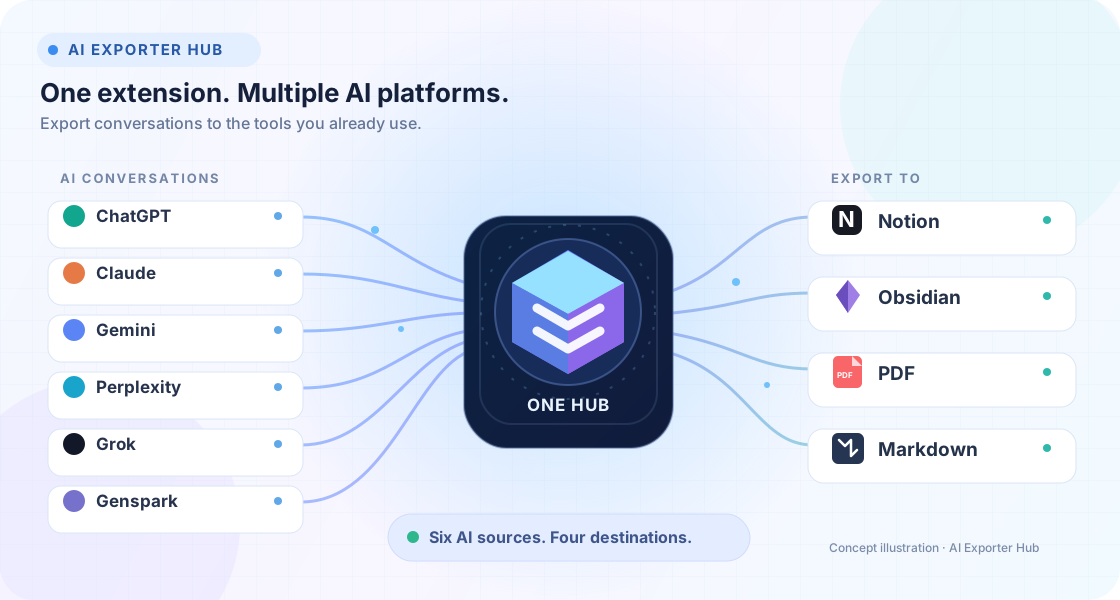
一整套適用於 ChatGPT、TypingMind、Claude、Gemini、Perplexity、Grok、Sora 等平台的瀏覽器擴充功能。將對話儲存到 Notion、Obsidian、PDF、Markdown、HTML、Evernote 或本機檔案。
- 41+
- AI 匯出工具
- 95,900+
- Chrome 使用者
- 1M+
- 已匯出對話
精選工具
最受歡迎的擴充功能
從使用者最常用的外掛開始,快速了解完整的 AI 匯出工具體系。
AIExportHub
Bulk export ChatGPT, Claude, Gemini, and Perplexity conversations to Notion, Markdown, Obsidian, or PDF. Select individual chats, export complete histories, preserve Projects, Gems, Spaces, images, attachments, citations, code, and generated files from one Chrome extension.
AIExportHub for TypingMind
Export TypingMind conversations to Notion, Markdown, Obsidian, or PDF with a local-first workflow that keeps prompts, replies, attachments, and source links together.
NotebookLM Hero
Export, import, archive, and organize your NotebookLM workspace. Save NotebookLM conversations and Studio Notes as clean local files, then import AI chats, webpages, articles, and highlights back into NotebookLM without repetitive copy-paste.
ChatGPT to Notion
Backup, export, and download your ChatGPT history to Notion. The ultimate Chrome Extension to bulk export your entire library—including Group Chats, Projects, and Deep Research—in a single click.
ChatGPT to Obsidian
Export ChatGPT to Obsidian as clean Markdown. Select complete chats for bulk export and save Projects, Group Chats, Deep Research, images, attachments, and archived conversations locally.
ChatGPT to PDF
Export, archive, and download your ChatGPT conversations as professional PDF documents. The ultimate Chrome Extension to bulk export your entire library—including Group Chats, Projects, and Deep Research—in a single click.
Export Gemini to Notion
Easily bulk export your Gemini AI conversations to Notion databases. Save time with batch processing and auto-sync features.
Export Gemini to Obsidian
Export Gemini conversations to Obsidian-ready Markdown with support for generated images, Gems, selective bulk export, code blocks, and YAML metadata.
Export Gemini to PDF
Export current chats, selected messages, full history, or Gem conversations from Google Gemini into clean PDFs with Custom Preview, flexible naming, and local-only processing.

Perplexity to Notion
Export Perplexity to Notion in one click or in bulk. Save searches, Spaces, Computer Tasks, sources, and related questions in a searchable Notion database.
Perplexity to Obsidian
Export Perplexity to Obsidian as clean Markdown. Bulk download chats, Computer Tasks, and Spaces with sources, images, attachments, and organized local backups.
ChatGPT to Evernote
批次儲存 ChatGPT 歷史記錄到 Evernote。
Claude to Obsidian
Export, sync, and backup your Claude conversations to Obsidian. The ultimate Chrome Extension to bulk export your entire Claude chat history—including artifacts and code—as clean Markdown files.
Claude to Notion
Bulk export Claude conversations to Notion. Back up complete history, batch-select the exact chats you need, or export entire Claude Projects—with Artifacts, images, attachments, metadata, and source links preserved.
Claude to PDF
Turn Claude conversations into polished PDF archives—export the active chat, every open Claude tab, selected history, complete history, or conversations from Claude Projects.

Grok to Notion — Export & Backup Grok Chats
Export the current Grok chat, select specific messages, or back up conversations in bulk to Notion—with images, files, timestamps, and formatting kept together.
Grok to Obsidian and Html
Export, batch download, and back up your Grok conversations to local Markdown, HTML. A fast Chrome extension for building a private archive of your AI chats.
NotionAI Exporter
Turn Notion AI conversations into a searchable Notion archive with one-click capture, selective review, project backups, rich formatting, and media-aware sync.
Bulk Exporter for Sora
Bulk export, backup, and download your Sora prompts, images, and videos. The ultimate Chrome Extension to batch export your entire Sora library—organized, archived, and ready to reuse.
為什麼需要 Hub
AI 工作早已不只是單一應用程式和資料庫。
你可以在 Perplexity 研究、在 Claude 寫作、在 ChatGPT 腦力激盪、用 Sora 生成內容,再封存到不同系統。首頁會清楚呈現整個生態系。
一個 Hub,多種工作流程
為 AI 平台和目的地選擇合適的匯出工具,不必受單一流程限制。
預設支援批次備份
在內容消失前批次匯出歷史對話、研究執行緒、檔案、提示詞和生成內容。
完整保留格式
保留 Markdown、程式碼區塊、表格、圖片、來源、LaTeX 和中繼資料。
本機優先的隱私
大多數匯出都在瀏覽器中處理,適合個人和專業檔案。
更多擴充功能
依平台瀏覽
精選工具是入口,完整目錄涵蓋各種 AI 平台和目的地。
Midjourney
3 個工具Midjourney to Notion
Chrome ExtensionSave one Midjourney creation from the web app or Discord, or batch export your available history to a structured Notion database with prompts, parameters, images, videos, source links, and metadata.
Midjourney to Obsidian
Local-firstExport Midjourney Jobs or supported Discord creations as Obsidian-ready Markdown with structured frontmatter, source links, and local images—one at a time or as a complete batch archive.
Midjourney to Google Sheets
Chrome ExtensionBatch sync Midjourney prompts, parsed parameters, job links, image URLs, live image previews, and timestamps into an authorized Google spreadsheet for filtering, analysis, and team review.
TypingMind
1 個工具AIExportHub for TypingMind
新增Export TypingMind conversations to Notion, Markdown, Obsidian, or PDF with a local-first workflow that keeps prompts, replies, attachments, and source links together.
NotebookLM
1 個工具NotebookLM Hero
新增Export, import, archive, and organize your NotebookLM workspace. Save NotebookLM conversations and Studio Notes as clean local files, then import AI chats, webpages, articles, and highlights back into NotebookLM without repetitive copy-paste.
Claude
3 個工具Claude to PDF
新增Turn Claude conversations into polished PDF archives—export the active chat, every open Claude tab, selected history, complete history, or conversations from Claude Projects.
Claude to Obsidian
高評分Export, sync, and backup your Claude conversations to Obsidian. The ultimate Chrome Extension to bulk export your entire Claude chat history—including artifacts and code—as clean Markdown files.
Claude to Evernote
Chrome ExtensionA powerful Chrome extension that lets you save your entire conversations with Anthropic's Claude (cutting-edge AI assistant) to Evernote with just one click, complete with properly formatted markdown.
Grok
2 個工具Grok to Obsidian and Html
新增Export, batch download, and back up your Grok conversations to local Markdown, HTML. A fast Chrome extension for building a private archive of your AI chats.
Grok to Notion
Chrome ExtensionSave and export your Grok AI chat conversations to notion. Backup your AI chats with one click. Grok Download - Save AI Conversations with One Click.
ChatGPT 工具
7 個工具ChatGPT to PDF
必備Export, archive, and download your ChatGPT conversations as professional PDF documents. The ultimate Chrome Extension to bulk export your entire library—including Group Chats, Projects, and Deep Research—in a single click.
ChatGPT to Airtable
Chrome ExtensionSave ChatGPT conversations to Airtable with one click, or batch-sync your history into structured records with titles, notes, URLs, timestamps, project context, tags, and optional attachments.
ChatGPT to Evernote
熱門批次儲存 ChatGPT 歷史記錄到 Evernote。
ChatGPT Prompt Hub
Web AppManage, discover, and instantly use the best ChatGPT prompts. Access 5,000+ high-quality prompts, customize your own, and boost your productivity in seconds.
ChatGPT & Claude AI Prompts
Web AppDiscover and use high-quality AI prompts to enhance your AI experience.
Batch ChatGPT to Notion
Chrome ExtensionBatch Save ChatGPT to Notion. A Chrome extension tool that simplifies the process of batch saving your ChatGPT conversations to Notion. Just one click, saving you time.
ChatGPT Bulk Delete
Chrome ExtensionDelete all your ChatGPT conversations with one click. A Chrome extension tool that simplifies the process of deleting your ChatGPT conversations. Just one click, saving you time.
Perplexity
1 個工具Perplexity to Airtable
Chrome ExtensionSave Perplexity conversations to Airtable with one click. Export Perplexity conversations.
Midjourney
2 個工具Midjourney to Notion
Chrome ExtensionSave & Organize Your Midjourney Prompts with One Click. Effortlessly save Midjourney prompts, images, and attributes to Notion. Organize your AI art like a pro.
Midjourney to Sheets
Chrome ExtensionBackup all your midjourney art prompts to google sheets with one-click.
DeepSeek
1 個工具DeepSeek to Notion
Chrome ExtensionBatch Save DeepSeek conversations to Notion with one click. Export DeepSeek conversations. DeepSeek to Notion - Save AI Conversations with One Click.
Genspark
1 個工具Genspark to Obsidian
Chrome ExtensionExport, download, and back up Genspark conversations as clean Markdown files for Obsidian, Notion, Logseq, VS Code, Git repositories, and long-term offline storage. Save current chats, opened tabs, selected records, complete Hubs, archived Hubs, or your full Genspark history without copy-paste cleanup.
需要新的 AI 平台或目的地?
告訴我們哪款匯出工具能完善你的工作流程: [email protected]
常見問題
常見問題
匯出、同步、排查問題或選擇方案前需要了解的一切。
什麼是 AI Exporter Hub?
AI Exporter Hub 是一套瀏覽器擴充功能,協助你把 AI 對話建立成第二大腦。我們可以從 ChatGPT、TypingMind、Google Gemini、Claude、Perplexity 和 Grok 等主流 AI 平台匯出並備份聊天記錄,直接儲存到 Notion、Obsidian,或 PDF、Markdown、JSON 等本機檔案,同時保留原有格式。
目前支援哪些 AI 平台?
我們目前支援 ChatGPT、TypingMind、Claude、Google Gemini、DeepSeek、Grok、Perplexity、Sora 和 Genspark 等主流 AI 平台。透過 Universal Pass,你可以使用全部這些擴充功能。如需支援其他平台,請寄信至 [email protected]。
可以免費使用嗎?
可以。我們為一般使用者提供 Free Starter 免費入門方案,始終免費支援單次對話匯出和基本功能。需要批次匯出、自動同步、群組聊天支援以及跨平台無限備份的進階使用者,可以升級到 Single Pro 或 Universal Pass 方案。
可以一次批次匯出全部歷史對話嗎?
可以!這是我們的核心功能。不同於只能一次儲存一段對話的其他擴充功能,AI Exporter 可以一鍵批次匯出完整聊天記錄,涵蓋數百甚至數千段對話。你可以立即將完整檔案同步到 Notion,或備份到本機,不需要重複手動操作。
可以將對話匯出為 PDF 或 Markdown 嗎?
當然可以。我們支援多種匯出格式,配合不同工作流程。你可以直接同步到 Notion 和 Obsidian,也可以將對話下載為 PDF、Markdown、HTML、TXT 或 JSON 檔案。PDF 匯出整潔且格式完整,非常適合封存或分享報告。
會保留格式(圖片、程式碼、LaTeX)嗎?
會,這是我們的核心優勢。不同於簡單複製貼上,AI Exporter 會保留 100% 的原始格式,包括具語法高亮的程式碼區塊、LaTeX 數學公式、表格、清單和行內圖片。在 AI 聊天中看到的內容,匯出到 Notion 或 PDF 後也會保持一致。
Notion 同步如何運作?
操作很簡單。連結 Notion 帳戶後,你可以一鍵將任何 AI 對話儲存到選定的 Notion 資料庫。我們會自動處理屬性對應(URL、建立時間、標籤)。你也可以啟用自動同步,在背景自動備份新的對話,不需要手動操作。
如何授權 Notion 存取?
在擴充功能中授權 Notion 存取,然後選擇推薦的自動複製範本流程,或使用手動複製的 Notion 範本。設定指南會逐步介紹這兩種方式。
查看授權指南我的資料是否私密且安全?
隱私是我們的首要任務。對於直接同步(例如 Notion/Obsidian)和文字匯出(Markdown/JSON),所有處理都在瀏覽器本機完成,我們不會儲存你的聊天記錄。注意:為確保 PDF 完美呈現,PDF 產生會暫時使用安全伺服器處理資料,檔案產生後會立即刪除。
可以只匯出對話的一部分嗎?
可以,不必儲存整段對話。我們提供選擇性匯出功能,你可以透過核取方塊選擇特定問答對或單則訊息。這樣可以只儲存關鍵程式碼片段或洞見,避免無關內容。
為什麼 Chrome 每次下載檔案都詢問儲存位置?
Chrome 的下載設定可能啟用了每次下載前詢問儲存位置。請在 Chrome 下載設定中關閉「下載前詢問每個檔案的儲存位置」,如此批次匯出就能自動儲存。
查看下載提示設定為什麼檔案會儲存到 Downloads 根目錄,或被重新命名為 UUID?
通常是其他瀏覽器擴充功能攔截了下載,例如 Image Downloader。請暫時停用其他與下載相關的擴充功能,然後再次匯出。
查看疑難排解指南匯出時出現速率限制或 429 錯誤,如何解決?
批次匯出時,如果短時間內傳送過多請求,就會出現 429 錯誤。請增加請求間隔設定,等待幾分鐘後重試;如有需要,也可以拆分成較小批次匯出。
查看完整指南如何啟用 ChatGPT to Obsidian 訂閱?
開啟擴充功能,輸入購買時使用的電子郵件,然後在擴充功能介面中啟用訂閱。如果啟用沒有立即生效,請確認電子郵件地址無誤後重試。
查看啟用指南如何取消訂閱?
你可以透過購買郵件中的帳單管理入口取消訂閱,也可以依照文件中的取消指南操作。
查看取消訂閱步驟為什麼匯出或同步前需要重新整理頁面?
重新整理頁面可以確保內容指令碼連接到最新的頁面狀態,讓擴充功能正確讀取對話。如果匯出或同步按鈕沒有反應,請重新整理頁面後再試。
了解更多