
How to Disable the Download Location Prompt
Stop Chrome from asking where to save each file every time you export ChatGPT chats to Obsidian Markdown
When exporting ChatGPT chats to Obsidian Markdown, Chrome may show a save-location dialog for every downloaded file.
This is usually caused by Chrome’s download setting:
- Ask where to save each file before downloading
When this setting is enabled, Chrome interrupts each download and asks you to choose a folder manually. For batch export, that means you may need to confirm every single Markdown file one by one.
This is different from files being renamed to UUIDs or forced into the Downloads root folder. For that issue, see Download Saved to Root Folder or Renamed to UUID.
Symptoms
You may see this behavior:
- Chrome opens a save dialog every time the extension downloads a Markdown file
- Batch export pauses repeatedly until you choose a location
- You have to click Save for each exported chat
- The export content is correct, but the workflow is interrupted
This is a browser configuration issue, not a Markdown export issue.
Why This Happens
Chrome has a setting called Ask where to save each file before downloading.
When it is turned on, Chrome does not allow downloads to save automatically into the default download folder. Instead, it asks for confirmation on every file.
That can be useful for occasional manual downloads, but it is inefficient for exporting many ChatGPT conversations at once.
Recommended Setting
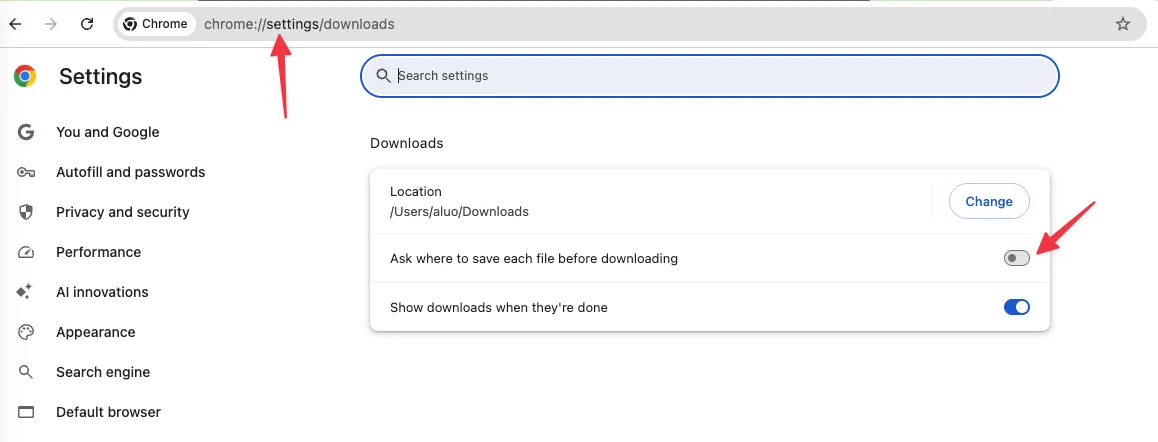
Open Chrome’s download settings:
chrome://settings/downloads
Then configure:
- Location: your preferred Downloads folder or Obsidian import folder
- Ask where to save each file before downloading: Off
After this setting is turned off, Chrome will save exported Markdown files automatically to the default download location.
Step-by-Step Fix
Step 1: Open Chrome Download Settings
In Chrome’s address bar, enter:
chrome://settings/downloads
You can also open Chrome settings manually and search for Downloads.
Step 2: Turn Off the Prompt
Find this option:
- Ask where to save each file before downloading
Turn it off.
Step 3: Export Again
Return to ChatGPT and run the export again.
If the setting is correct:
- Chrome should no longer open a save dialog for each file
- Batch export should continue without manual folder selection
- Files should be saved to your configured default download location
Changing the Default Download Folder
If you want exports to land in a specific folder by default:
- Open
chrome://settings/downloads - Find Location
- Click Change
- Choose the folder you want Chrome to use
For Obsidian workflows, you can choose a temporary folder inside Downloads and then move files into your vault, or choose a folder that you already use for importing Markdown notes.
If Files Still Save to the Wrong Place
If Chrome no longer shows the save dialog, but files still go to the Downloads root folder or get renamed to a UUID, check for extension conflicts instead.
The most common cause is another download-related extension intercepting Chrome downloads.
Follow this guide:
Frequently Asked Questions
Is this caused by ChatGPT to Obsidian?
Usually no. The repeated save dialog is controlled by Chrome’s download settings.
Will this affect other downloads?
Yes. Turning off this setting means Chrome will save downloads from other websites directly to the default download folder too.
Can I turn the prompt back on later?
Yes. Return to chrome://settings/downloads and turn Ask where to save each file before downloading back on.
Is this the same as the UUID filename issue?
No. The repeated save dialog is a Chrome setting. UUID filenames or ignored subfolders are usually caused by another download extension intercepting the download.
Summary
| Problem | Most Likely Cause | Fix |
|---|---|---|
| Chrome asks where to save every file | Chrome download prompt is enabled | Turn off Ask where to save each file before downloading |
| Batch export pauses after each file | Chrome is waiting for manual confirmation | Use automatic downloads with a default folder |
| Files are renamed to UUIDs | Another extension is intercepting downloads | Disable conflicting download extensions |
For the filename or folder override issue, read the related troubleshooting guide: Download Saved to Root Folder or Renamed to UUID.
Ready to try Chatgpt To Obsidian?
Open the product page for feature details, screenshots, pricing, and the Chrome Web Store install link.