
What Happens When a Claude Project Hits Its Context Limit?
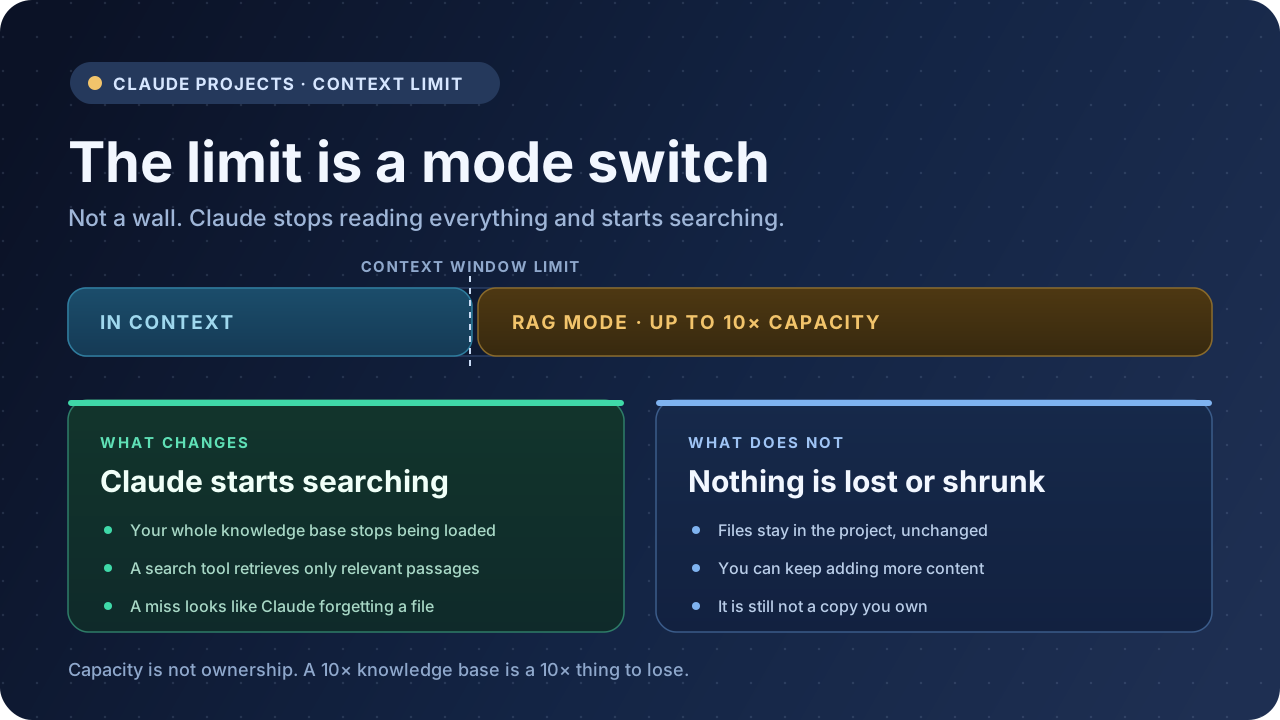
Short answer: nothing breaks and nothing is deleted. On a paid plan, Claude stops loading your entire knowledge base into its context window and switches to retrieval — a search tool pulls only the passages relevant to each question, and Anthropic expands your capacity by up to 10x. On a free plan, no switch exists: you simply cannot add more files.
The part that matters after the switch is quieter. Claude is no longer reading everything you uploaded, and the extra capacity is not a copy you own.
The limit is your model’s context window, not a file count
Claude does not enforce a maximum number of documents per project. The cap is a token budget: the context window of whichever model the project is using.
That number is not fixed. Anthropic’s current table lists 200K tokens as the baseline outside its newest models, and 1M tokens for models including Fable 5.1, Opus 5.5, Sonnet 5.5 and Haiku 5.5. Several older models sit at 500K.
Two consequences follow, and both surprise people.
Switching models changes where the limit is. Anthropic does not spell this out, but the threshold is defined as the model’s context window, and that window differs by model. Move a project from a 1M-token model to a 200K one and you can cross the threshold without adding a single file. If a project started behaving differently right after you changed models, this is the likely reason. The mechanics are in how to switch Claude models in Projects.
Your instructions share the budget. Project instructions are loaded into context every time. Anthropic’s own guidance is to keep them concise and use them for general context, key guidelines and Claude’s role — not as a second knowledge base. A 4,000-word instruction block competes with your documents for the same window.
One thing that is not in the budget at all: the project’s name and description. Anthropic notes that Claude does not have access to those details. If a critical rule only lives in the project description, Claude has never read it.
What happens at the threshold
On Pro, Max, Team and Enterprise, the switch is automatic:
When your project knowledge approaches the context window limit, Claude will automatically enable RAG mode to expand your project’s capacity by up to 10x while maintaining quality responses.
No toggle, no setup step, no prompt to accept. You get a visual indicator that the project is RAG-enabled, and that indicator is the only signal you will see.
The operative word is retrieval. Here is what actually differs between the two modes:
| In-context (below the limit) | RAG mode (at or above it) | |
|---|---|---|
| What Claude reads | Your entire knowledge base | Passages selected per question |
| How it gets there | Loaded into the context window | A project knowledge search tool retrieves it |
| Capacity ceiling | The model’s context window | Up to 10x that window |
| Response time | Scales with knowledge size | Kept quick by retrieving less |
| Can you add more files | Yes, until the limit | Yes, within the expanded capacity |
Anthropic describes the switch as moving to a “faster mode,” and states that the project converts back to context-based processing automatically if your knowledge later drops below the threshold. That second half is worth knowing: RAG is not a one-way upgrade. Remove enough files and the project goes back to reading everything.
The difference you feel: retrieval can miss
Anthropic’s position is that response quality stays consistent with in-context processing. Take that at face value — it is their measurement, and it is the reason the feature exists.
What changes is the failure mode. Below the threshold, a wrong answer is a reasoning problem: Claude had the document and drew the wrong conclusion. Above it, a wrong answer can be a retrieval problem: the passage never made it into the context, so Claude answered from what it did have, fluently and without flagging a gap.
Those two look identical in the chat window. “Claude forgot my file” and “Claude misread my file” produce the same kind of reply, and only one of them is fixed by asking again.
This is why the same project can feel reliable for months and then start missing things that are demonstrably in there. Nothing degraded. The mechanism changed.
Four things that make retrieval work better
Anthropic’s guidance for RAG projects is short and unusually concrete, because retrieval depends on matching a question to a document:
- Name files descriptively. A file called
notes.pdfgives the search tool nothing to match against.pricing-policy-2026-q3.pdfdoes. This is the highest-leverage five minutes you can spend on a large project. - Reference documents by name when you ask. “Using the Q3 pricing policy, what’s the discount floor?” narrows the search in a way that “what’s our discount policy?” does not.
- Group related content in one project. Split one topic across four projects and retrieval only ever sees a quarter of it.
- Upload the full set up front. Anthropic recommends adding all relevant material when you build the project rather than adding it piecemeal, because retrieval works against whatever is currently there.
One more, from the other direction: prune. Every stale draft left in the knowledge base is a candidate the search tool can return. A knowledge base that grows without ever shrinking gets noisier, not smarter.
10x capacity is not 10x ownership
This is the part the feature announcement does not cover, and it is the part that costs people work.
RAG gives a project more room. It does not give you anything you can take with you. Three specific things it is not:
It is not a backup. The expanded capacity lives inside the project. Delete the project and the capacity, the files and the retrieval index go with it — there is no trash and no recovery window, as covered in what to do when a Claude Project is deleted. The uncomfortable arithmetic is that RAG makes large knowledge bases practical, which encourages you to put more in, which raises the cost of losing the project. The feature that makes a big project possible also makes a big project worth losing.
It is not a readable archive. You can ask Claude about your documents. You cannot open your knowledge base as a folder, search it offline, or hand it to a colleague who does not use Claude. Retrieval is a service the project performs, not a file format you possess.
It does not travel. Change accounts, change AI tools, change jobs, and the knowledge base stays where it is. What travels is whatever you exported yourself.
There is a related confusion worth separating out, because the words are similar: RAG expands how much a project can hold, not how much a single conversation can remember. Anthropic’s documentation notes that context is not shared across chats within a project unless the information is in the knowledge base. Two long chats in the same project are still two separate conversations.
A short checklist before you hit the limit
Most of this is cheaper to do now than after a project starts missing things.
- Write instructions that are instructions. Rules, role, constraints. Move reference material into knowledge files where retrieval can find it.
- Rename files before you upload them. Filenames act as retrieval metadata, and fixing them is free.
- Split the 400-page PDF by topic. Smaller, single-subject files give the search tool cleaner boundaries to match against.
- Check the model. If a project needs more headroom than it has, a 1M-token model may push the threshold far enough that the switch never happens.
- Export a copy on a schedule. The knowledge base is the part you cannot rebuild from memory, because you may not still have the originals you uploaded.
For the export side, the Claude Projects backup guide compares PDF, Markdown, Obsidian and Notion for exactly this job, and how to export Claude chats to PDF or Markdown covers what each format preserves and what it drops. If you want files that stay searchable without a browser, Claude to Obsidian writes local Markdown; Claude to PDF gives you something you can hand to someone else; Claude to Notion gives you a workspace you can reorganise and share. Claude Export compares the destinations, and AI Exporter Hub is the option if you also archive ChatGPT and Gemini and want one library instead of four.
FAQ
Does Claude delete or compress files when RAG activates?
No. Your files stay in the project unchanged. The switch is automatic and reversible in both directions.
Can I turn RAG off?
Not manually. It activates and deactivates based on the size of your project knowledge. The only lever you have is reducing what is in the knowledge base.
What happens on a free plan?
RAG for projects is a paid feature. Free accounts do not get the 10x expansion, so the context window is a hard ceiling — once it is reached, you cannot add more content, which is the behaviour that applied to everyone before RAG existed. Free accounts are also capped at five projects.
Does RAG change how many tokens I use?
Project usage counts against your plan like any other use of Claude. Retrieval exists partly so a large knowledge base does not have to be loaded in full, but it is not a separate billing line.
Does RAG work with web search, extended thinking and Research?
Yes. Anthropic states that RAG works with all Claude features, including web search, extended thinking and Research.
Will RAG help me get a deleted project back?
No. RAG is a capacity mechanism inside a living project. It creates no copy outside your account.
The short version
Crossing the context limit does not damage anything. It changes how Claude reads your project: from everything at once, to the passages it judges relevant. Anthropic calls the quality equivalent, and in practice the difference shows up as retrieval misses rather than wrong reasoning.
The 10x number is real, and it is also the most misleading part of the feature, because it measures capacity rather than ownership. A knowledge base large enough to need RAG is a knowledge base large enough to hurt when it is gone.