
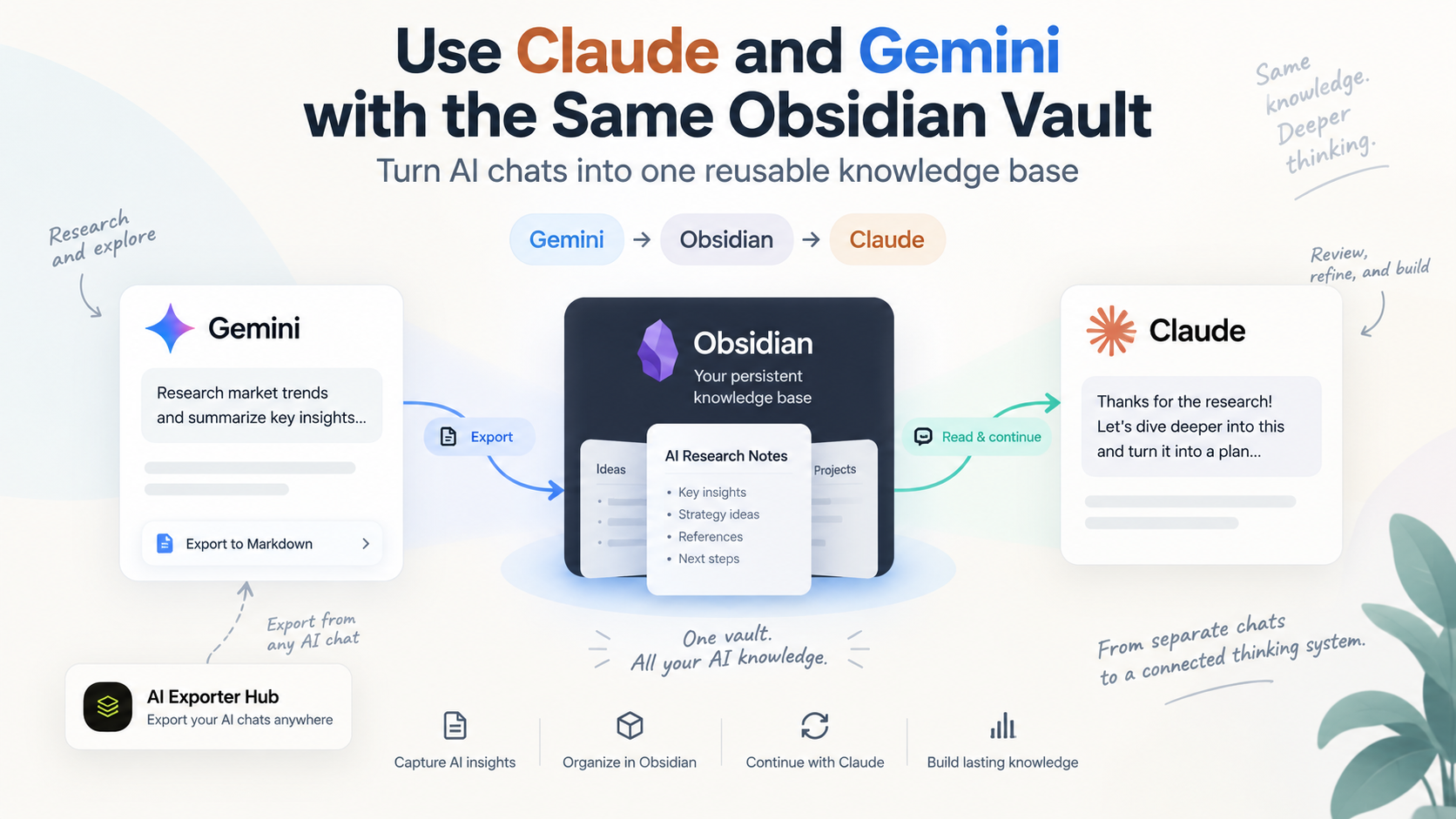
Use Claude and Gemini with the Same Obsidian Vault
A practical workflow for turning Gemini research and Claude reasoning into one reusable AI knowledge base
Most people use Claude and Gemini as separate tools.
You research something in Gemini. A few days later, you open Claude and start from scratch. Important context remains trapped inside the old Gemini conversation.
Then the same thing happens in reverse.
The real problem is not that AI models cannot generate useful answers.
The problem is that your knowledge is scattered across different AI apps.
A better workflow is to make Obsidian the shared memory layer between them.
Instead of treating Gemini and Claude as two separate knowledge silos, you can use a workflow like this:
Gemini
   ↓
Research / brainstorm / analyze
   ↓
Save conversation to Obsidian
   ↓
Shared Obsidian Vault
   ↓
Claude reads the saved context
   ↓
Claude refines / critiques / continues the work
   ↓
Save the result back to Obsidian
   ↓
Reusable knowledge for the next AI session
The result is not just an archive of AI chats.
It becomes a reusable knowledge system where different AI models can work on the same body of information over time.
Why use both Claude and Gemini?
You do not have to choose one AI assistant for everything.
Different models can be useful at different stages of the same project.
For example, you might use Gemini for:
- exploring a new topic;
- analyzing large amounts of source material;
- brainstorming alternatives;
- working with Google’s ecosystem;
- collecting an initial set of ideas.
Then use Claude for:
- reviewing the research;
- finding gaps or contradictions;
- restructuring the material;
- turning rough research into a document;
- continuing a long-running project;
- working directly with files in a local project environment.
The problem appears when the output from the first model never reaches the second.
Copying and pasting a few paragraphs works for small tasks.
It becomes painful when you have:
- long conversations;
- dozens or hundreds of chats;
- images and attachments;
- research spanning several weeks;
- multiple related projects;
- useful decisions buried inside old conversations.
This is where Obsidian becomes useful.
Obsidian as the shared memory layer
An Obsidian vault is fundamentally a collection of local files, primarily Markdown.
That makes it particularly useful for AI workflows.
Instead of your knowledge living only inside:
Gemini history
Claude history
ChatGPT history
Perplexity history
you can create a neutral layer:
                Gemini
                   ↓
                   ↓
Claude  →  Obsidian Vault  ←  Other AI tools
                   ↑
                   ↑
              Your own notes
The important difference is ownership.
The conversation is no longer useful only when you reopen the original AI service.
It becomes a normal Markdown file that you can:
- search;
- link;
- tag;
- reorganize;
- edit;
- back up;
- version;
- reuse with another AI.
That changes an AI conversation from temporary chat history into persistent project context.
Example workflow: Gemini → Obsidian → Claude → Obsidian
Let’s look at a realistic example.
Imagine you are researching a new product idea.
You start in Gemini and ask:
Research the current market for AI meeting-note tools. Identify user complaints, major competitors, pricing patterns, and potential underserved use cases.
Gemini gives you a long research conversation.
Normally, that conversation remains inside Gemini.
Instead, save it into your Obsidian vault.
Step 1 — Do the initial research in Gemini
Use Gemini normally.
You might have several rounds of discussion:
Market research
↓
Competitor analysis
↓
Pricing comparison
↓
User pain points
↓
Potential product opportunities
Do not worry about turning everything into perfect notes yet.
At this stage Gemini is the exploration layer.
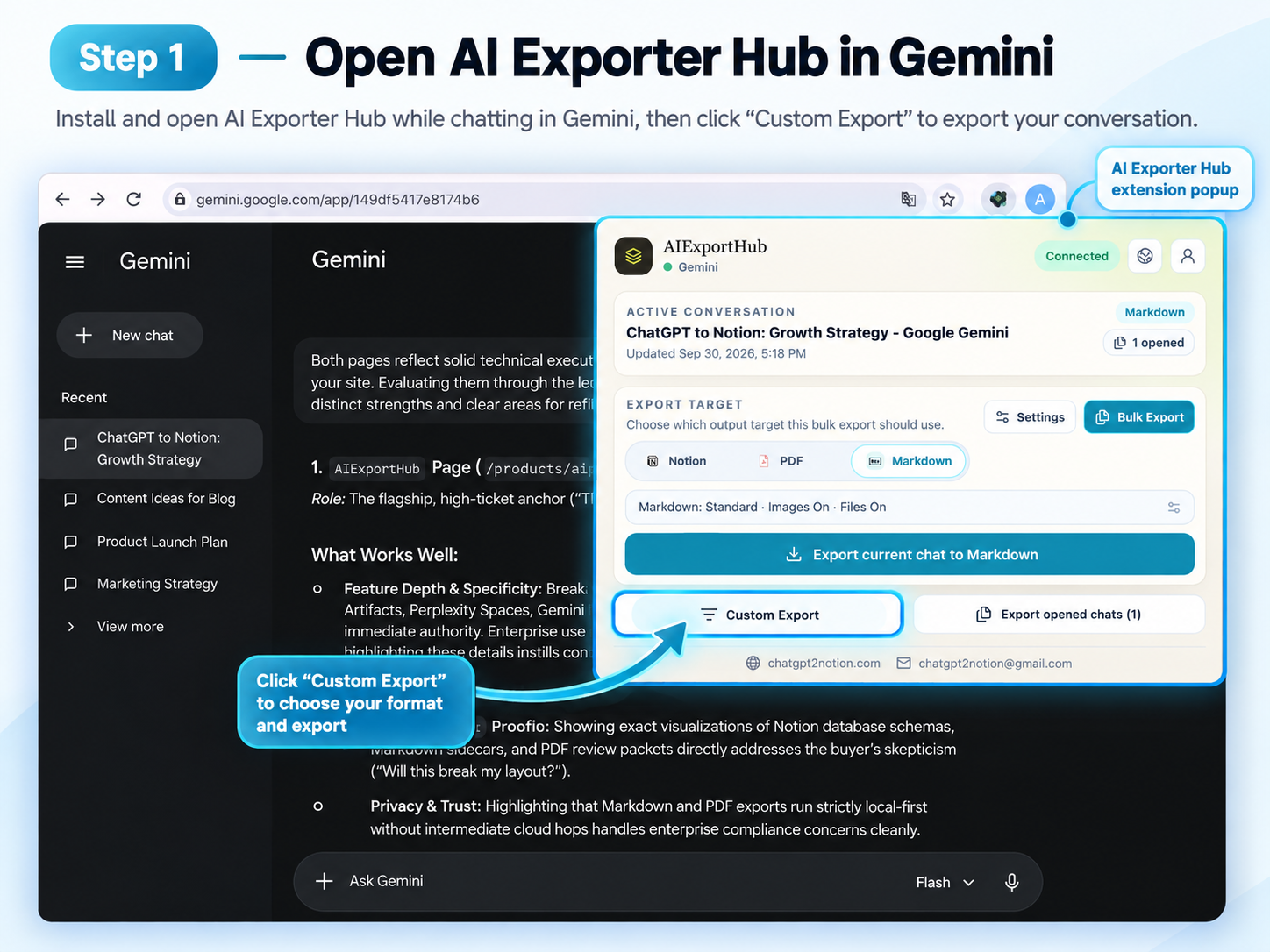
Gemini is the exploration layer: a long research conversation becomes the input for the rest of the workflow.
Step 2 — Export the Gemini conversation to Obsidian
Now move the conversation out of Gemini and into your vault.
With AI Exporter Hub, you can export AI conversations into Markdown files that can be stored directly inside an Obsidian vault.
Instead of manually copying individual messages, the conversation can remain structured as a reusable document.
For example:
AI Knowledge Vault/
│
├── 00 Inbox/
│
├── Projects/
│   └── AI Meeting Notes/
│       ├── Research/
│       │   └── Gemini - Market Research.md
│       │
│       ├── Analysis/
│       ├── Decisions/
│       └── Final/
│
└── AI Chats/
    ├── Gemini/
    ├── Claude/
    └── ChatGPT/
There are two useful ways to organize exported conversations.
Method A — Organize by AI platform
AI Chats/
├── Gemini/
├── Claude/
└── ChatGPT/
This is simple and works well if your main goal is AI chat backup.
Method B — Organize by project
Projects/
└── AI Meeting Notes/
    ├── Gemini Research.md
    ├── Claude Review.md
    ├── User Interviews.md
    └── Product Strategy.md
This is usually better if you want different AI models to collaborate on the same project.
The model that originally generated the information becomes less important.
The project becomes the organizing unit.
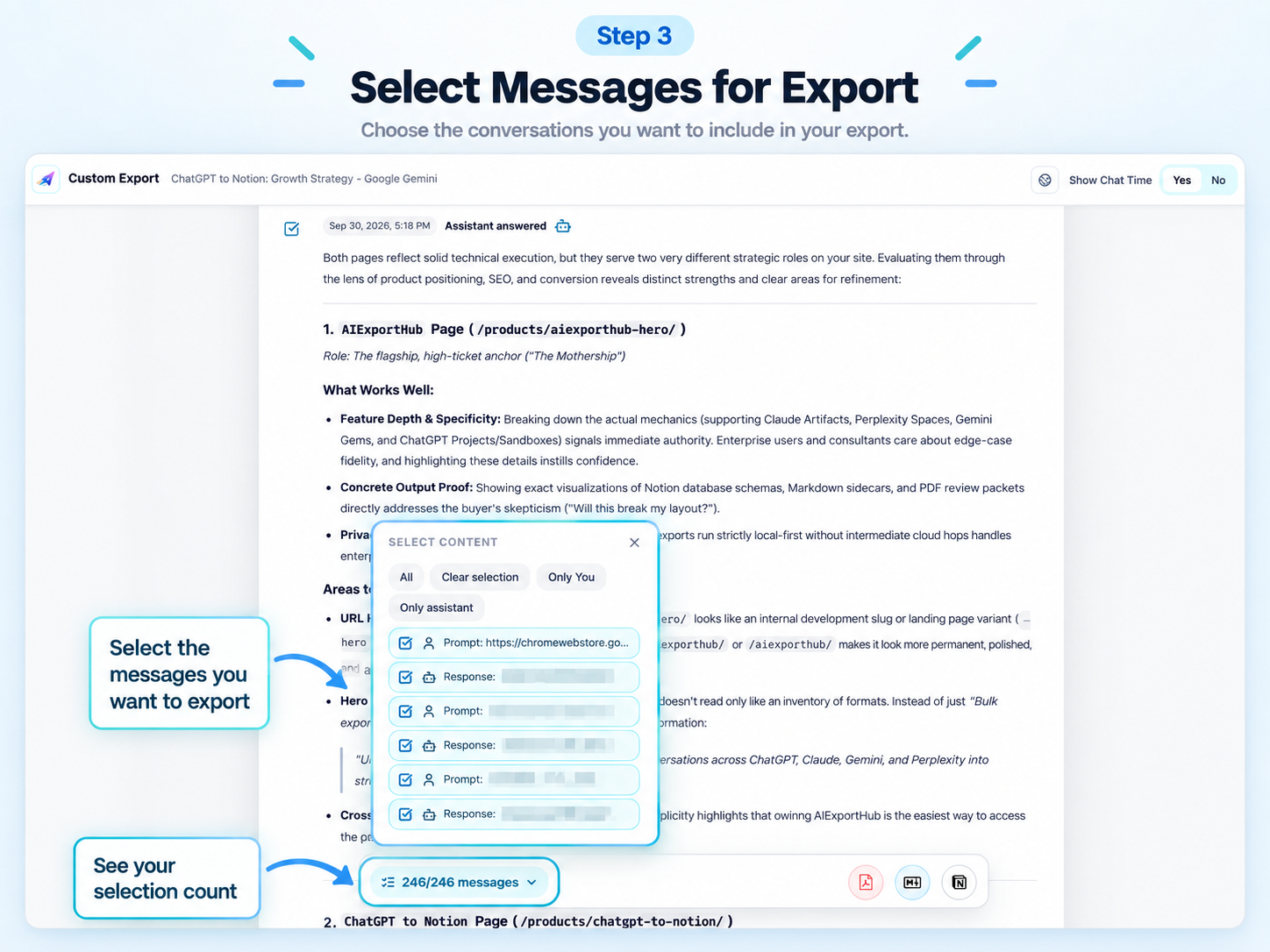
Choose the conversation and an Obsidian-friendly Markdown destination, then verify the exported file in the vault.
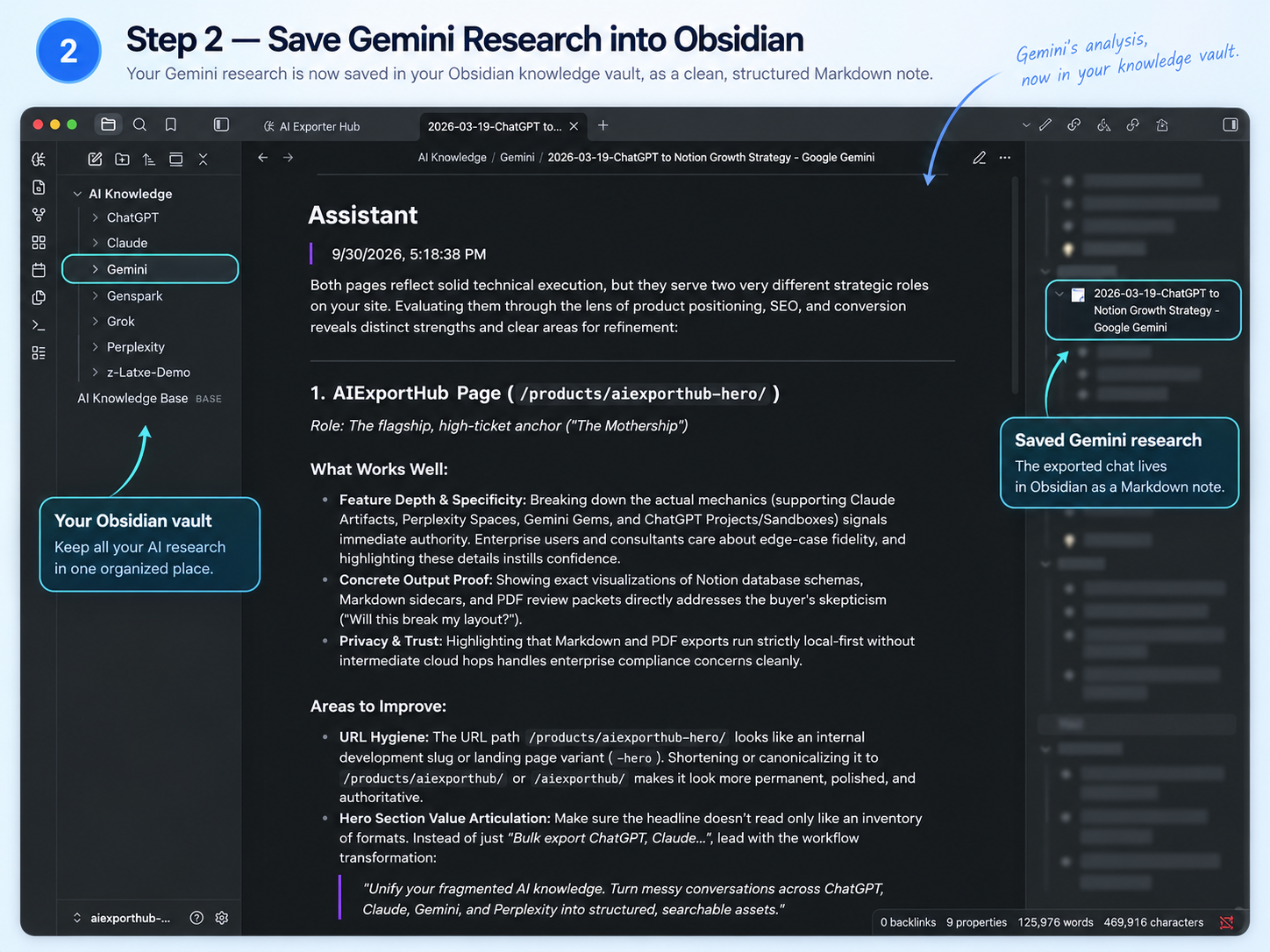
The exported chat is now a normal project file that another AI can read.
Step 3 — Let Claude read the Gemini research
Now the interesting part begins.
Instead of explaining the entire research project to Claude again, give Claude access to the project folder.
One convenient desktop workflow is to open the Obsidian vault—or just the relevant project folder—with Claude Code.
For example:
Projects/
└── AI Meeting Notes/
    └── Research/
        └── Gemini - Market Research.md
You can then ask Claude:
Read the Gemini market research in this project.
Do not summarize it yet. First identify weak assumptions, unsupported conclusions, missing competitors, and areas that require additional evidence.
Claude is no longer starting from zero.
Gemini has already performed the first research pass.
Claude becomes the second-pass reasoning layer.
You could then continue:
Based on the existing Gemini research, create three possible product positions. For each one, explain the target customer, core pain point, differentiation, pricing hypothesis, and biggest risk.
Or:
Compare the findings in the Gemini research with the notes in the User Interviews folder. Highlight any contradictions.
Or:
Turn this research into a one-page product strategy.
The key is that the original Gemini conversation has become reusable context.
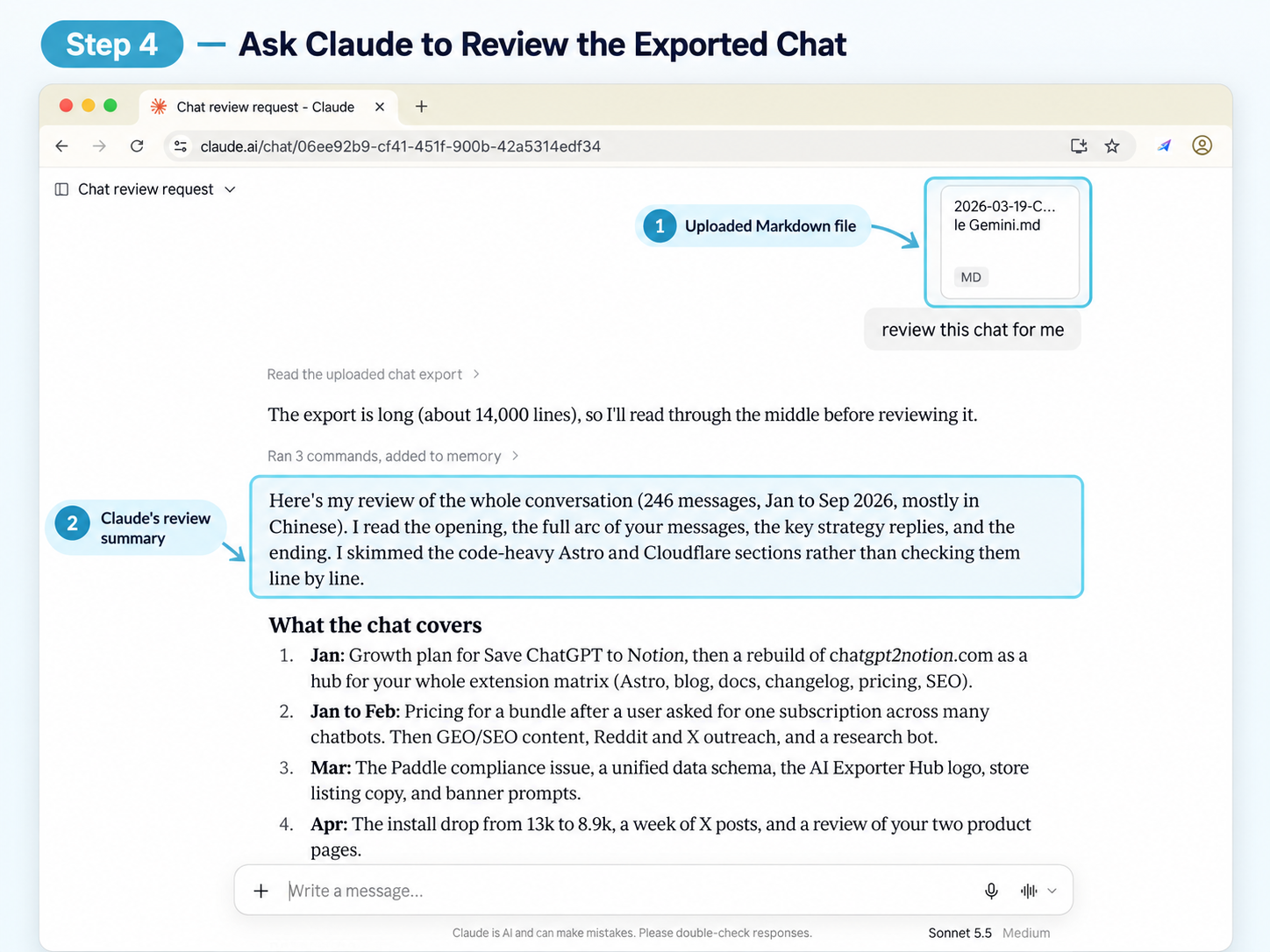
Claude can read the exported file, critique the research, and create the next project artifact without starting from an empty chat.
Step 4 — Save Claude’s work back into the same vault
Claude’s output should not become another isolated AI conversation.
Save the useful result back into the project.
For example:
Projects/
└── AI Meeting Notes/
    ├── Research/
    │   └── Gemini - Market Research.md
    │
    ├── Analysis/
    │   └── Claude - Market Critique.md
    │
    ├── Decisions/
    │   └── Product Positioning.md
    │
    └── Final/
Now the project contains both:
Gemini's exploration
+
Claude's analysis
without requiring either platform to own the complete history.
This is the important conceptual change:
Claude and Gemini do not need to communicate directly with each other.
The shared Obsidian vault acts as the communication layer.
Step 5 — Send the improved context back to Gemini
The workflow does not have to stop with Claude.
Suppose Claude identifies a gap:
There is not enough evidence about how freelancers currently move meeting transcripts into Notion.
You can take the relevant project context and continue the research in Gemini:
Here is the current project analysis. Claude identified insufficient evidence around freelancer workflows. Research this specific gap and return findings that can be added to the existing project.
Then save that conversation back into:
Projects/
└── AI Meeting Notes/
    └── Research/
        └── Gemini - Freelancer Workflow Research.md
Now your loop becomes:
Gemini research
      ↓
   Obsidian
      ↓
Claude critique
      ↓
   Obsidian
      ↓
Gemini follow-up research
      ↓
   Obsidian
      ↓
Claude synthesis
      ↓
   Obsidian
This is much more powerful than repeatedly starting new isolated chats.
The real benefit: AI conversations become project memory
Consider what happens after three months.
Without a shared knowledge layer:
Gemini
 ├── Conversation 1
 ├── Conversation 2
 ├── Conversation 3

Claude
 ├── Conversation 1
 ├── Conversation 2
 └── Conversation 3
You have useful knowledge, but retrieving it depends on remembering:
- which AI you used;
- approximately when the conversation happened;
- what the conversation was called;
- which message contained the useful answer.
With an Obsidian-centered workflow:
Projects/
└── AI Meeting Notes/
    ├── Research/
    ├── Competitors/
    ├── User Feedback/
    ├── Decisions/
    ├── Experiments/
    └── Final/
The information is organized around your work, not around the AI vendor.
That distinction becomes increasingly important as people use multiple AI models.
Add links between AI conversations
Once conversations are stored as Markdown, you can also use normal Obsidian links.
For example:
## Related research

- [[Gemini - Meeting Notes Market Research]]
- [[Claude - Competitor Positioning Review]]
- [[Customer Interview Summary]]
- [[Product Pricing Experiment]]
A Gemini conversation can reference a Claude analysis.
A Claude-generated strategy can reference your own notes.
An old ChatGPT conversation can become supporting research for a new Gemini project.
Eventually the useful unit is no longer:
“a Claude conversation”
or:
“a Gemini conversation.”
It becomes:
a connected piece of knowledge inside your vault.
Add lightweight metadata
You can make the system even more useful with simple YAML frontmatter.
For example:
---
title: AI Meeting Notes Market Research
source: Gemini
type: AI Research
project: AI Meeting Notes
status: reviewed
created: 2026-09-30
tags:
  - market-research
  - ai-tools
  - product-ideas
---
A Claude analysis could use:
---
title: AI Meeting Notes Market Critique
source: Claude
type: AI Analysis
project: AI Meeting Notes
status: active
created: 2026-09-30
tags:
  - strategy
  - competitor-analysis
---
Now you can search or build Obsidian views around:
source
project
type
status
tags
instead of depending on folder names alone.
A simple folder structure that works
You do not need an elaborate “second brain” before starting.
Try this:
AI Vault/
│
├── 00 Inbox/
│
├── AI Chats/
│   ├── ChatGPT/
│   ├── Claude/
│   └── Gemini/
│
├── Projects/
│
├── Knowledge/
│
└── Archive/
When a conversation becomes important, move or link it into a project.
For example:
Projects/
└── New SaaS/
    ├── Research.md
    ├── Competitors.md
    ├── Decisions.md
    └── Sources/
This avoids spending more time managing your knowledge system than using it.
You do not need every AI conversation in your vault
There is one important caveat.
Do not turn Obsidian into a dumping ground.
Many AI conversations are disposable:
- simple translations;
- quick questions;
- throwaway code;
- temporary troubleshooting;
- casual brainstorming.
Save the conversations that contain future context.
A useful rule is:
If another AI session would benefit from knowing this later, save it.
Examples include:
- research;
- product decisions;
- technical architecture;
- writing drafts;
- customer insights;
- learning notes;
- project planning;
- long-running investigations.
This keeps the vault useful instead of simply recreating your entire AI history in another location.
What if you already have hundreds of AI conversations?
This is where batch export becomes much more useful than manual copy and paste.
Instead of trying to migrate everything perfectly on day one:
- export your important historical conversations;
- store them under
AI Chats; - gradually move valuable ones into project folders;
- leave the rest as searchable archive material.
For example:
AI Chats/
├── Claude Archive/
├── Gemini Archive/
└── ChatGPT Archive/
Then your active projects can reference only the conversations that matter.
This creates two layers:
Archive
  ↓
Everything worth keeping

Knowledge / Projects
  ↓
Everything worth reusing
Export is only the first step
This is why I increasingly think of AI chat export as something broader than downloading a file.
The old workflow is:
AI conversation
      ↓
Export
      ↓
Markdown file
      ↓
Done
The more useful workflow is:
AI conversation
      ↓
Capture
      ↓
Obsidian
      ↓
Organize
      ↓
Reuse with another AI
      ↓
Create new knowledge
      ↓
Save it back
      ↓
Repeat
Exporting is simply the bridge between temporary AI conversations and persistent knowledge.
Where AI Exporter Hub fits
AI Exporter Hub is designed around this idea of making AI conversations portable.
Instead of keeping valuable conversations trapped across different AI platforms, you can move them into tools you control, including Obsidian.
That means a workflow can start in Gemini today, continue in Claude tomorrow, and still remain part of the same project months later.
The goal is not simply:
“Download a Gemini chat.”
It is:
Keep the useful knowledge produced by every AI you use.
As AI workflows become increasingly multi-model, having a neutral knowledge layer becomes much more valuable.
Today that layer might be Obsidian.
Tomorrow you might use a different AI.
Your files can remain yours.
A practical workflow to try today
Start with one real project.
Do not migrate your entire AI history yet.
Try this:
1. Pick one useful Gemini conversation
Something involving real research or thinking.
2. Save it into an Obsidian project folder
For example:
Projects/My Project/Research/3. Ask Claude to read the research
Use a prompt such as:
Read the existing research in this project. Identify the strongest conclusions, weak assumptions, missing evidence, and unanswered questions. Do not repeat the existing research unless necessary.
4. Ask Claude to create a new artifact
For example:
Analysis.md
Strategy.md
Decision.md
Next Steps.md
5. Save that result into the same project
Now both models have contributed to one persistent knowledge base.
6. Continue the loop
Whenever one model produces useful context, save it.
Whenever another model needs context, let it work from the vault.
Final thought
The interesting future is probably not:
Claude vs. Gemini.
It is:
Claude and Gemini and whatever model comes next.
Each model can become a specialist.
Gemini can research.
Claude can critique.
Another model can code.
Another can search the web.
But your knowledge should not have to restart every time you switch tools.
Your Obsidian vault can become the persistent layer underneath all of them:
Different AI models
        ↓
Shared project context
        ↓
Your Obsidian vault
        ↓
Knowledge you actually own
That is a much more durable workflow than keeping your best thinking trapped inside dozens of separate AI chat histories.