
Custom Export
Preview a Claude conversation, select individual messages, and control Artifacts before saving to Notion
Custom Export creates a full-page preview of the active Claude conversation before anything is written to Notion. Use it when the final page should contain only the useful part of a longer chat.
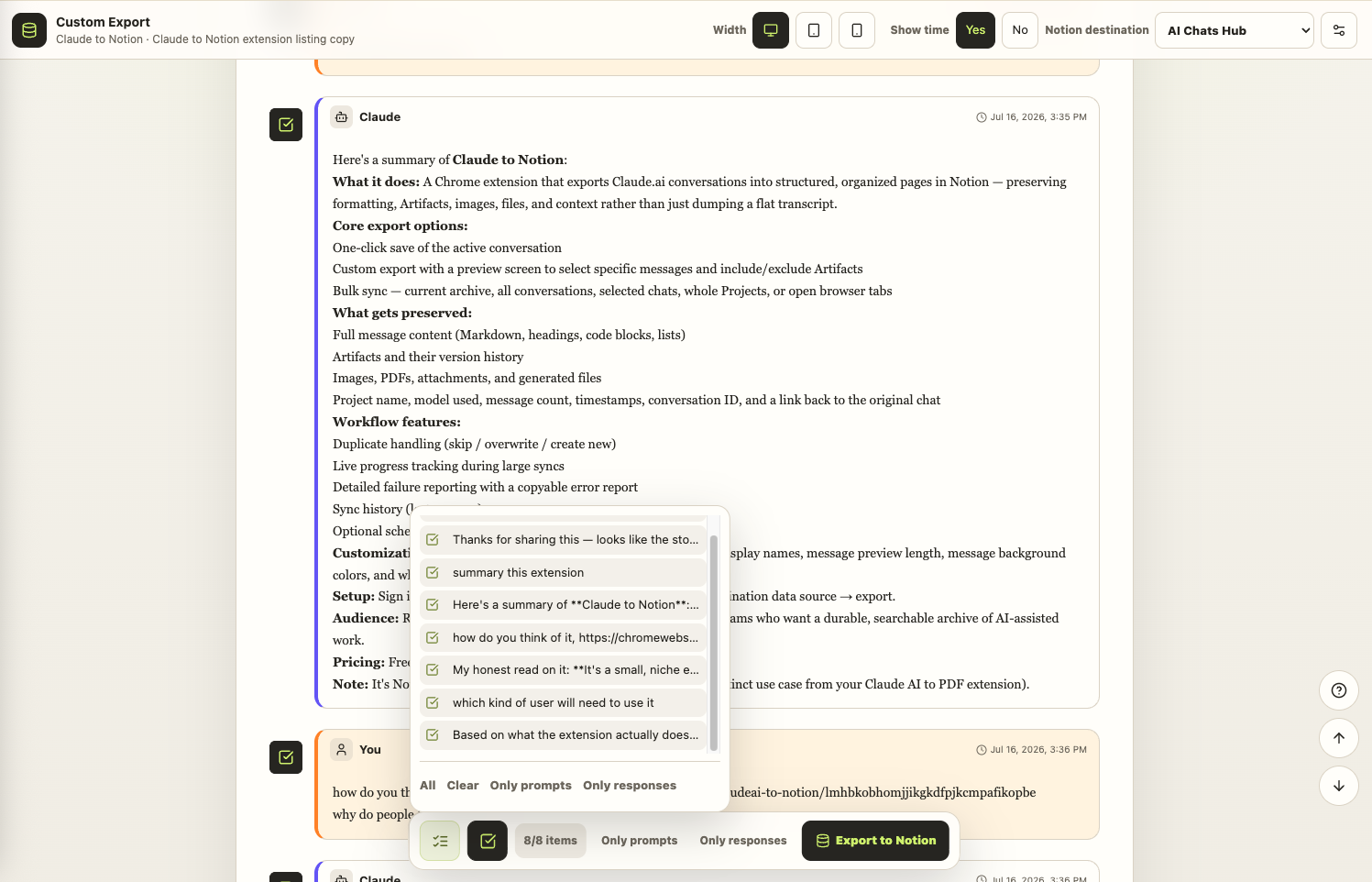
Open Custom Export
- Open the source conversation on
claude.ai. - Select the Claude to Notion extension.
- Choose Custom export.
- Wait for the full-page preview to load.
Select messages
Use the checkbox beside any user or Claude message to include or exclude it. The selection toolbar also provides:
- All to select the complete conversation
- Clear to remove the current selection
- Only prompts to keep user messages
- Only responses to keep Claude messages
The selected count updates as you work. Review the first and last selected messages before exporting so the final page still has enough context.
Include or exclude Artifacts
Open the preview settings to control content such as Artifacts and destination preferences. Artifact content and version history are included only when they are exposed by the source conversation and enabled for the export.
Preview layout and timestamps
The top toolbar lets you inspect the conversation at different content widths and choose whether message times are shown. These controls help you verify the selection; Notion still renders the final result using its own page layout.
Choose the destination
Select the Notion destination in the preview toolbar. If the required data source is missing, return to Connect to Notion, add access, and refresh the list.
Export and verify
- Confirm the selected count.
- Select Export to Notion.
- Wait for the success state.
- Open the saved page and confirm message order, formatting, Artifacts, images, and files.
Good uses for Custom Export
- Turn a long research chat into a concise evidence note
- Remove private or irrelevant messages before a team handoff
- Save only final prompts and answers from an iterative writing session
- Keep the useful Artifact versions without archiving every side discussion
For many complete conversations, use Bulk, Selective & Project Sync instead.
Ready to try Claude To Notion?
Open the product page for feature details, screenshots, pricing, and the Chrome Web Store install link.