
ChatGPT to Notion - Export and Back Up ChatGPT Conversations
Save single chats, batch export your full ChatGPT history, and archive Group Chats, Projects, Deep Research, code blocks, tables, and images into a searchable Notion database.
- 13,900+
- Chrome users
- 1M+
- Conversations exported
- 4.5
- User rating
More AI export tools
Export AI Chats to Your Second Brain
The most complete collection of browser extensions. Bulk save chats from ChatGPT, Perplexity, Google Gemini, and Claude to Notion, Obsidian, Evernote, and more.

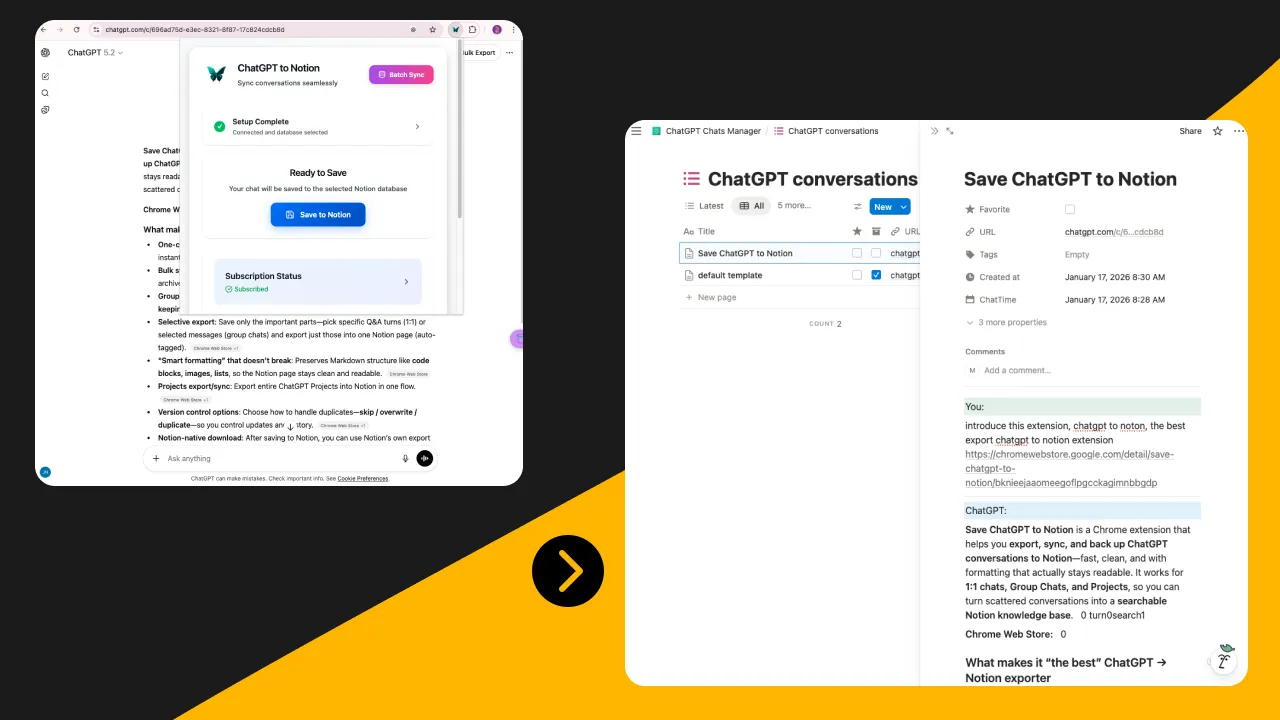
ChatGPT to Notion
Bulk save chats to Notion DB.

ChatGPT to Obsidian
Bulk Export as formatted Markdown.
ChatGPT to PDF
Bulk Save ChatGPT conversations to PDF.

Bulk Export AI Chats from Gemini to Notion
Bulk export chats from Google Gemini to Notion.

Bulk Export AI Chats from Gemini to Obsidian
Back up Google Gemini history as Markdown locally.
Bulk Export AI Chats from Gemini to PDF
Export chats from Google Gemini into PDF files.

Perplexity to Notion
Bulk Save research threads instantly.

Perplexity to Obsidian
Bulk Research to local markdown.

ChatGPT to Evernote
Bulk Save ChatGPT history to Evernote.

Claude to Obsidian
Bulk Save Claude conversations to Obsidian.
Claude to Notion
Bulk Capture Claude's creative writing.

Grok to Notion
Bulk Archive XAI Grok conversations.

Exporter for Sora
Bulk Export Sora Prompts and Images to Local MarkdownFile with one click.
Supported Platforms
Trusted by 30,000+ power users worldwide
Why Choose Us
Pixel-Perfect Formatting
Preserves Markdown, code blocks, LaTeX, tables, and images exactly as they appear—even for complex Group Chats and Deep Research.
One-Click Bulk Backup
Stop saving chats one by one. We are the tool that lets you batch export your entire history—thousands of conversations—in a single click to prevent data loss.
Local & Private
Privacy by design. All processing happens locally in your browser. Your chat data never touches our servers.
Seamless Sync
Turn fleeting AI conversations into a permanent Knowledge Base in Notion, Obsidian, or Markdown files.
Frequently Asked Questions
Everything you need to know about exporting and backing up your AI chats
What is AI Exporter Hub?
AI Exporter Hub is a suite of browser extensions for building a second brain from AI conversations. We help you export and back up chats from major AI platforms such as ChatGPT, Google Gemini, Claude, Perplexity, and Grok directly into Notion, Obsidian, or local files like PDF, Markdown, and JSON while preserving formatting.
Which AI platforms do you support?
We currently support popular AI platforms including ChatGPT, Claude, Google Gemini, DeepSeek, Grok, and Perplexity. With our Universal Pass, you get access to all these extensions. If you need support for another platform, email [email protected].
Is it free to use?
Yes, we offer a Free Starter plan for casual users. You can export single conversations and use basic features for free forever. For power users who need Batch Export, Auto-Sync, Group Chats Support, and unlimited backups across all platforms, we recommend upgrading to our Single Pro or Universal Pass plans.
Can I batch export all my historical conversations at once?
Yes! This is our signature feature. Unlike other extensions that restrict you to saving one chat at a time, AI Exporter empowers you to batch export your entire chat history—hundreds or thousands of conversations—in a single click. You can sync your full archive to Notion or backup locally instantly. No manual repetition required.
Can I export chats as PDF or Markdown?
Absolutely. We support multiple export formats to fit your workflow. You can sync directly to apps like Notion and Obsidian, or download chats as PDF, Markdown, HTML, TXT, and JSON files. Our PDF exports are clean and well-formatted, perfect for archiving or sharing reports.
Do you preserve formatting (Images, Code, LaTeX)?
Yes, this is our core strength. Unlike simple copy-pasting, AI Exporter preserves 100% of the original formatting. This includes syntax-highlighted code blocks, LaTeX math formulas, tables, lists, and inline images. What you see in the AI chat is exactly what you get in Notion or your PDF.
How does the Notion sync work?
It's seamless. Once you link your Notion account, you can save any AI conversation to your chosen Notion database with one click. We handle all the property mapping (URL, Create Time, Tags) automatically. You can also use our Auto-Sync feature to backup new conversations in the background without lifting a finger.
Is my data private and secure?
Your privacy is our top priority. For direct syncs (like Notion/Obsidian) and text exports (Markdown/JSON), all processing happens locally in your browser—we never store your chat history. Note: For PDF generation, data is processed temporarily on our secure server to ensure perfect rendering and is immediately deleted after the file is created.
Can I export only part of a conversation?
Yes. You don't have to save the entire thread. We offer Selective Export, which allows you to select specific Q&A pairs or individual messages using checkboxes. This is perfect for saving just the key code snippets or insights without the clutter.
Why are my files saved to the Downloads root folder or renamed to a UUID?
This is usually caused by another browser extension intercepting downloads, such as Image Downloader. Disable other download-related extensions temporarily, then export again.
See troubleshooting guideHow do I fix rate limit or 429 errors during export?
429 errors happen when too many requests are sent in a short time during batch export. Increase the request delay settings, wait a few minutes before retrying, and export in smaller batches if needed.
See full guideHow do I activate my ChatGPT to Obsidian subscription?
Open the extension, enter the email you used for purchase, and activate your subscription from the extension UI. If activation does not work immediately, verify the email and try again.
See activation guideHow do I cancel my subscription?
You can cancel your subscription from the billing portal linked in your purchase email or follow the cancellation guide in our docs.
See cancellation stepsWhy do I need to refresh the page before exporting or syncing?
Refreshing ensures the content script is attached to the latest page state and the extension can read the conversation correctly. If export or sync buttons do not work, refresh the page and try again.
Learn more