
How to Export Perplexity to Obsidian: Sources, Spaces, and Attachments
Export Perplexity research to Obsidian with preserved sources, Space-based folders, attachment handling, and a practical Markdown review checklist.
Guide summary
- Search intent
- High commercial intent: users want to export Perplexity research into an organized, source-preserving Obsidian vault.
- Best next step
- Export Perplexity to Obsidian
- Topics
- PerplexityObsidianMarkdownResearchSources
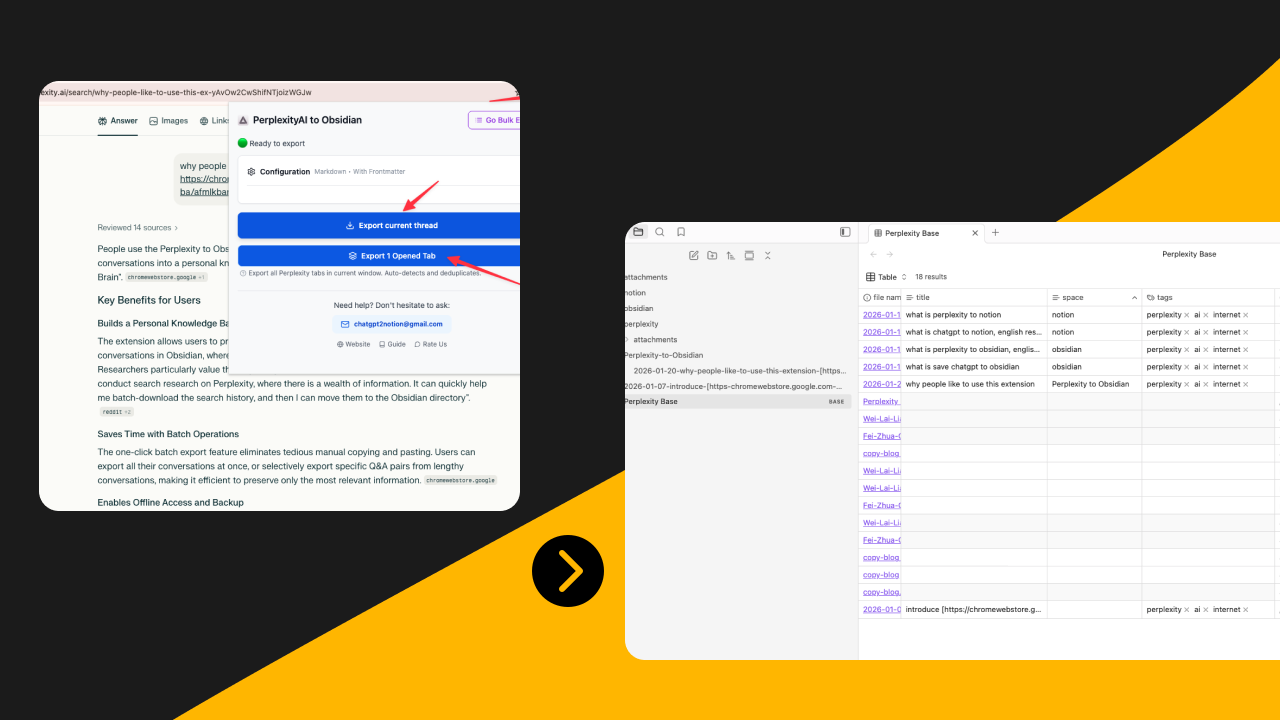
The best way to export Perplexity to Obsidian is to save the thread as readable Markdown with enough structure to stay useful later. That means preserving headings, sources, useful related questions, and clear filenames, then placing the export inside a vault structure that matches how you actually search and link notes. For file-based research workflows, Obsidian is often the best destination because you keep long-term ownership and can connect Perplexity outputs to your existing notes.
Why use Obsidian for Perplexity exports
Perplexity threads are often source-backed research notes. They age better in a local vault than in a generic downloads folder.
Obsidian is a strong destination when you want:
- local file ownership
- Markdown portability
- backlinks to your own notes
- folder-based project organization
- offline-friendly archives
- version-control-friendly text files
If your main need is team collaboration or database filtering, Notion may be better. But if the goal is a durable personal research system, Perplexity to Obsidian is the more natural fit.
What a useful Obsidian export should preserve
Markdown export is not only about getting text out. A good Perplexity export should preserve enough structure for later reading and reuse.
Check for:
- clean headings
- readable lists and tables
- source links
- conversation title
- useful related questions
- export date or metadata
- original conversation URL when available
The current product documentation describes support for Perplexity Markdown structure, timestamps, selective export, Spaces organization, and attachment handling. That matters because Obsidian users care about file quality more than surface-level “save succeeded” messages.
When Obsidian is better than Notion
Choose Obsidian when you want:
- a second-brain vault
- local-only research storage
- fast full-text search across files
- fewer database decisions upfront
- direct editing in Markdown
- an archive that can move between tools
Choose Notion when:
- multiple people need to review the same material
- you want properties and filtered views
- the archive is part of an operations workflow
The point is not that one destination is superior. It is that Perplexity export should follow the next job the saved thread needs to do.
Recommended Perplexity vault structure
An export page becomes more valuable when it shows what “good output” looks like.
Use a structure like this:
AI Research/
  Perplexity/
    Inbox/
    Spaces/
    Sources/
    Reviews/
    Attachments/
Suggested note frontmatter:
---
platform: Perplexity
space: Market Research
topic:
  - pricing
  - competitors
exported_at: 2026-06-23
source_review: pending
conversation_url: https://...
---
This adds enough metadata for filtering without turning Markdown into database busywork.
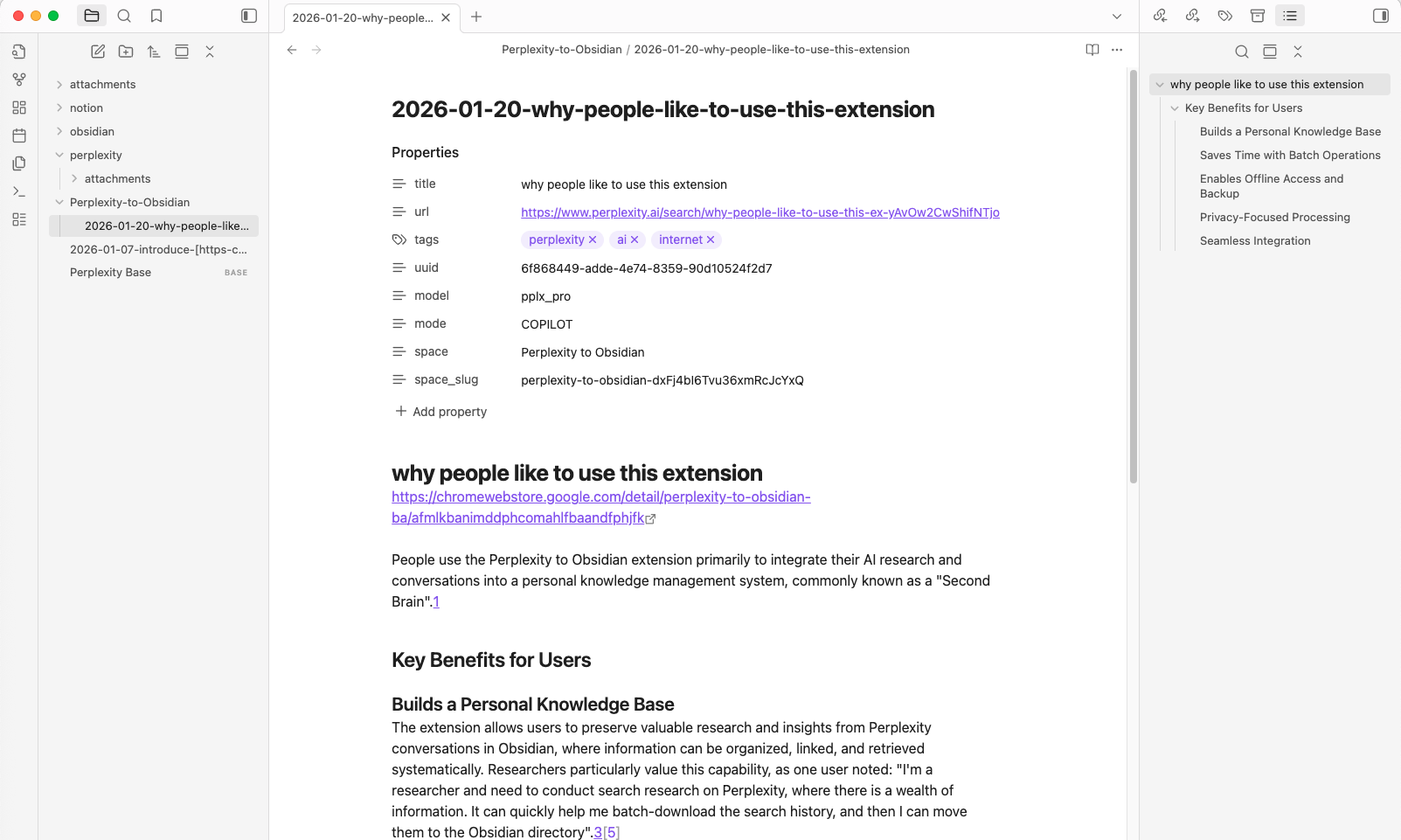
Step by step: how to export Perplexity to Obsidian
1. Pick the right export scope
Choose between:
- one conversation
- batch history export
- filtered export by Space
- filtered export by date
If you are cleaning up a vault, small scoped exports are usually easier than a giant first import.
2. Decide whether you need full or selective export
This is one of the main reasons the Obsidian destination deserves its own page. The Perplexity to Obsidian workflow supports selective export for specific Q&A pairs. That matters when:
- the thread is very long
- only part of the research is reusable
- you want cleaner notes for a vault
- you are building literature notes rather than full transcripts
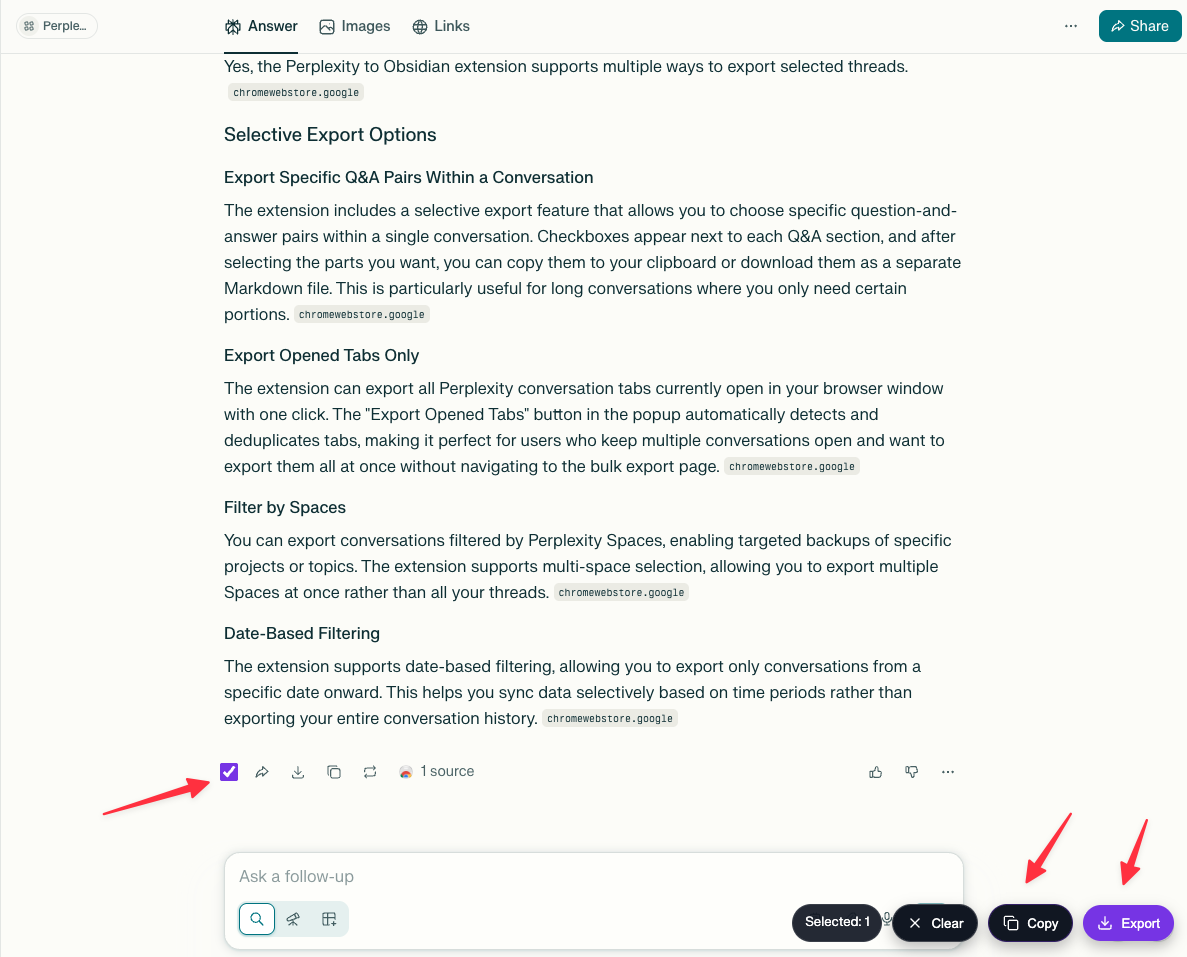
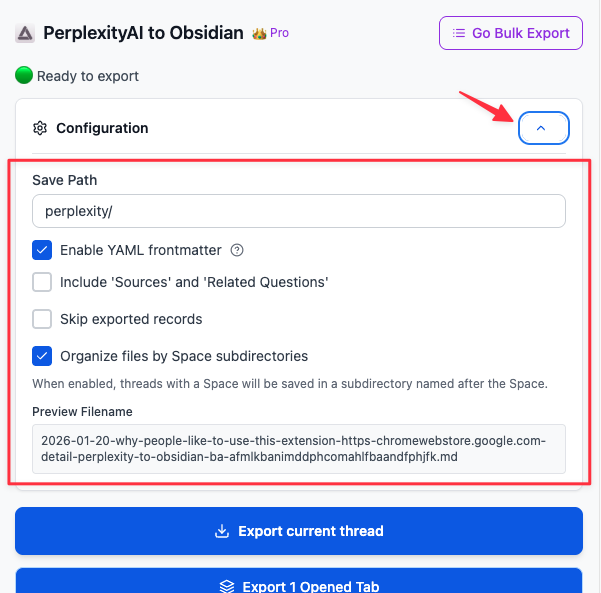
3. Configure source-related sections
Perplexity answers often lose meaning when sources disappear. Keep sources enabled for:
- research notes
- claim-heavy summaries
- anything you may cite later
You can be more selective with related questions. Keep them when they reveal the research path. Skip them when they add clutter.
4. Handle attachments and downloaded files intentionally
The product documentation describes support for downloading user attachments with wiki-link formatting. That is useful when the question included uploaded PDFs, images, or other reference files.
If you enable attachment download:
- keep an
Attachments/folder inside the vault - avoid renaming files without updating links
- decide whether each attachment belongs next to the note or in a shared folder
5. Check the file before trusting the archive
A strong Markdown export should open cleanly in Obsidian without major manual repair.
Check:
- title quality
- heading hierarchy
- working source links
- readable tables or code blocks
- attachment links
- filename clarity
If the note is messy, fix the export settings before you scale to batch export.
Best practices for long-term vault quality
Use file names that still make sense in six months
Bad names create dead archives. A good pattern is:
perplexity-topic-project-YYYY-MM-DD.md
If you need help standardizing this across platforms, Best File Naming System for AI Chat Exports is relevant.
Keep raw exports separate from processed notes
Use an Inbox/ folder for new exports and move only the best notes into project folders after review. That keeps the vault readable.
Link Perplexity notes to permanent notes
Add one line under the export such as:
Related note: [[EU AI Vendor Landscape]]Derived from: [[Competitor Pricing Review]]
This is where Obsidian starts outperforming a simple archive folder.
Common problems and fixes
The note is too long
Use selective export or split the workflow into smaller threads before saving everything.
The file keeps useful answers but not the research trail
Turn sources back on. For Perplexity, source preservation is often the difference between “interesting text” and “reusable research.”
Attachments feel disorganized
Standardize one attachments folder and do not mix uploaded files with screenshots or unrelated assets.
Space-based projects are getting mixed together
Use Space subdirectories or separate folders per research area. The product page indicates this pattern is supported.
The export is technically fine but hard to reuse
Add frontmatter plus one human summary sentence. That small step dramatically improves later retrieval.
Obsidian checklist for Perplexity exports
- The note has a meaningful title.
- Headings are readable.
- Sources are preserved when needed.
- Related questions are kept only when useful.
- The file is stored in the correct folder.
- Frontmatter includes topic and export date.
- Attachment links resolve correctly.
- One line explains why the thread matters.
That checklist is why this page is more than a template variation on “save AI chat elsewhere.”
FAQ
Can I export Perplexity conversations as Markdown for Obsidian?
Yes. The product documentation explicitly supports Markdown export for Obsidian workflows.
Can I export only part of a Perplexity thread?
Yes. The changelog notes selective export for specific Q&A pairs, which is especially useful for long research threads.
Does Perplexity to Obsidian support Spaces?
Yes. The product page describes exporting by Space and organizing files into Space-related subdirectories.
Can attachments be saved too?
Yes, the current product content indicates support for downloading user attachments and formatting links for Obsidian.
Is Obsidian better than Notion for Perplexity?
It is better for local ownership, Markdown portability, and second-brain workflows. It is not better for every team or every archive.
What should I review after export?
Review headings, links, sources, filenames, attachments, and whether the note is in the right folder.
Final takeaway
Perplexity export to Obsidian is strongest when the output behaves like a good note, not like a dumped transcript. The page is intentionally focused on source preservation, Space organization, and attachment review rather than repeating a general Notion-versus-Obsidian comparison. If the Markdown keeps structure, preserves sources, and fits a clear vault pattern, the conversation becomes reusable research instead of forgotten browser history.
If your goal is a durable file-based archive, start with Perplexity to Obsidian, compare when Perplexity to Notion might be better, and use the AI Export Hub workflow that keeps your notes both portable and searchable.