
Custom Preview
Review a Claude conversation, select individual messages, filter prompts or responses, and preview the final PDF before exporting.
Custom Preview is the best workflow when the full conversation contains setup, retries, dead ends, or sensitive sections that should not appear in the finished document.
Open Custom Preview
- Open the source conversation on Claude.
- Click the Claude to PDF extension.
- Choose Custom preview.
- Wait for the conversation cards to appear.
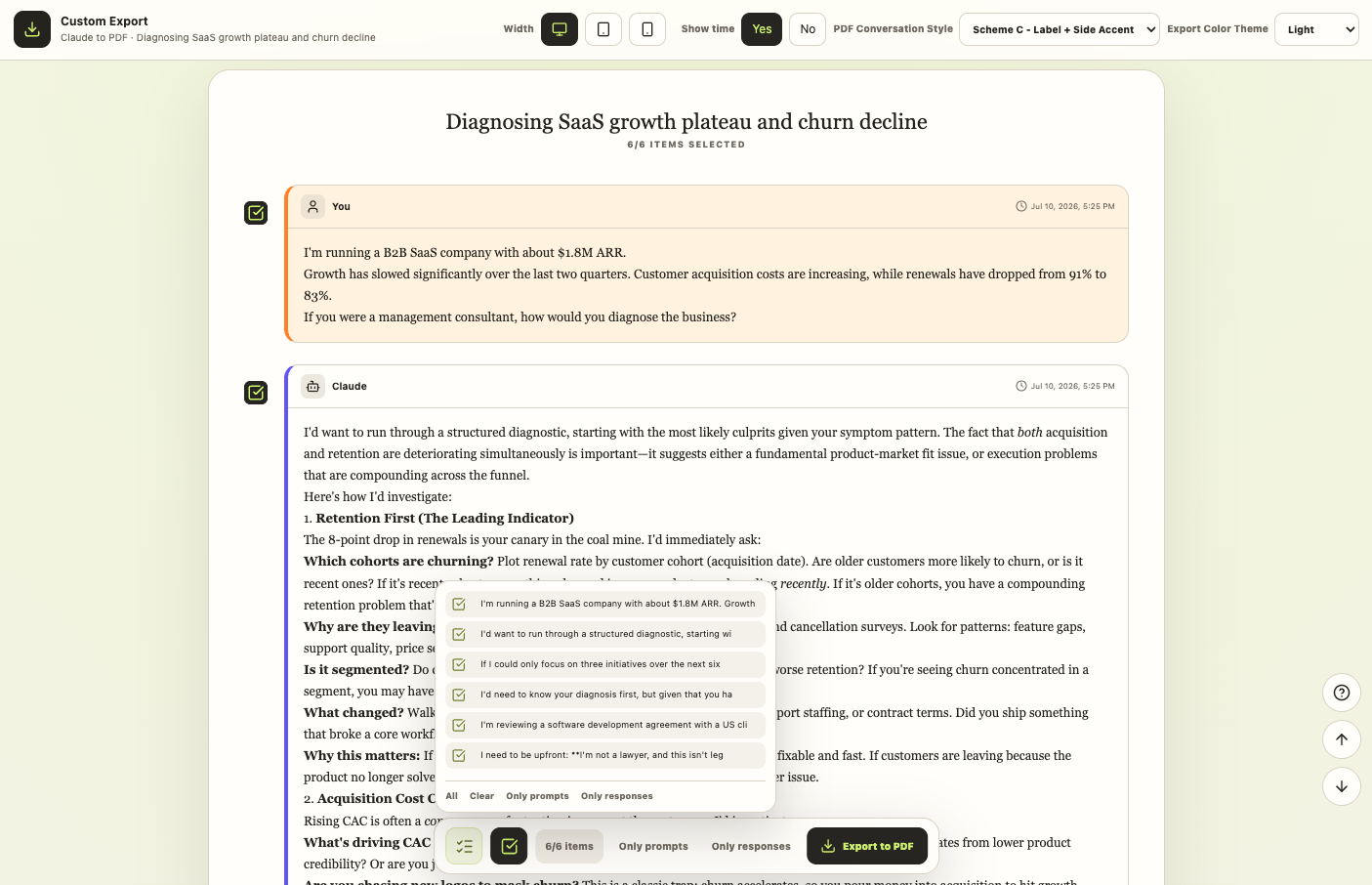
Select content
Each message has its own checkbox. You can:
- Select or clear individual messages
- Use All to restore the complete conversation
- Use Clear to start from an empty selection
- Use Only prompts to keep user messages
- Use Only responses to keep Claude messages
The selected count above the preview updates as you change the set.
Adjust the preview
The toolbar supports:
- Desktop, tablet, and mobile preview widths
- Timestamp visibility
- Three PDF conversation styles
- Light, Dark, and Eye-care themes
These controls change the presentation, not the underlying Claude conversation.
Export the selection
- Review the selected message cards in order.
- Confirm the selected item count.
- Choose Export to PDF.
- Keep the preview tab open while Chrome creates the file.
Good uses for Custom Preview
- Remove early brainstorming from a client-ready document
- Keep only the final prompt and response for a decision record
- Create a study handout from selected explanations
- Exclude a message containing private account details
- Verify images, tables, or Artifact references before saving
What Custom Preview does not change
It does not edit the original Claude conversation. It only controls which parsed messages are passed to the local PDF export.
If content is missing from the preview
- Return to the Claude tab.
- Let the conversation finish loading.
- Refresh the Claude tab.
- Reopen Custom Preview.
For media and Artifact limitations, see Troubleshooting & FAQ.
Ready to try Claude To Pdf?
Open the product page for feature details, screenshots, pricing, and the Chrome Web Store install link.