
After Exporting My AI Conversations, I Built an Obsidian Dashboard to Actually Use Them
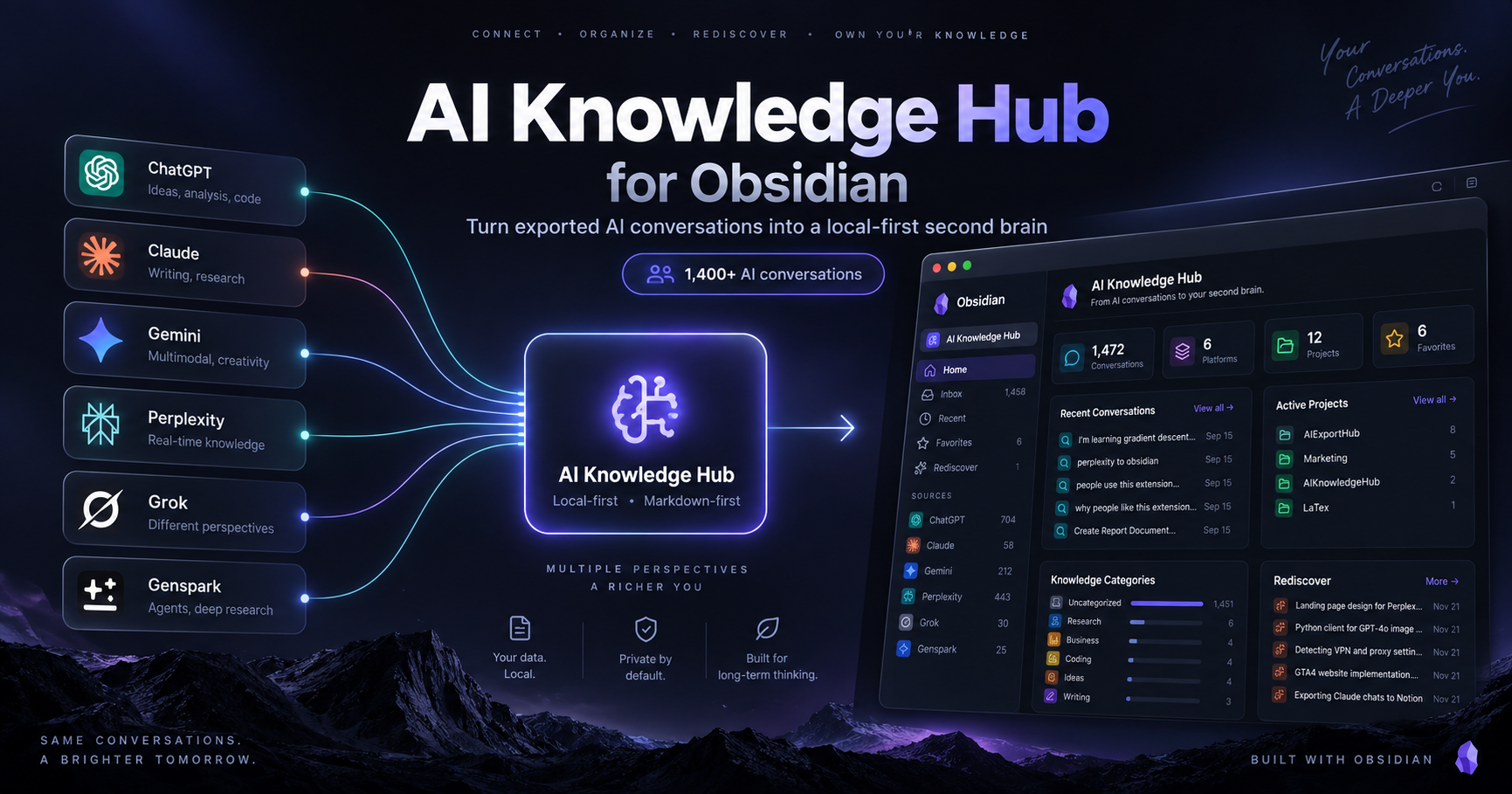
A few days ago, I wrote about an experiment: bringing conversations from ChatGPT, Claude, Gemini, Perplexity, Grok, and Genspark into one Notion workspace.
That experiment answered one question:
Can conversations from different AI platforms be treated as one personal knowledge base?
The answer was yes.
But it created a more interesting question.
Once hundreds — and eventually thousands — of conversations are safely exported, what do you actually do with them?
Saving AI history is useful.
Being able to think with it again is much more useful.
That question led me to build the next version of the idea, this time inside Obsidian.
From an AI archive to an AI Knowledge Hub
My original problem was fragmentation.
Research might happen in Perplexity.
Long-form thinking might happen in Claude.
Brainstorming happens in ChatGPT.
Some experiments live in Gemini.
Other conversations end up in Grok or Genspark.
Each platform keeps its own history, so over time I was effectively building six separate knowledge silos.
AIExportHub helped solve the first part of the problem by exporting those conversations into portable formats such as Markdown, Notion, Obsidian, and PDF.
But after exporting a large portion of my history, I realized something:
A folder full of Markdown files is safer than a chat sidebar, but it is not automatically a knowledge system.
So instead of building another export format, I started building a layer on top of the Markdown itself.
That became AI Knowledge Hub for Obsidian.
You can follow the plugin and join the discussion on its Obsidian Community page. The implementation is also available in the AI Exporter Hub GitHub repository for anyone who wants to inspect the source code, report an issue, or contribute.
The current version: more than 1,400 AI conversations in one place
The current workspace contains more than 1,400 imported conversations from six AI platforms:
- ChatGPT
- Claude
- Gemini
- Perplexity
- Grok
- Genspark
This is still only part of my full AI history.
The important difference is that I am no longer browsing those conversations as six separate archives.
They now appear inside one dashboard.
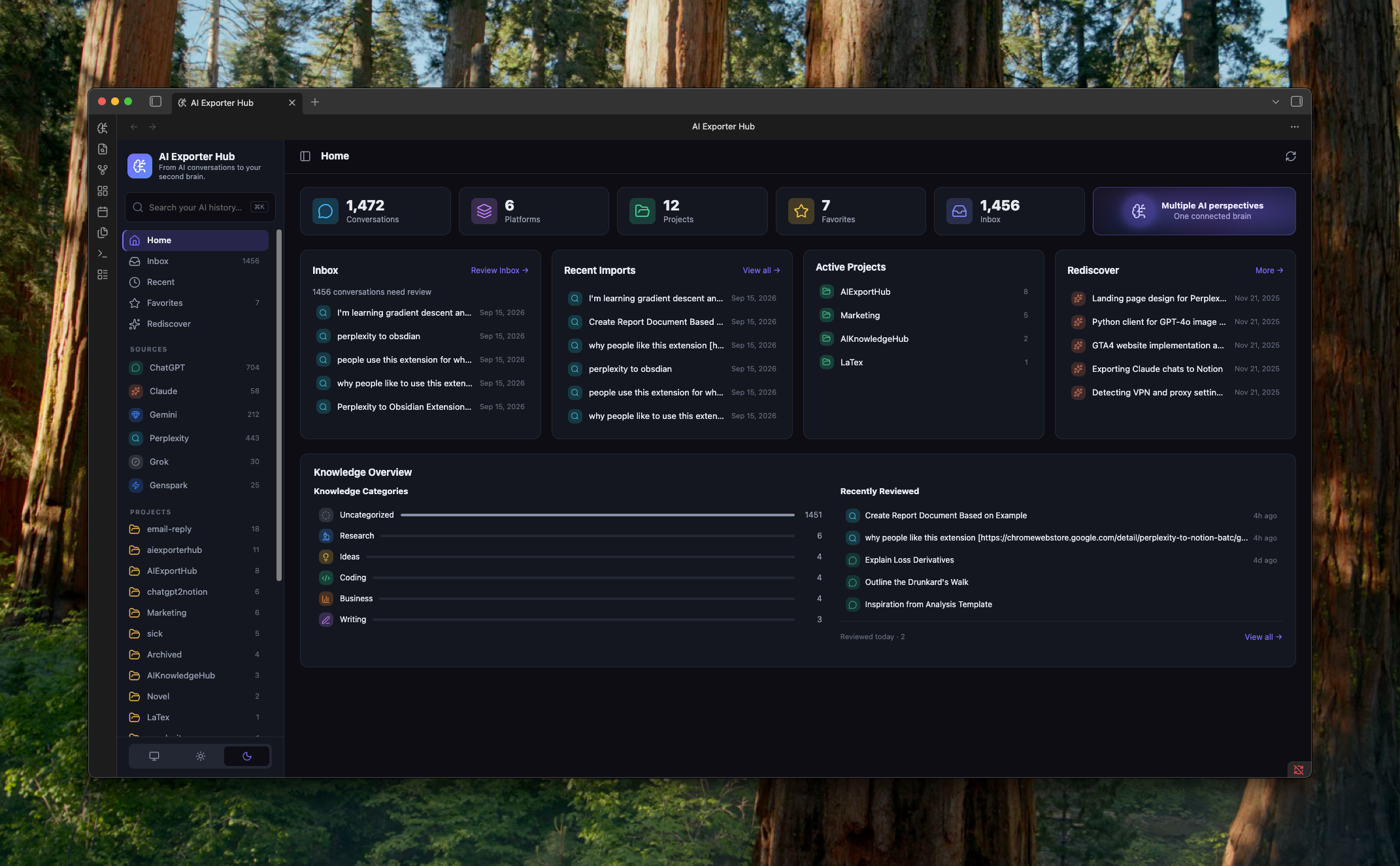
The homepage currently gives me a few different ways to understand what is inside the archive.
Conversations
A simple count of how much AI history has been imported.
The number itself is not the goal, but once the archive reaches the thousands, it becomes obvious that normal folder browsing is no longer enough.
Sources
The dashboard groups conversations by the AI platform they came from.
That means ChatGPT, Claude, Gemini, Perplexity, Grok, and Genspark become sources, rather than separate knowledge systems.
This distinction matters.
The platform tells me where a conversation came from.
It does not necessarily tell me what the conversation is about.
Projects
Projects are becoming much more important than platforms.
A single project might contain:
- a ChatGPT brainstorming session,
- a Claude strategy discussion,
- a Perplexity research thread,
- and a Gemini implementation conversation.
From a knowledge-management perspective, all four belong together.
That is why I think the long-term hierarchy should look more like:
Platform = source
Project = purpose
Category = type of knowledge
rather than using folders alone.
Importing everything creates another problem: the Inbox
Once importing becomes easy, another problem appears very quickly.
You can suddenly have hundreds of new conversations waiting for attention.
So the plugin includes an Inbox.
The idea is similar to an email inbox or a read-later app:
New conversations can arrive automatically, but they do not have to stay unorganized forever.
A conversation can eventually be:
- assigned to a project,
- given a knowledge category,
- marked as reviewed,
- favorited,
- or simply archived.
This is a small feature, but I think it represents an important difference between an archive and a working knowledge system.
An archive asks:
Where did I save this?
An Inbox asks:
What still needs attention?
Recent Imports and Recently Reviewed are intentionally different
The dashboard also separates two things that initially look similar:
Recent Imports
These are conversations that recently entered the system.
It answers:
What just arrived?
Recently Reviewed
These are conversations I have actually looked at or processed.
It answers:
What have I recently worked through?
That difference becomes useful once imports are automated.
Otherwise, a dashboard can easily become a long list of things that arrived but were never really used.
Projects matter more than folders
One of the biggest lessons from using the system with real data is that physical folders are not enough.
A Markdown file can live inside:
AI Knowledge/
  ChatGPT/
but still belong to a project such as:
AIExportHub
Marketing
Product Design
Customer Support
Finance
Research
So I am treating the folder primarily as the source location, while project and category information live in metadata.
A conversation might conceptually look like this:
---
type: ai-conversation
platform: ChatGPT
project: AIExportHub
category: Product
favorite: false
status: reviewed
---
That means the same underlying Markdown file can appear in different useful views without having to physically move it around.
This is one of the reasons Obsidian fits this experiment so well.
Markdown is the source of truth
This is probably the biggest architectural difference between this version and a traditional web dashboard.
The plugin is not the database.
The Markdown files are.
That means the structure is closer to this:
ChatGPT
Claude
Gemini
Perplexity
Grok
Genspark
      ↓
 AIExportHub
      ↓
 Markdown files
      ↓
 Obsidian Vault
      ↓
 AI Knowledge Hub
The dashboard is an interface over those files.
If the plugin disappeared tomorrow, the conversations would still exist as ordinary Markdown files in the vault.
They could still be:
- opened,
- searched,
- moved,
- backed up,
- synced,
- edited,
- indexed by another tool,
- or imported somewhere else.
That leads to a principle I increasingly like:
The dashboard is temporary. The Markdown is permanent.
For long-term personal knowledge, that feels safer than putting everything into another proprietary database.
The conversation page is more important than the dashboard
The homepage is useful for orientation, but I do not think the homepage is the real product.
The more important screen is what happens after clicking a conversation.
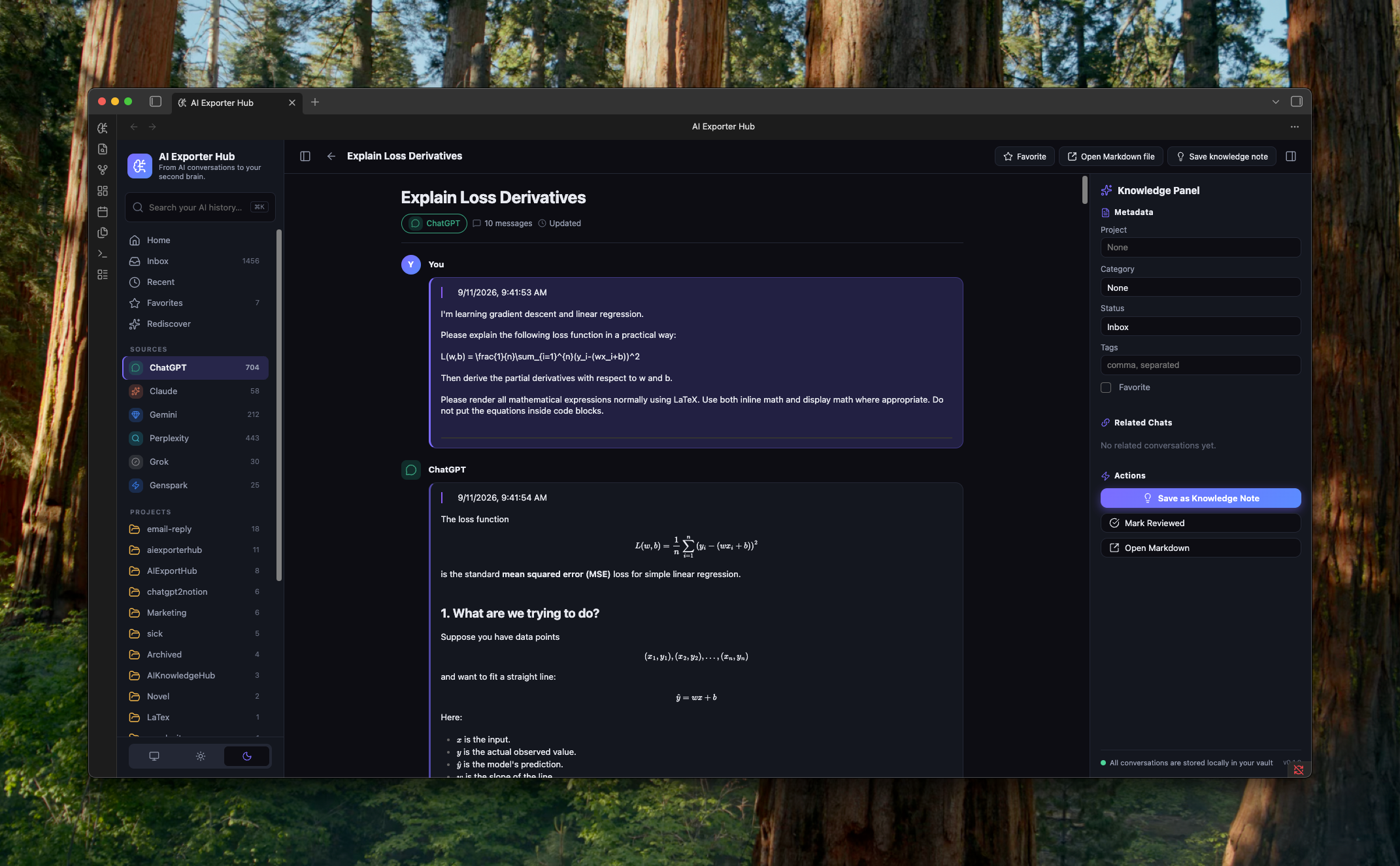
The conversation page is designed around the original chat.
The raw conversation remains the source material.
I do not want an AI-generated summary to replace it.
Instead, the long-term direction is to let the original conversation sit at the center, while the surrounding interface helps answer questions such as:
- Which project does this belong to?
- What category of knowledge is it?
- Is it worth favoriting?
- Have I already reviewed it?
- Are there related conversations?
- What useful ideas came out of it?
- Did I make a decision here?
- Should part of this become a permanent knowledge note?
This is where I think the product can eventually move beyond being a better chat archive.
Conversation is not the same thing as knowledge
This distinction has become more important as I work on the system.
A 50-message conversation may contain only one idea that matters six months later.
Another conversation may contain:
- a decision,
- three useful sources,
- a reusable explanation,
- and an unfinished idea.
So I do not think the final knowledge system should treat the full conversation as the smallest unit forever.
Instead, the model may eventually become:
Conversation
     ↓
   Extract
     ↓
Insight / Idea / Decision / Resource
     ↓
   Project
     ↓
 Personal Knowledge
The conversation remains the source.
But important parts of it can become normal Markdown knowledge notes.
For example:
---
type: ai-knowledge
knowledge_type: insight
project: AIExportHub
source_conversations:
  - "[[AI Knowledge Hub Product Strategy]]"
---
That feels much closer to how a real second brain should work.
Search is useful. Rediscovery may be more valuable.
The dashboard also includes a section called Rediscover.
This started as a concept in the earlier Notion version, but I wanted to make it a real part of the Obsidian version.
Search solves a very specific problem:
I remember something exists. Help me find it.
Rediscovery solves a different one:
I forgot something existed. Show it to me when it becomes useful again.
For example, the system might eventually surface:
You researched this topic six months ago.
Or:
These three Claude conversations are related to the project you are working on today.
Or:
You favorited this discussion eight months ago but never opened it again.
Or even:
You have asked versions of this same question 14 times across ChatGPT, Claude, and Perplexity.
That is much closer to memory than ordinary search.
Why Obsidian makes this especially interesting
I do not think Obsidian is automatically better than Notion.
They solve different problems well.
Notion is excellent for:
- databases,
- structured views,
- cloud access,
- collaboration,
- sharing.
Obsidian is particularly interesting here because of:
- local files,
- Markdown,
- backlinks,
- metadata,
- search,
- portability,
- long-term ownership.
For an AI archive, those properties matter.
AI conversations may eventually become a record of years of research, decisions, experiments, and thinking.
I do not want that entire history to depend on one AI provider — or even on my own plugin.
The file should survive the tool.
AIExportHub is becoming the capture layer
Building this Obsidian version has also changed how I think about AIExportHub itself.
Originally, the product was mainly about exporting AI conversations.
That still matters.
But exporting is increasingly starting to look like only the first layer.
I now think about the system like this:
Layer 1 — Capture
AIExportHub gets conversations out of ChatGPT, Claude, Gemini, Perplexity, Grok, Genspark, and other AI platforms.
Layer 2 — Organize
The Obsidian plugin groups them by:
- source,
- project,
- category,
- status,
- favorites,
- recency.
Layer 3 — Retrieve
Search and filtering help bring back conversations when they become useful.
Layer 4 — Rediscover
The system proactively resurfaces forgotten knowledge and connections.
In short:
AIExportHub helps capture my AI conversations. AI Knowledge Hub helps me use them again.
What I want to build next
The current version is still early.
The foundation now works:
- multi-platform conversation library,
- dashboard,
- Inbox,
- Recent Imports,
- Projects,
- Categories,
- Favorites,
- Recently Reviewed,
- Rediscover,
- dedicated conversation views.
The next layer is where things become more interesting.
I am exploring features such as:
Related conversations
Show discussions connected by project, category, tags, or eventually semantic similarity.
Knowledge extraction
Turn parts of a conversation into:
- insights,
- ideas,
- decisions,
- action items,
- resources.
Compare conversations
Select conversations from different AI platforms and compare:
- common conclusions,
- different viewpoints,
- conflicts,
- unique insights.
Semantic search
Search by meaning rather than remembering the exact wording used months ago.
Ask your AI history
Eventually, I would like to ask:
What have I already learned about this?
And get an answer based not on one model’s current context window, but on years of my own conversations across multiple AI tools.
Every answer should still point back to the original conversations.
That part is important.
The larger question is no longer how to save AI chats
When I started building export tools, the problem felt simple:
How do I save my ChatGPT conversations?
Then it became:
How do I save conversations from every AI platform?
Now the question feels much bigger:
How do I turn years of conversations with AI into knowledge I can actually use again?
I do not think the answer is simply “export everything.”
Export is necessary.
But after the export comes organization.
After organization comes retrieval.
And after retrieval comes something potentially more valuable:
rediscovery.
That is the direction I want to explore with AI Knowledge Hub.
Build your own AI knowledge archive
If your conversations are already scattered across ChatGPT, Claude, Gemini, Perplexity, Grok, Genspark, and other AI tools, AIExportHub can help bring them into portable formats such as Notion, Markdown / Obsidian, and PDF.
You can also read the earlier experiment:
I Put My AI Conversations Into Notion. Then I Realized Exporting Was the Easy Part.
The Notion version helped me understand the information architecture.
The Obsidian version is helping me explore something different:
What does a local-first AI second brain actually look like?
I am still finding out.
But this version already feels much closer to the answer.
Would you use an Obsidian workspace like this for your own AI history?
And if you had thousands of conversations stored locally, what would matter most to you:
search, projects, knowledge extraction, comparison, or rediscovery?