
Installation
Install Midjourney to Google Sheets and confirm that the extension recognizes a signed-in Midjourney account before Google authorization.
Install from the Chrome Web Store
- Open Midjourney to Google Sheets in the Chrome Web Store.
- Click Add to Chrome.
- Review the
storage,identity, Google, and Midjourney permissions. - Pin the extension.
Recognize Midjourney
- Open Midjourney Organize.
- Sign in.
- Refresh the page once after installation.
- Open the extension popup.
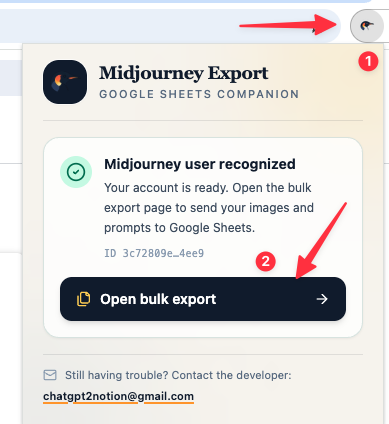
When the account is ready, the popup shows a masked ID and enables Open bulk export.
If the account is not recognized:
- Confirm the Organize page is signed in.
- Refresh the Midjourney tab.
- Use Check again in the popup.
Next step
Ready to try Midjourney To Google Sheets?
Open the product page for feature details, screenshots, pricing, and the Chrome Web Store install link.