
Overview & Exported Columns
Learn how Midjourney to Google Sheets turns prompts, parameters, job links, image URLs, previews, and timestamps into structured spreadsheet rows.
Midjourney to Google Sheets batch-syncs Midjourney creation data into an authorized spreadsheet. It is designed for sorting, filtering, review queues, prompt analysis, and simple team catalogs.
Exported columns
The current v1.3 row structure is:
| Column | Value |
|---|---|
| Prompt | Full Midjourney command |
| Attributes | Parsed prompt parameters |
| URL | Midjourney Job link |
| ImageUrl | Original Midjourney CDN image URL |
| ImageUrlPreview | Google Sheets IMAGE formula |
| CreatedAt | ISO timestamp written during sync |
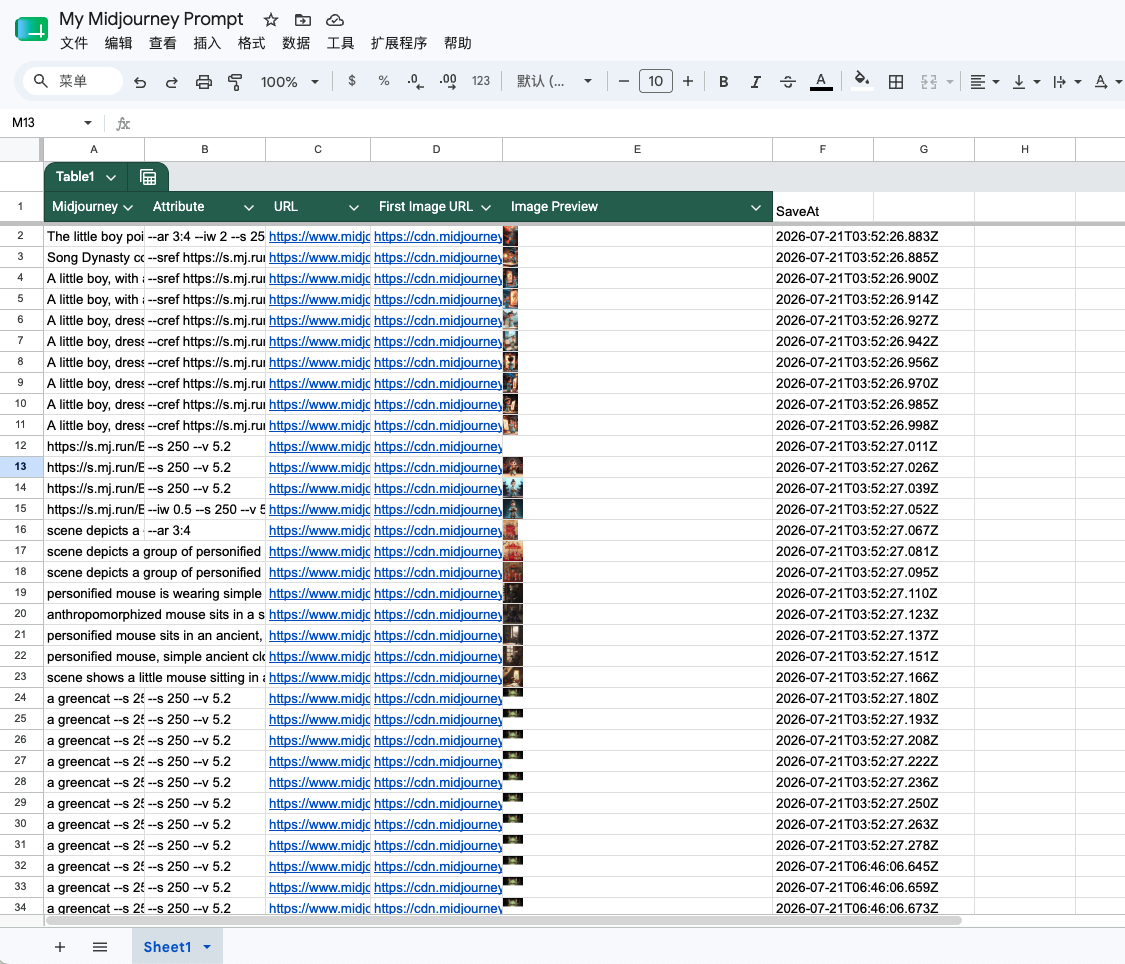
Images remain URL-based. The extension does not copy image binaries into Google Drive.
Batch ranges
- Sync latest data processes the latest 1,000 available records.
- Sync all data follows the available Midjourney pagination.
Rows are grouped into write batches of up to 100 and appended after the current used range.
Current destination rule
Choose the spreadsheet file in the extension. The current implementation writes to the first worksheet tab inside that spreadsheet.
Recommended setup
- Install and recognize Midjourney.
- Connect Google and choose a spreadsheet.
- Test the latest scope.
- Use all-data batch sync when the columns look correct.
Ready to try Midjourney To Google Sheets?
Open the product page for feature details, screenshots, pricing, and the Chrome Web Store install link.