
 v2 workflow · Local-first Chrome Extension
 Midjourney to Obsidian — Markdown & Local Image Backup
Export Midjourney Jobs or supported Discord creations as Obsidian-ready Markdown with structured frontmatter, source links, and local images—one at a time or as a complete batch archive.
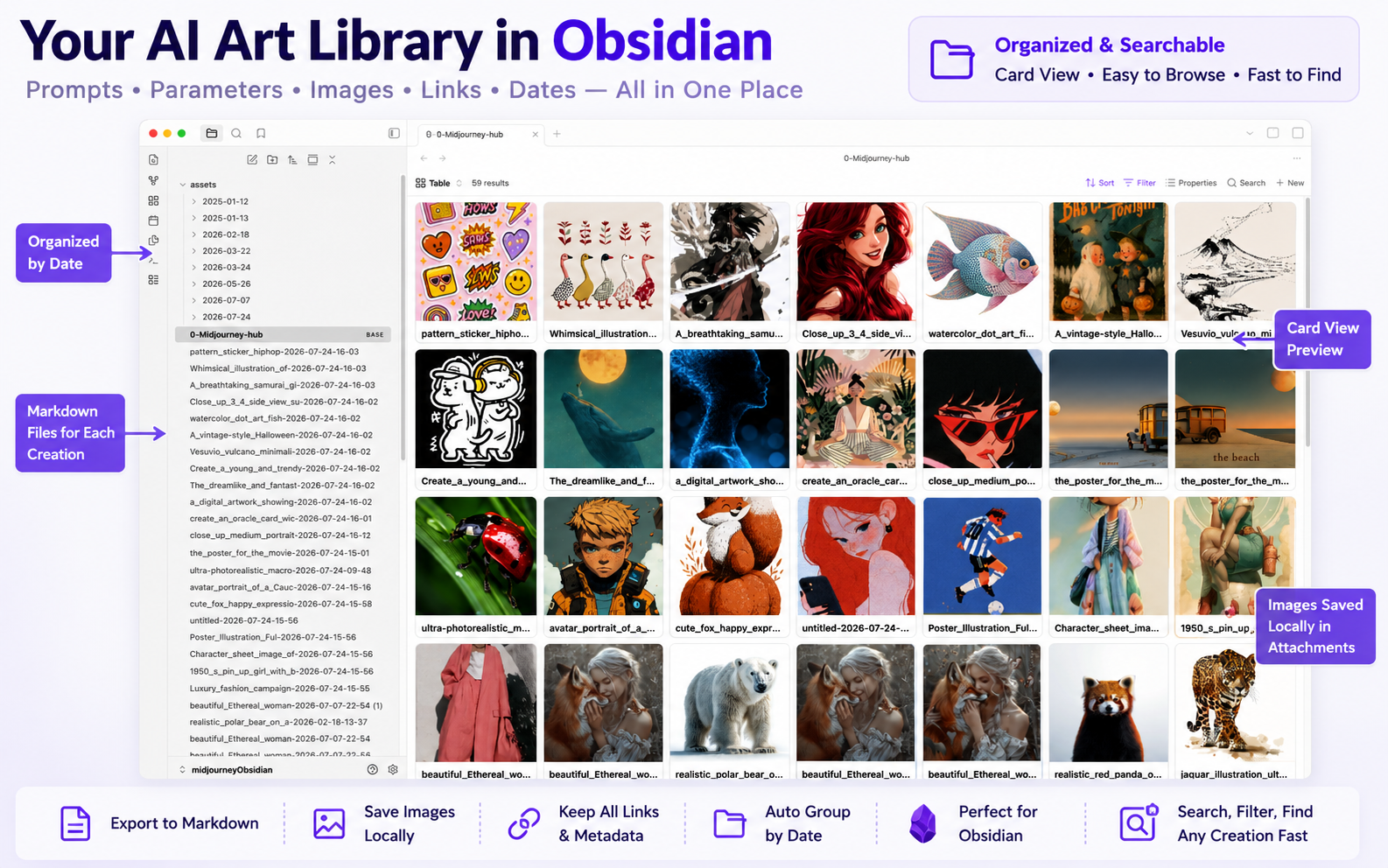
A portable creative archive: Markdown at the root, images in predictable dated folders, and no destination account required.
Compatibility matrix
What Midjourney to Obsidian — Markdown & Local Image Backup can export
A practical support table for real content types and destination behavior.
| Content type | Support | Export result | Notes |
|---|---|---|---|
| Prompt and parameters | Supported | YAML properties plus readable Markdown sections | Frontmatter values are escaped for complex prompts. |
| Midjourney images | Supported | Local attachment plus original remote URL | If the image download fails, the note is still created with the remote URL and a warning. |
| Video creations | Partial | Remote video link plus local preview image | Video files are not downloaded in the current batch workflow. |
| Midjourney Jobs single export | Supported | One Markdown note and optional local image | No special setup required. |
| Discord Midjourney messages | Supported | One Markdown note with Discord source metadata | Available on supported Midjourney bot message layouts. |
| Complete history | Supported | Paginated local Markdown and attachment archive | No special setup required. |
Output proof
Real export examples
Use these examples to verify what exported files, folders, or destination pages look like before installing.
Obsidian art library
A card-based prompt library built from local Markdown notes and images.
Metadata table
Prompt properties, image paths, model attributes, dates, and source links in a filterable view.
Key Features
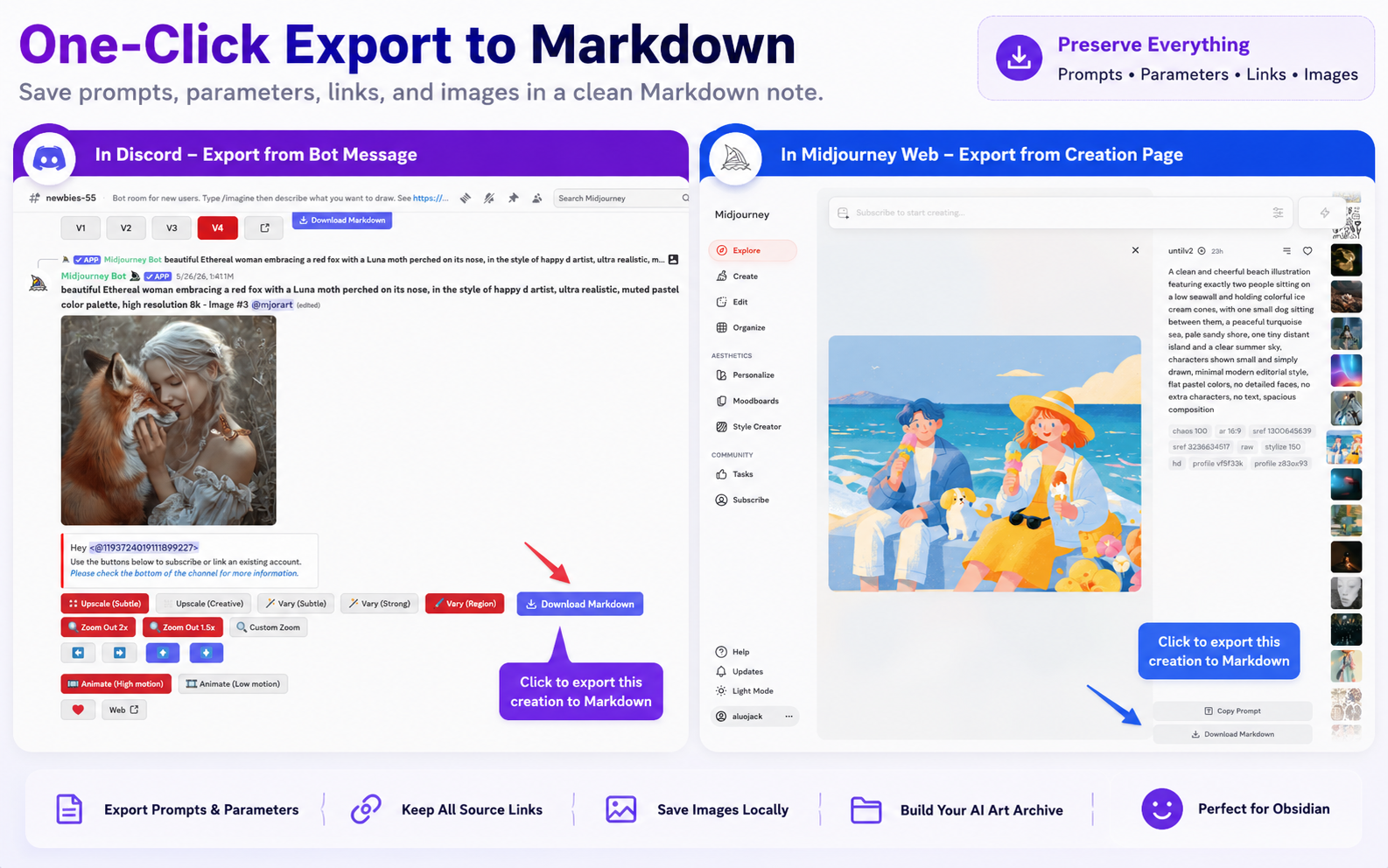
Export one creation from Midjourney or Discord
Use the injected Markdown action on a Midjourney Job or a supported Discord message. The same exporter creates the note, chooses the best available image, and records the real source.
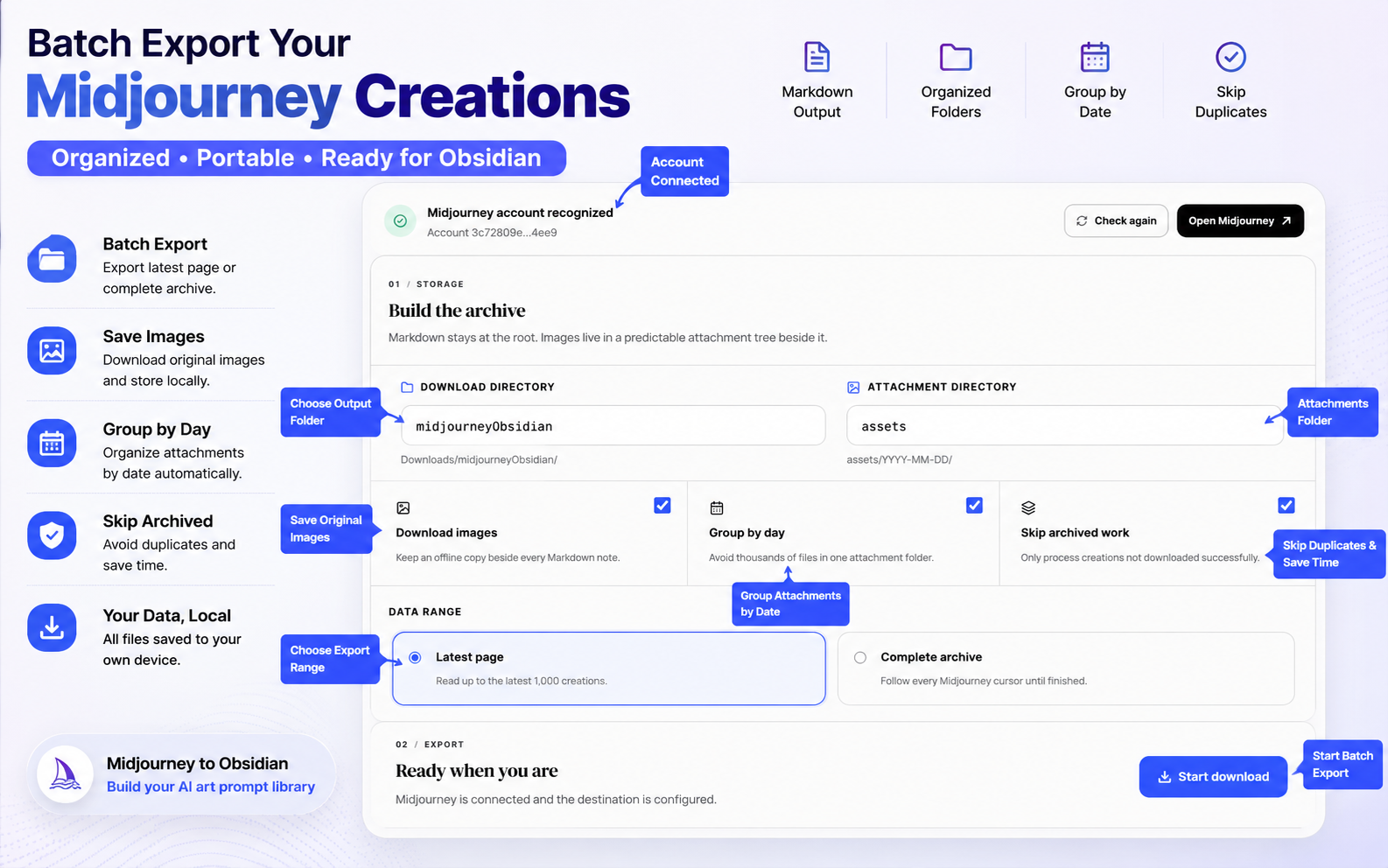
Configure a complete local archive
Choose the download and attachment folders, group media by date, skip successful IDs, and switch between the latest page and the complete paginated archive.
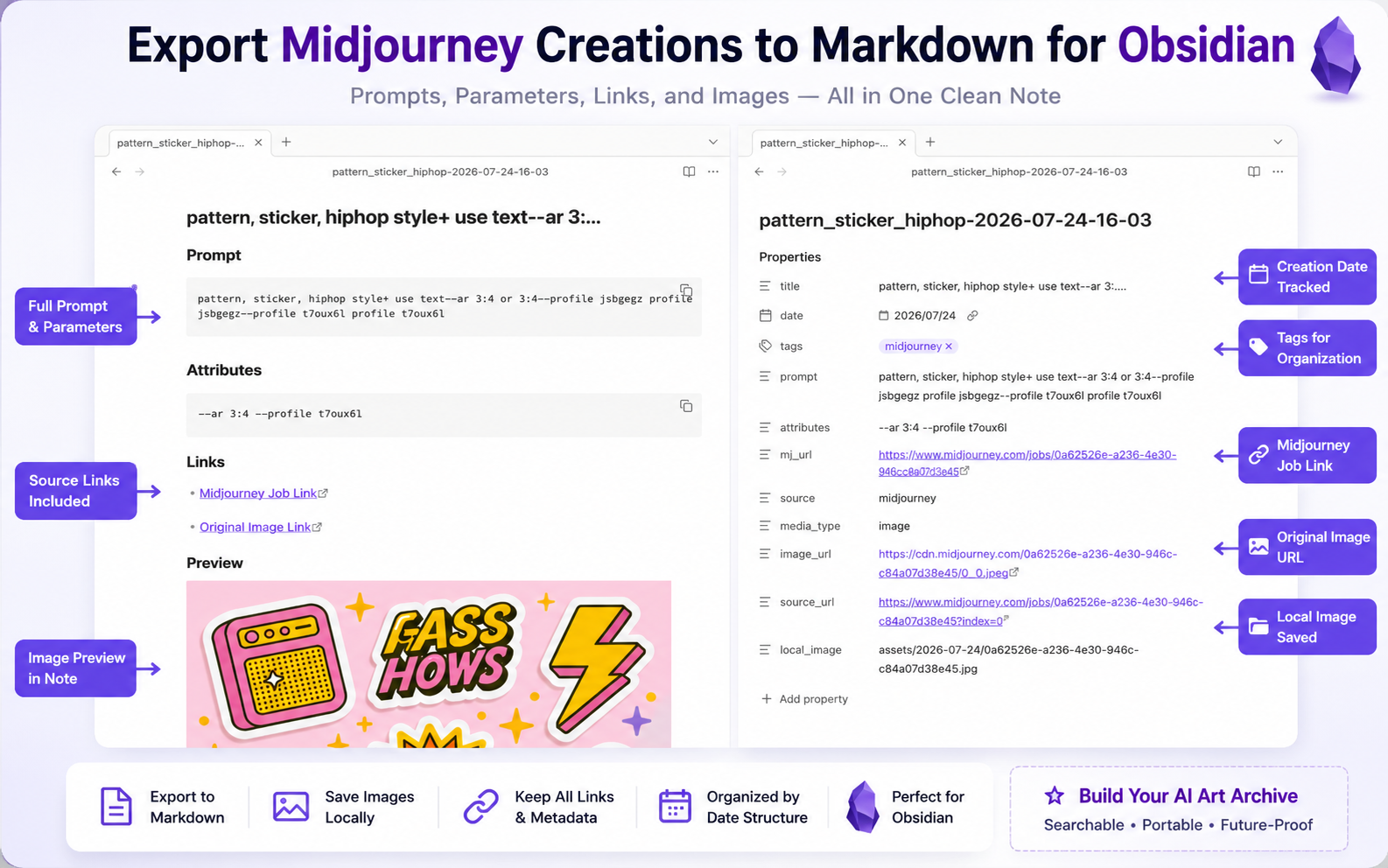
Keep Markdown, metadata, and images together
Every note includes structured frontmatter, prompt and parameter blocks, job/source links, the original image URL, and a relative local attachment path when the image download succeeds.
Build table and card views in Obsidian
The consistent frontmatter works with Obsidian search, properties, Bases, and community plugins that present your prompt library as a table or gallery.
Key Features of Midjourney to Obsidian — Markdown & Local Image Backup
Keep prompts, parameters, source links, images, and creation metadata together in Obsidian.
Structured YAML frontmatter
Each note records title, date, tags, prompt, attributes, Midjourney URL, source, media type, image URL, and optional video and local-image fields.
Local image attachments
Images download beside the notes and use relative Markdown paths, with the remote URL kept as a fallback.
Dated attachment folders
Group images under assets/YYYY-MM-DD to prevent one enormous attachment directory.
Image and video awareness
The page adapter scores image candidates to avoid thumbnails and records video URLs while keeping the preview image local.
Midjourney Jobs export
Save the active creation from the Jobs or direct creation page without opening the batch workspace.
Discord message export
Export prompt text, parameters, original media, message time, and a permanent Discord source link from supported Midjourney messages.
Reliable batch history
Only actual successes are marked complete; failed and cancelled runs remain visible for recovery.
Configurable filename conflicts
Keep unique files by default or intentionally overwrite matching paths when rebuilding an archive.
Known limits
Export boundaries and fixes
Clear limits build trust. These are the cases to check before running large exports.
Chrome controls the download root
Extensions cannot write directly to an arbitrary Obsidian vault path without a browser download workflow.
Set a stable subdirectory under Downloads, then move or sync that folder into your vault.
Troubleshooting guideVideo files remain remote
The current exporter records the video URL and downloads the available cover image, but does not download the full video file.
Use the video link stored in the Markdown note when you need the original motion asset.
Free batch runs process up to 30 creations
The current local archive workflow caps free batch processing at 30 creations.
Single exports remain useful for selected work; upgrade for an unrestricted complete archive.
How it Works
Related resources Midjourney to Obsidian — Markdown & Local Image Backup
Use these guides and docs to solve common export, backup, and troubleshooting workflows.
What's New
Version 2 workflow added robust Midjourney account detection, Midjourney Jobs and Discord single export, local dated image attachments, video metadata, complete pagination, reliable cancellation, and the unified MidjourneyExporter pricing link.
Frequently Asked Questions About Midjourney to Obsidian — Markdown & Local Image Backup
Have another question? Contact us on Discord or by email.
Does Midjourney to Obsidian download the images?
Yes. Image download is enabled by default. Images are stored in a configurable attachment folder, optionally grouped by date, and the Markdown note uses a relative path when the download succeeds.
Can I export one Midjourney creation?
Yes. Use the injected action on a supported Midjourney Job or direct creation page. Supported Midjourney bot messages in Discord also have a single-export workflow.
Can I batch export my complete history?
Yes. Latest page reads up to 1,000 creations. Complete archive follows Midjourney pagination until no cursor remains or you cancel.
What happens if an image download fails?
The Markdown note still downloads and uses the remote image URL. The run records a warning so you can retry the asset later.
Are video files downloaded?
No. The current workflow records the remote video URL and keeps the available preview image, but it does not batch-download the full video file.
What are the paid plan prices?
The shared MidjourneyExporter pricing page currently offers $4.90 monthly, $49 annually, or $69 lifetime access.
Unlock unlimited Midjourney exports
Choose monthly access for $4.90, annual access for $49, or lifetime access for $69. One pricing page covers the Midjourney exporter family.
View MidjourneyExporter Plans