
How to add the Airtable base template
Copy the ChatGPT DataBase Template into your Airtable workspace and select it in the extension.
ChatGPT to Airtable works best with a destination table that already has the fields used by the extension. The official template gives you a ready-to-use starting point.
1. Open the template
Open the ChatGPT DataBase Template while signed in to the Airtable account that you want to use for exports.
2. Copy the base
Click Copy base in the Airtable header. Choose your Airtable workspace and confirm the destination when Airtable asks where to place the copy.
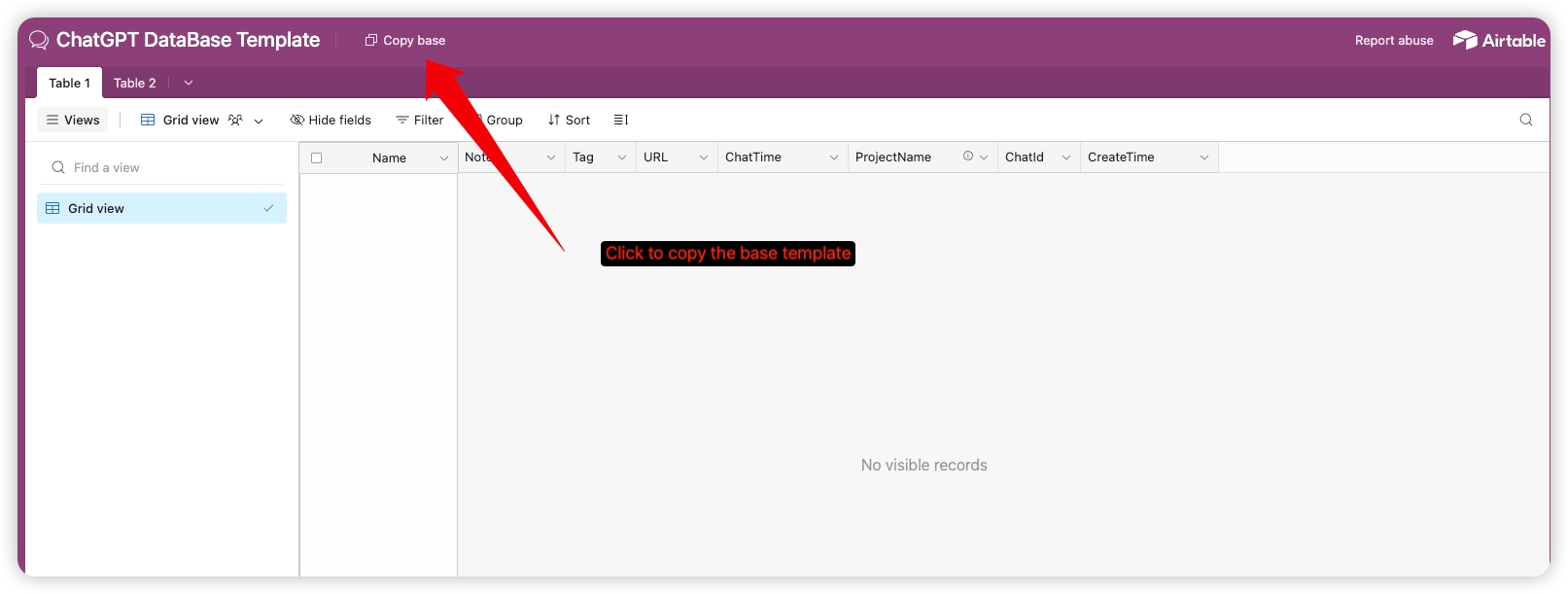
After the copy finishes, open the new base and check that the table and its fields are available. You can rename the base or table; keep the field names unchanged so the extension can map exports automatically.
3. Select the copied base in ChatGPT to Airtable
- Open the extension options page.
- In Connect to Airtable, reconnect or authorize Airtable if needed.
- In Select Airtable Base, click the refresh button to load recently copied bases.
- Choose the copied base and the table that should receive your conversations.
- Save a short test conversation before starting a batch export.
See Connect Airtable for the authorization and destination steps.
Fields included in the template
The extension creates or uses these fields when it prepares a destination table:
Name— conversation titleNotes— formatted ChatGPT messagesURL— source conversation URLChatId— stable conversation identifierChatTime— conversation update timeProjectName— ChatGPT project name, when availableTags— comma-separated export tagsPartIndex,PartCount, andParentChatId— metadata for conversations split into multiple recordsAttachments— images and files when media export is enabled
If the copied base does not appear
Make sure you copied the base into a workspace where the authorized Airtable account has access. Return to the extension, use the refresh control beside the base selector, and reload the options page if the list is still stale.
Ready to try Chatgpt To Airtable?
Open the product page for feature details, screenshots, pricing, and the Chrome Web Store install link.