
Best AI Chat Exporter Tools
Compare AI chat exporter tools for ChatGPT, Claude, Gemini, Perplexity, and Grok, then choose the right Notion, Obsidian, PDF, or HTML workflow.
Guide summary
- Search intent
- Commercial investigation intent: users want to compare AI chat exporter tools by source platform, archive destination, and workflow requirements.
- Best next step
- Browse All AI Export Tools
- Topics
- AI Chat ExportExporter ToolsNotionObsidianPDFHTML
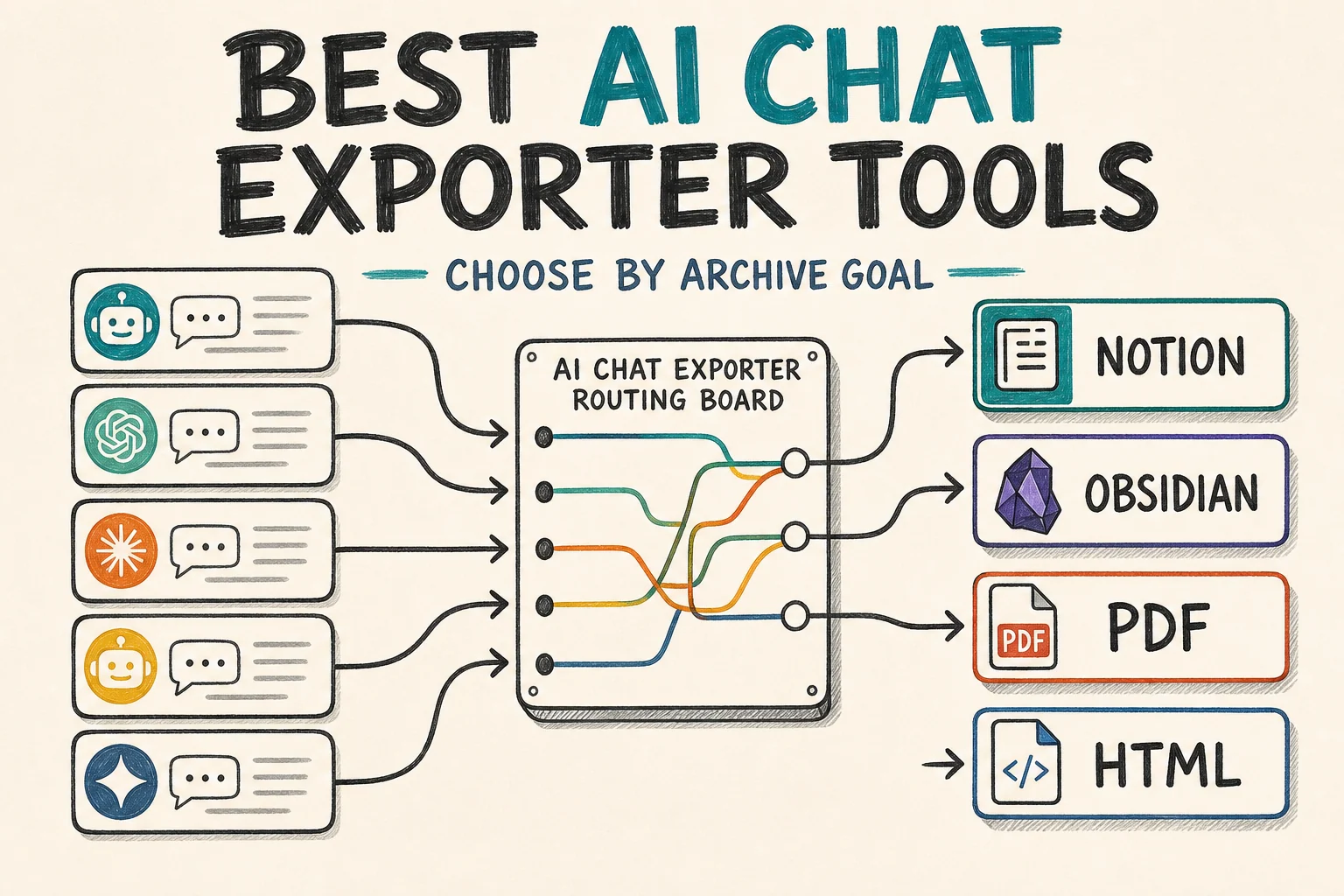
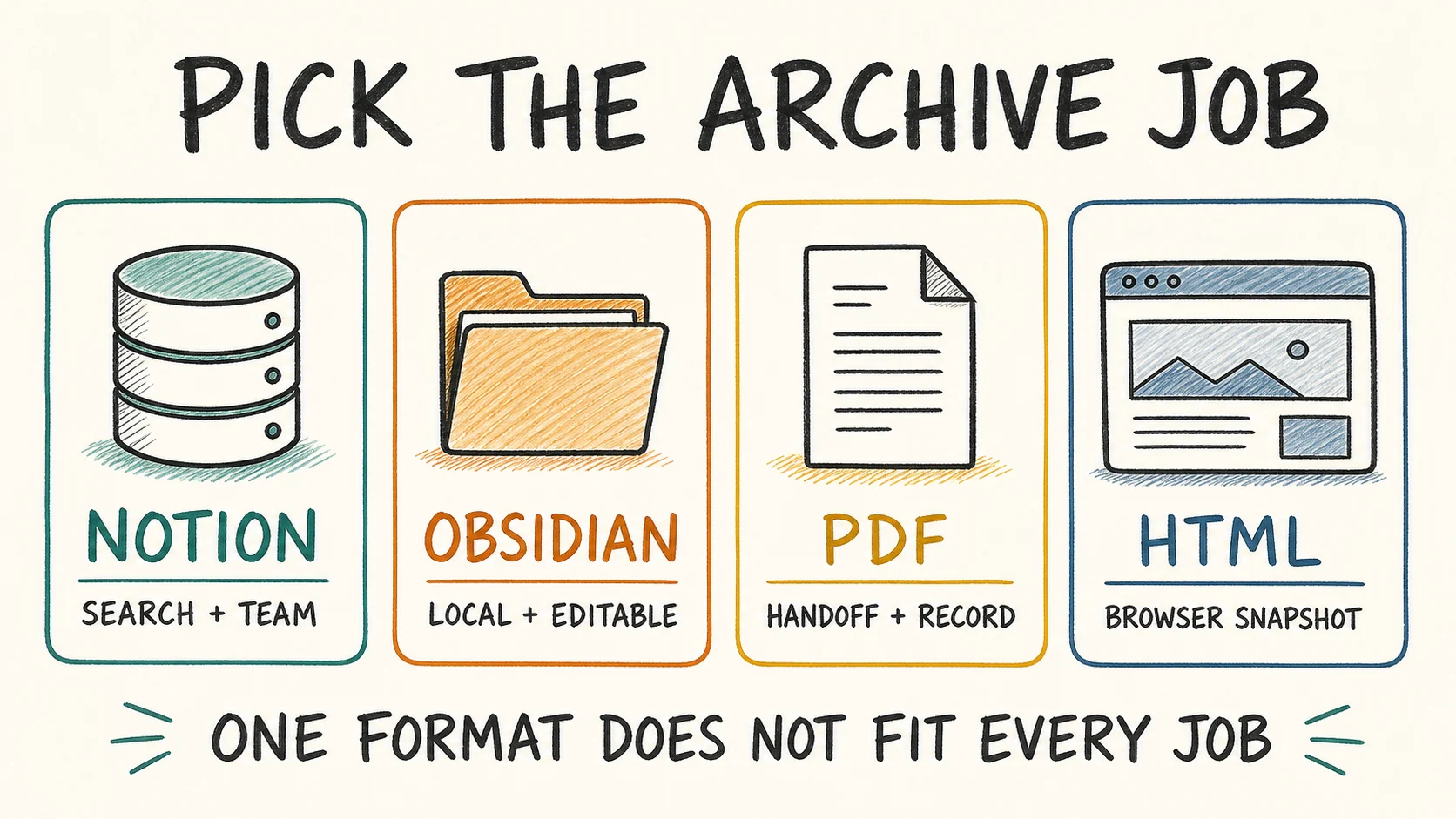
The best AI chat exporter tool is the one that supports your source platform and produces the archive you actually need. Choose Notion for a searchable shared workspace, Obsidian or Markdown for local editable files, PDF for a stable handoff document, and HTML for a browser-readable snapshot. Do not choose one universal format before deciding how you will use the conversation after export.
Why AI chat exporter tools matter
Heavy AI users rarely work in one product. ChatGPT may hold planning work, Claude may hold polished writing, Gemini may contain long research sessions, Perplexity may contain source-backed answers, and Grok may hold fast-moving notes.
That creates a practical problem: useful thinking is scattered across several sidebars. Search inside the original AI app becomes less useful once you need long-term retrieval, topic tagging, local ownership, client handoff, or a repeatable backup process.
An exporter is valuable when it helps you:
- move conversations into a system you control
- preserve useful structure such as headings, code blocks, and source links
- reduce inconsistent copy-and-paste cleanup
- run a repeatable backup instead of a one-time rescue
- turn temporary chats into reusable knowledge assets
The right tool is not necessarily the one with the longest feature list. It is the one that preserves the content you care about in the destination where you will use it, with an acceptable amount of cleanup and verification.
Start with the archive job, not the extension
Before comparing tools, answer four questions:
- Which AI platform are you exporting from?
- Where should the conversation live after export?
- Is it active working knowledge, a fixed record, or a handoff document?
- How much verification and cleanup are you willing to do?
If you skip those questions, you may compare products that solve different jobs.
Source-to-destination matrix
The table below reflects the dedicated product paths listed in the AI Export Hub catalog as of August 2, 2026. A blank category does not mean export is impossible; it means there is no dedicated product for that source-and-destination combination in the current catalog.
| Source platform | Searchable workspace | Local editable archive | Fixed or browser-readable archive |
|---|---|---|---|
| ChatGPT | ChatGPT to Notion | ChatGPT to Obsidian | ChatGPT to PDF |
| Claude | Claude to Notion | Claude to Obsidian | Claude to PDF |
| Gemini | Gemini to Notion | Gemini to Obsidian | Gemini to PDF |
| Perplexity | Perplexity to Notion | Perplexity to Obsidian | No dedicated PDF or HTML product listed |
| Grok | Grok to Notion | Grok to Obsidian and HTML | HTML through Grok to Obsidian and HTML |
This matrix prevents a common mistake: assuming that every exporter supports every platform and destination. Start with a route that is actually listed, then verify it with one representative conversation before exporting a large batch.
Best AI chat exporter by use case
Best for a searchable knowledge base: Notion
Choose a Notion exporter when you need:
- one page or database record per conversation
- tags, topics, dates, and review status
- team access and filtered views
- links between chats and ongoing projects
- a workspace for retrieval rather than a static backup
Select the platform-specific Notion tool from the AI Export Hub product catalog. Notion is strongest when exported chats remain active working knowledge.
Best for local ownership: Obsidian or Markdown
Choose an Obsidian or Markdown workflow when you care about:
- editable plain-text files
- a local folder or vault you can back up independently
- long-term portability
- links between exported notes
- developer, research, or privacy-sensitive workflows
Markdown reduces future migration risk because many editors and knowledge tools can read it. It still needs a naming convention and backup plan; local ownership is not the same as automatic safety.
Best for stable handoff: PDF
PDF is useful when the reader will not open your note system. Common uses include client handoffs, study packs, meeting records, and review documents. It preserves a fixed reading experience better than an editable knowledge base.
Treat PDF as a finishing format. It is less convenient for extracting and reorganizing knowledge later, so it should not automatically become the only copy of important working material.
Best for a browser-readable snapshot: HTML
HTML is useful when you want a local archive that opens in a browser without importing it into a notes app. In the current catalog, this is available through the Grok local export workflow. Confirm that assets and links still work from the saved location before deleting the source conversation.
A practical tool selection scorecard
| Selection factor | Strong starting choice |
|---|---|
| Team tagging, database views, and retrieval | Notion |
| Local ownership and editable text | Obsidian or Markdown |
| Read-only handoff or fixed record | |
| Browser-readable local snapshot | HTML |
| Structured research library | Notion or Obsidian |
| Lowest future format lock-in | Markdown |
This is a starting scorecard, not a claim that one format wins every category. Content with images, complex tables, citations, or code should be tested because preservation varies by source and destination.
How to choose and test an exporter
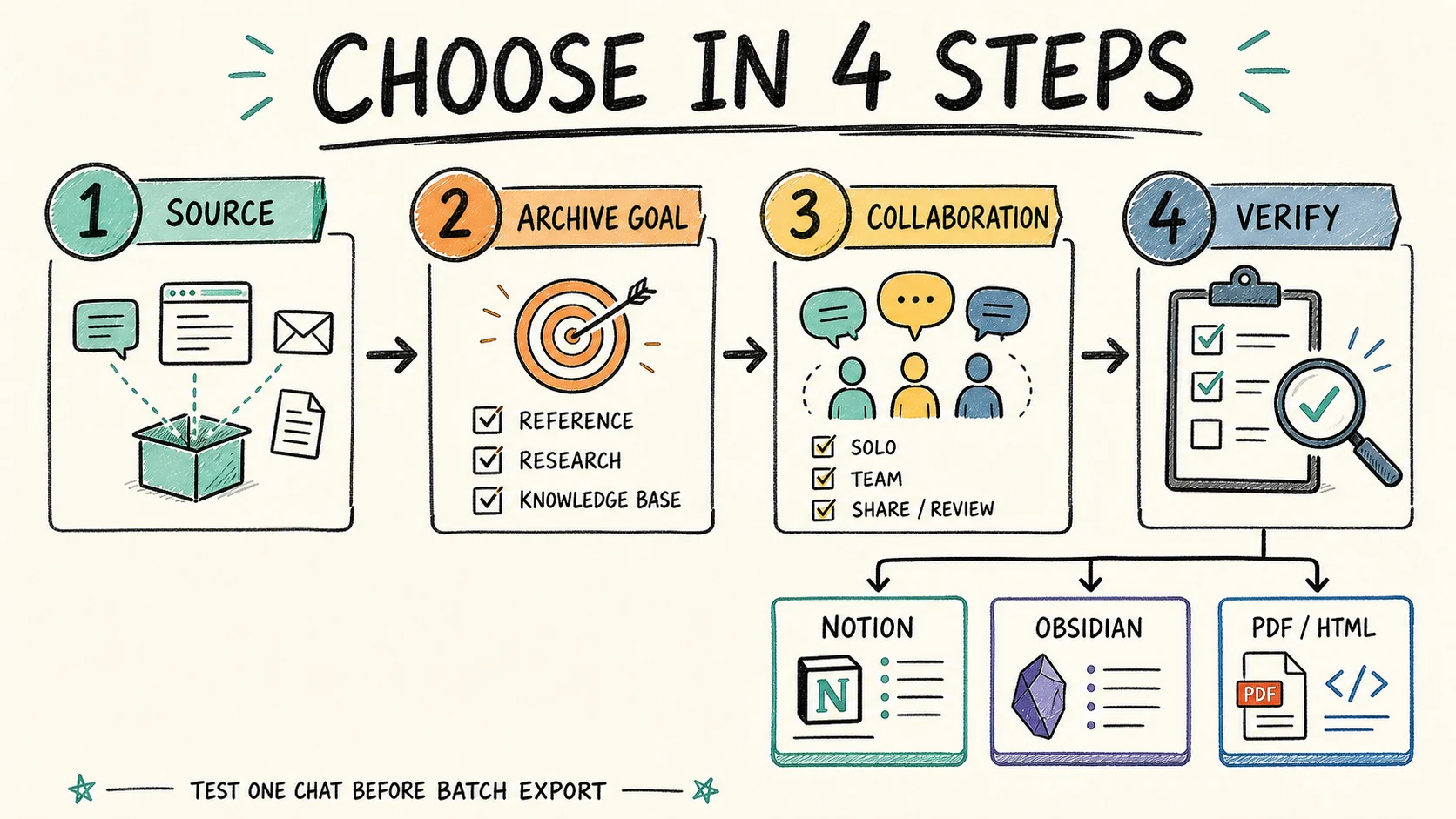
1. Identify the source platform
Start with ChatGPT, Claude, Gemini, Perplexity, or Grok. Use the matrix above to narrow the catalog to products that explicitly list that source.
2. Classify the conversation
Put the conversation into one of three buckets:
- working knowledge that you will search and update
- archive material that you mainly need to retain
- a handoff document for another person
Working knowledge usually belongs in Notion or Obsidian. A fixed record often ends in PDF. A local browser snapshot may fit HTML.
3. Test one representative conversation
Choose a chat that contains the material you normally care about, then check:
- title quality and message order
- headings, lists, tables, and code blocks
- image and attachment handling
- source links and timestamps
- duplicate behavior when you export again
Do not begin with the easiest chat if most of your valuable chats contain code, citations, or images.
4. Prepare the destination before a batch
For Notion, create fields such as Topic, Source, Export Date, and Review Status. For Obsidian, define the target folder, filename pattern, and asset location. For PDF or HTML, create a dated archive folder with a consistent project structure.
5. Scale only after verification
Open the exported result in the destination, search for it, and confirm that it remains understandable without the source app. Only then use batch export. Before deleting originals, follow the AI chat export checklist.
Recommended archive structures
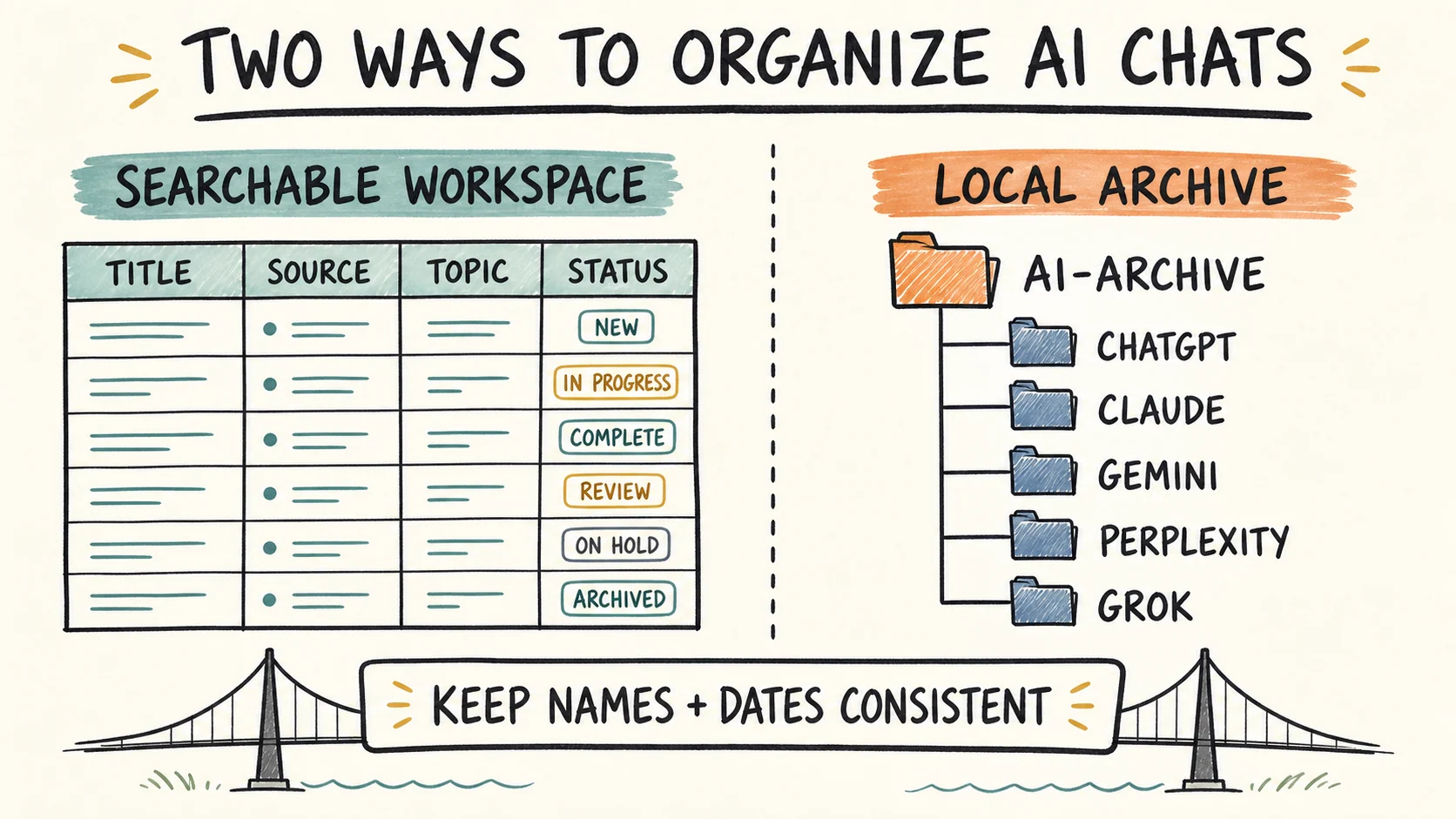
Searchable workspace structure
Use a database with fields such as:
- Title
- Source Platform
- Topic or Project
- Original Date
- Export Date
- Review Status
- Destination Type
Local archive structure
AI-Archive/
  ChatGPT/
  Claude/
  Gemini/
  Perplexity/
  Grok/
  Shared-References/
If the volume is high, add Current, Archive, and Handoff subfolders. Keep naming and dates consistent across platforms so a local search does not depend on remembering the original chat title.
Common exporter mistakes
Weak tools or poorly designed workflows often fail because they:
- dump raw text without preserving useful structure
- make batch exports difficult to verify
- force every conversation into one destination
- ignore image, code, attachment, or citation handling
- create duplicates without a clear update strategy
- leave exported files without useful names or metadata
The exporter is only one layer. Your destination structure, verification routine, and backup policy determine whether the archive remains usable.
FAQ
What is the best AI chat exporter overall?
There is no single best exporter overall. Choose a dedicated tool for your source platform, then select Notion for searchable collaboration, Obsidian or Markdown for local editable knowledge, PDF for fixed handoff documents, or HTML for browser-readable snapshots.
Should I keep every AI chat in one format?
Usually not. A mixed system is often more practical: Notion for active retrieval, Markdown for local ownership, and PDF for final records that need a stable reading format.
Is manual copy and paste enough?
It can work for a few short conversations. At higher volume it becomes inconsistent, difficult to verify, and easy to organize poorly. A dedicated exporter is most useful when the process needs to be repeatable.
Which format is best for code-heavy chats?
Markdown or Obsidian is a strong starting point because code stays editable and portable. Test language labels, nested code fences, and long outputs before a batch export.
Which format is best for team collaboration?
Notion is usually the strongest starting point when the goal is shared access, metadata, database views, and ongoing retrieval. Confirm permissions and database structure before importing a large archive.
Choose the route before the tool
AI chat exporters are routing tools for a knowledge system, not just download buttons. Decide the source, archive job, and destination first. Then choose a verified product path, test one realistic conversation, and scale only after the output passes inspection.
Browse all AI Export Hub products to compare the available platform routes. If you use several platforms, review the Universal Pass options before buying separate upgrades, and keep the final archive reliable with a documented verification and backup routine.