
 v1.3 · Batch spreadsheet sync Chrome Extension
 Midjourney to Google Sheets — Batch Prompt & Image Catalog
Batch sync Midjourney prompts, parsed parameters, job links, image URLs, live image previews, and timestamps into an authorized Google spreadsheet for filtering, analysis, and team review.
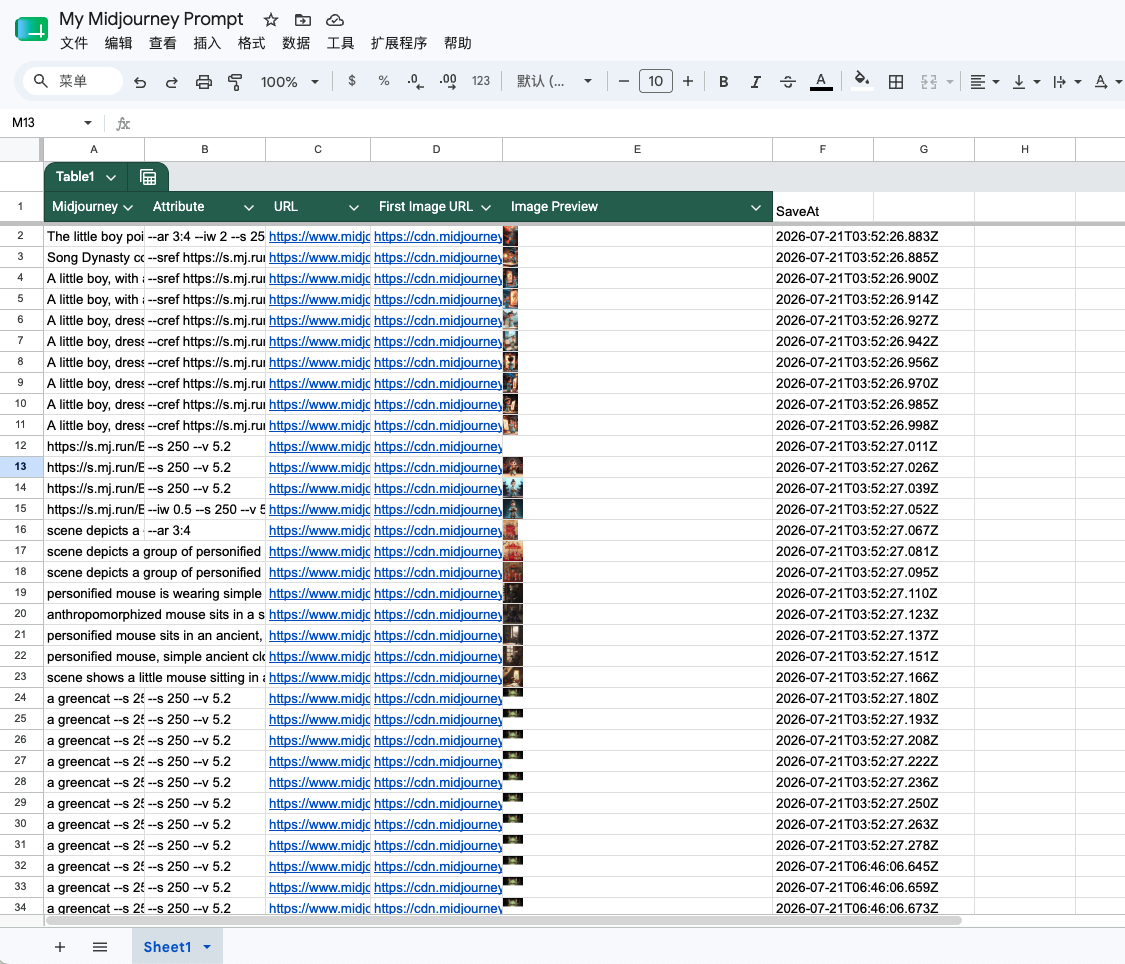
Turn a visual history into rows you can sort, filter, annotate, chart, and share.
Compatibility matrix
What Midjourney to Google Sheets — Batch Prompt & Image Catalog can export
A practical support table for real content types and destination behavior.
| Content type | Support | Export result | Notes |
|---|---|---|---|
| Prompt text | Supported | Prompt column | No special setup required. |
| Parameters | Supported | Normalized Attributes column | No special setup required. |
| Midjourney job link | Supported | Clickable URL column | No special setup required. |
| Image | Supported | Original image URL plus Google Sheets IMAGE preview | Images are referenced by URL; they are not copied into Google Drive. |
| Creation timestamp | Supported | ISO CreatedAt column | No special setup required. |
| Multiple worksheet tabs | Limited | Rows are written to the first worksheet tab | The current v1.3 implementation does not expose a worksheet-tab selector. |
Output proof
Real export examples
Use these examples to verify what exported files, folders, or destination pages look like before installing.
Midjourney spreadsheet catalog
Prompt rows with job links, source image URLs, inline previews, and timestamps.
Key Features
Confirm the Midjourney account before export
The popup reports whether a signed-in Midjourney account has been recognized and opens the bulk workspace only when the source is ready.
Authorize only the spreadsheets you choose
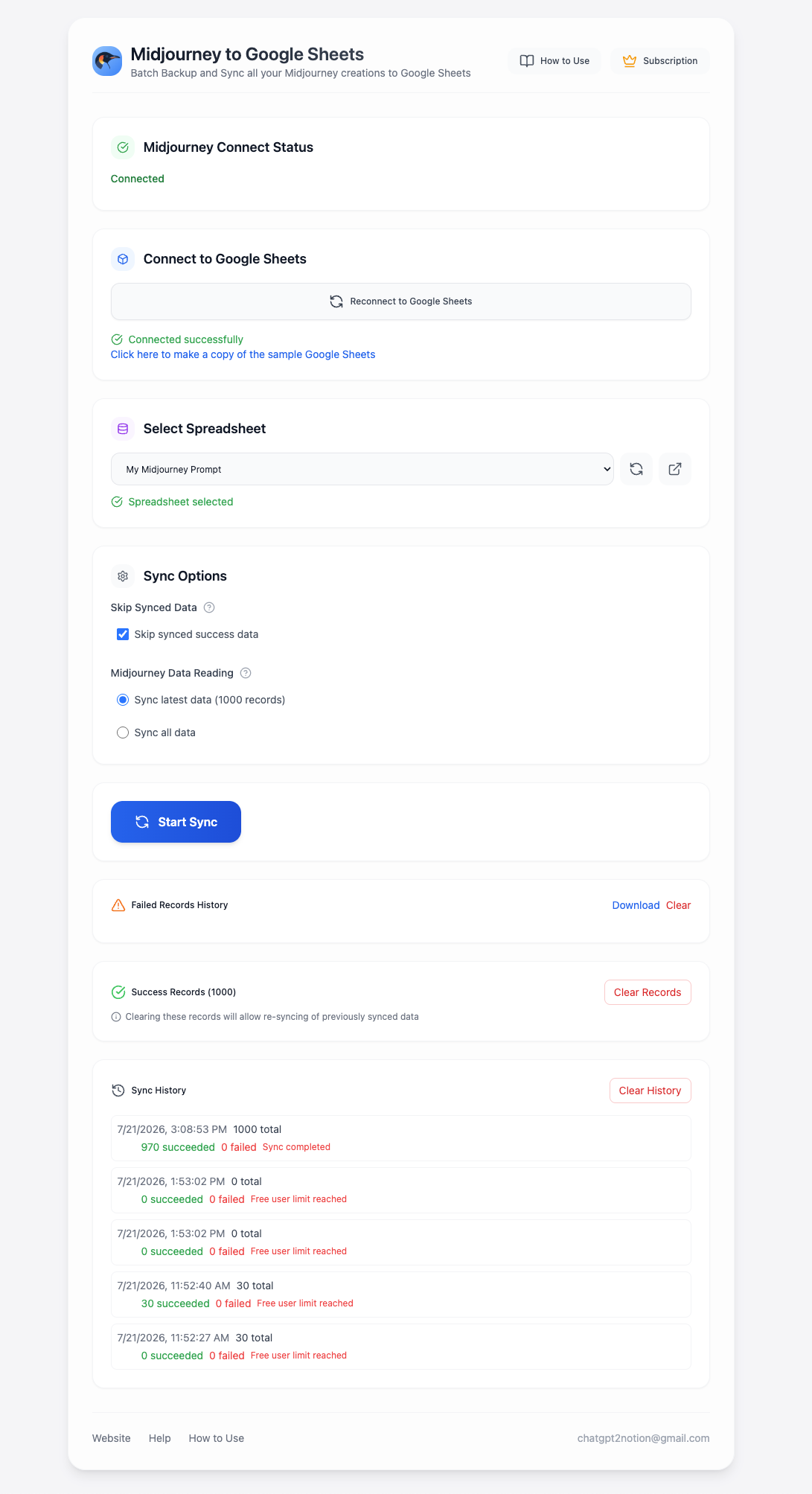
Connect Google, add an authorized spreadsheet, choose the destination, and configure latest or complete history plus local success-ID skipping.
Work with prompts as structured rows
The destination receives prompt text, parsed attributes, a Midjourney job URL, the original image URL, a live IMAGE preview formula, and a created-at timestamp.
Key Features of Midjourney to Google Sheets — Batch Prompt & Image Catalog
Keep prompts, parameters, source links, images, and creation metadata together in Google Sheets.
Google OAuth connection
Sign in through Chrome's web-auth flow and grant spreadsheet plus drive.file access for selected files.
Authorized file picker
Choose the spreadsheet files the extension may update instead of exposing an unrelated destination list.
Latest or complete history
Sync the latest 1,000 records for recurring catalog updates or follow available pagination for a complete archive.
Live image previews
Each row includes an IMAGE formula beside the original image URL so a visual preview appears directly in the sheet.
Parsed attributes
Prompt parameters are normalized into a separate Attributes column for easier filtering and analysis.
Append-only batch writes
Rows are grouped into batches of up to 100 and appended after the current used range.
Skip successful IDs
Avoid writing the same Midjourney creation again during a repeat sync.
Progress and failure history
Monitor page, item, success, and failure counts; download failed-record details when a batch needs recovery.
Known limits
Export boundaries and fixes
Clear limits build trust. These are the cases to check before running large exports.
The first worksheet tab is used
The current exporter resolves the first sheet inside the selected spreadsheet and appends rows there.
Place the intended destination tab first before running the sync.
Troubleshooting guideImages remain URL-based
The sheet uses the Midjourney CDN URL and an IMAGE formula; it does not copy image binaries into Google Drive.
Use Midjourney to Obsidian when you need local image files.
Free syncs stop after 30 records
The current Google Sheets workflow limits free users to 30 records.
Upgrade through the shared pricing page for unrestricted larger syncs.
How it Works

Related resources Midjourney to Google Sheets — Batch Prompt & Image Catalog
Use these guides and docs to solve common export, backup, and troubleshooting workflows.
What's New
Version 1.3 workflow verified with the account-recognition popup, Google file authorization, latest/all batch scopes, 100-row writes, success-ID skipping, and unified MidjourneyExporter pricing.
Frequently Asked Questions About Midjourney to Google Sheets — Batch Prompt & Image Catalog
Have another question? Contact us on Discord or by email.
Which columns does the extension write?
The current row structure is Prompt, Attributes, URL, ImageUrl, ImageUrlPreview, and CreatedAt.
Can I choose the spreadsheet?
Yes. Connect Google, authorize spreadsheet files through the picker, then select one of those files in the export workspace.
Can I choose a worksheet tab?
Not in the current v1.3 workflow. Rows are appended to the first worksheet tab in the selected spreadsheet.
Can it sync my complete Midjourney history?
Yes. Choose Sync all data to follow available pagination. Use latest data for the most recent 1,000 records and a faster recurring update.
Does it upload image files to Google Drive?
No. It writes the original image URL and a Google Sheets IMAGE formula for the preview.
What are the paid plan prices?
The shared MidjourneyExporter pricing page currently offers $4.90 monthly, $49 annually, or $69 lifetime access.
Unlock unlimited Midjourney exports
Choose monthly access for $4.90, annual access for $49, or lifetime access for $69. One pricing page covers the Midjourney exporter family.
View MidjourneyExporter Plans