
Overview & Getting Started
Transform your Claude conversations into an organized, searchable knowledge base with one-click export to Obsidian
Transform your Claude conversations into an organized, searchable knowledge base. Export, sync, and back up your AI interactions directly to Obsidian as clean Markdown files with one click.
Why Claude to Obsidian?
Your Claude conversations contain valuable insights, code solutions, research findings, and creative ideas. But they’re scattered across chat history, difficult to organize, and at risk of being lost. Claude to Obsidian solves this by seamlessly exporting your AI conversations as local Markdown files, perfect for Obsidian’s powerful organization tools.
Key Features
Instant Export
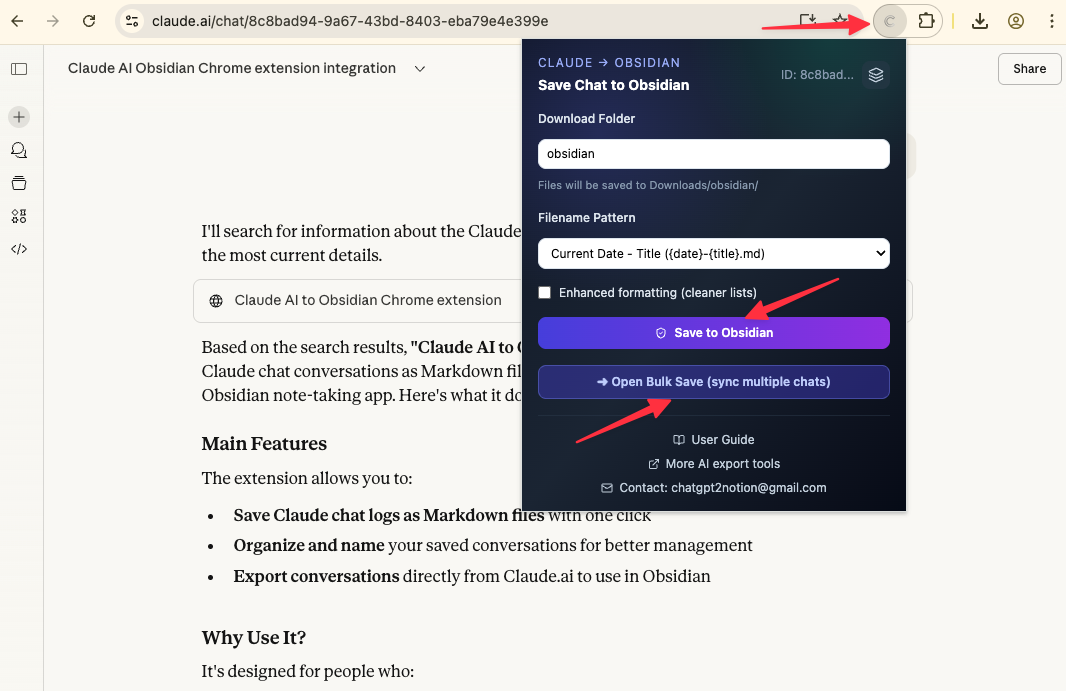
Save any Claude conversation to your local Downloads folder with a single click. No manual copying, no formatting issues—just clean, organized Markdown content ready for Obsidian.
Full Artifact Support
Export complete artifact history from your Claude sessions. Every code version, every iteration, every artifact created during your conversation is preserved with full version history.
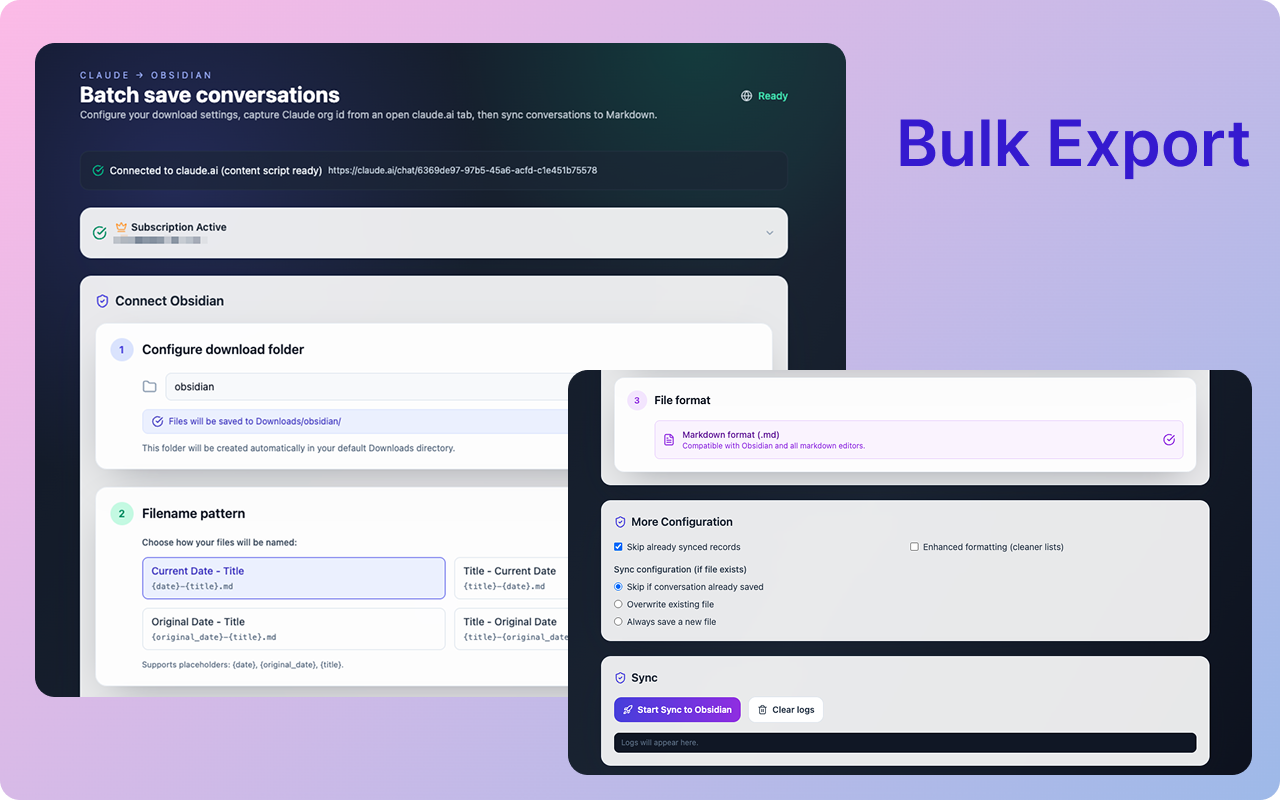
Batch Export & Backup
Build a durable local backup of your Claude knowledge:
- Export multiple conversations in bulk
- Smart options: skip or overwrite existing files
- Build a complete archive of your AI interactions
- Perfect for creating a comprehensive knowledge base
Smart Formatting
Preserves your content structure:
- Markdown formatting
- Code blocks with syntax highlighting
- Images and attachments
- Lists and tables
- Artifact content with version history
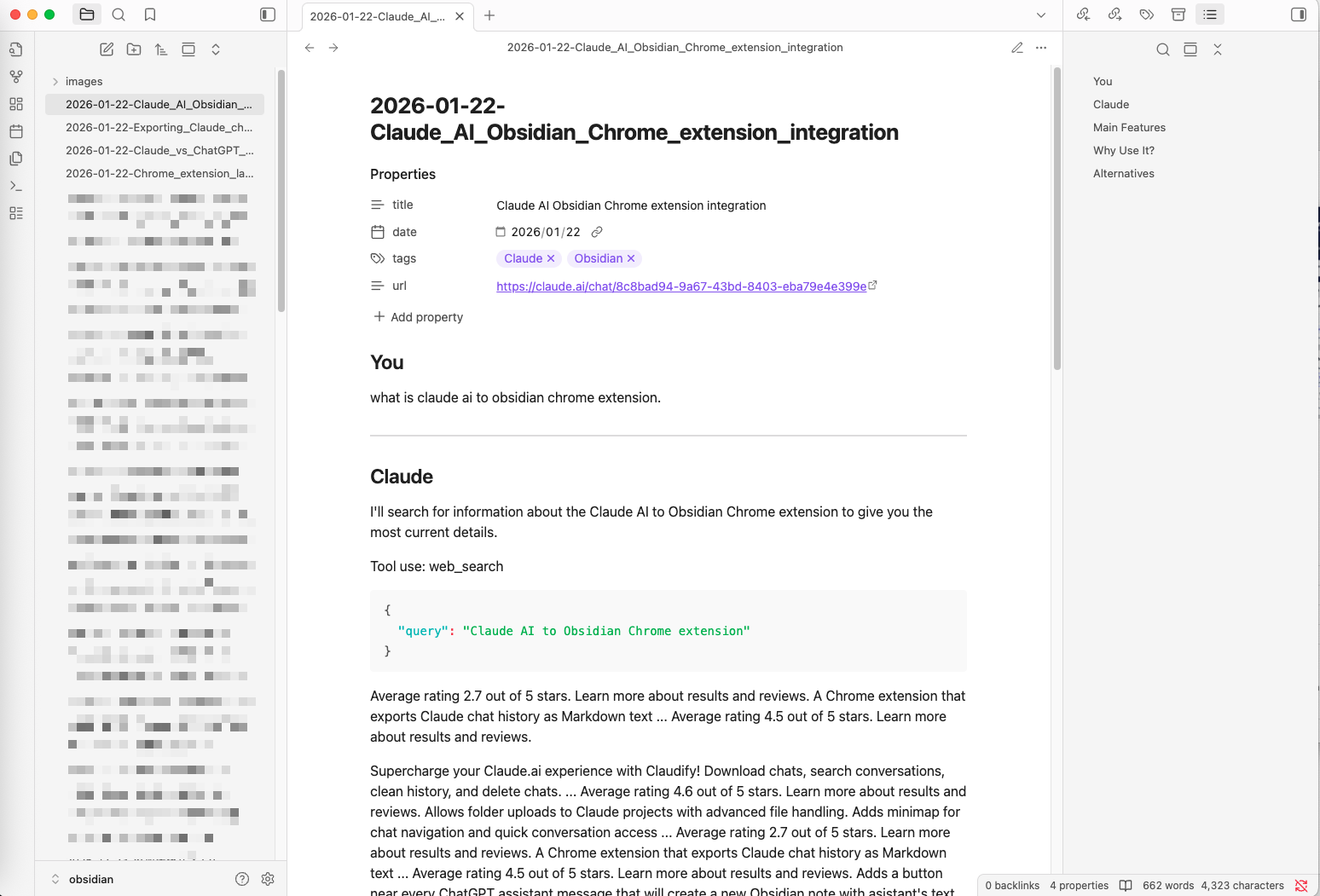
- Frontmatter metadata for Obsidian
Flexible Filename Patterns
Choose how your files are named:
- Title-based: Uses conversation title as filename
- Date-based: YYYY-MM-DD format for chronological organization
- Title with Date: Combines both for maximum clarity
Local-First & Private
Everything happens in your browser:
- Files saved directly to Downloads folder
- No cloud servers or middleman
- No API keys required
- Complete privacy and control
- Works offline after initial setup
Who Is This For?
Researchers: Collect and organize AI-generated insights for your projects in a local, searchable vault.
Students: Build a searchable study knowledge base from Claude tutoring sessions, all stored locally.
Developers: Archive code solutions and debugging sessions with full artifact history preserved.
Writers: Keep creative writing sessions and brainstorming with Claude backed up and private.
Knowledge Workers: Create a reliable, searchable archive of your AI interactions in Obsidian.
How It Works
- Install: Add the extension to Chrome from the Web Store
- Configure: Set your download folder path and filename pattern preferences
- Export: Save full chats with one click, or batch export multiple conversations
- Import: Move downloaded Markdown files to your Obsidian vault
- Organize: Use Obsidian’s powerful tools to tag, search, and link your AI knowledge
What You Get in Markdown
Each exported conversation includes:
- Title: Original Claude conversation title
- URL: Source link for reference
- Date: Conversation timestamp (frontmatter metadata)
- Content: Fully formatted messages with preserved structure
- Artifacts: Complete artifact history with all versions
Recent Updates
January 2026: Bulk export feature added. Export multiple conversations at once.
November 2025: Initial release with single conversation export and artifact support.
November 2025: Added customizable filename patterns and conflict handling options.
Next Steps
Ready to get started? Follow our Installation Guide to set up the extension.
Ready to try Claude To Obsidian?
Open the product page for feature details, screenshots, pricing, and the Chrome Web Store install link.