
Import Sources to NotebookLM
Import supported AI chats, webpages, articles, and highlighted text into a selected NotebookLM notebook.
Use NotebookLM Hero import workflows to send useful source material into NotebookLM without repetitive copy-paste.
Import from the popup
Open a supported source page and click the extension icon. Choose Import, then select a destination notebook.
Supported workflows include:
- AI chat import from supported ChatGPT, Claude, Gemini, and Perplexity pages.
- Webpage and article import.
- Highlighted text import for selected passages.
- Creating a new NotebookLM notebook during import when needed.
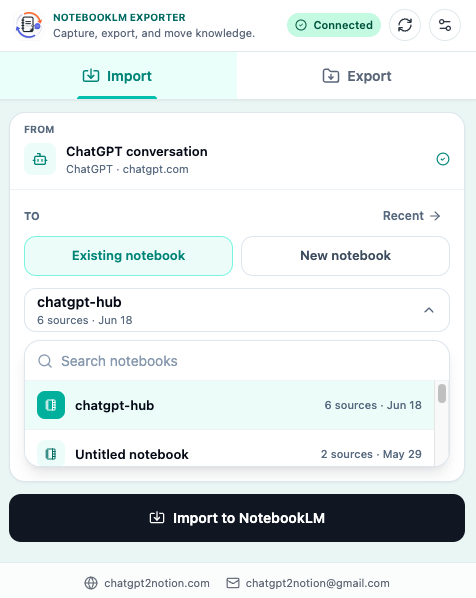
Select the destination notebook
Before sending content, choose where it should go:
- Search or browse available NotebookLM notebooks.
- Select the destination notebook.
- Create a new notebook if the destination does not exist.
- Start the import.
- Open the target notebook to confirm the source was added.
Good notebook naming makes this workflow much easier. Use clear project names such as Market research - Q3, Literature review - RAG, or Customer interview analysis.
Save highlighted text
Highlight import is best when you only need a focused passage from a webpage.
- Select text in the browser.
- Use the extension selection action or context menu.
- Choose the destination NotebookLM notebook.
- Send the selected passage.
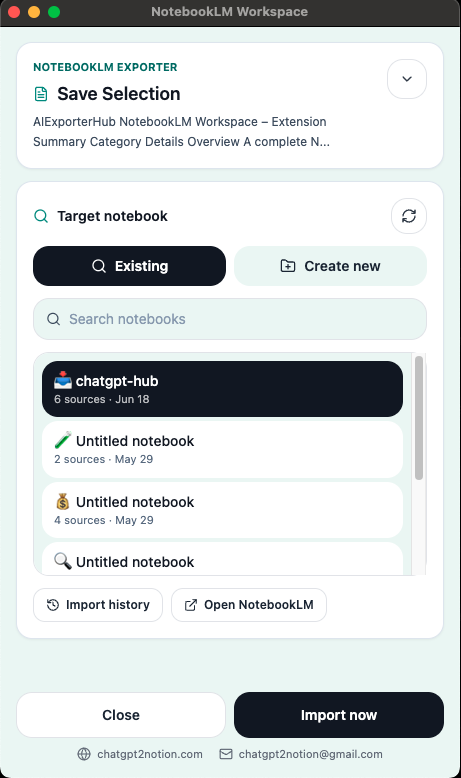
When to use full page import vs highlight import
| Workflow | Use it when |
|---|---|
| Full page import | The whole article or page is useful as a source |
| Highlight import | Only one passage, quote, or section matters |
| AI chat import | A conversation contains useful reasoning, drafts, or research |
Import quality tips
- Clean up the source page before importing if it contains unrelated expanded panels.
- Use highlight import for quotes, tables, or exact passages.
- Create separate notebooks for separate research projects.
- Review the target notebook after import so you know the source landed correctly.
Ready to try NotebookLM Hero?
Open the product page for feature details, screenshots, pricing, and the Chrome Web Store install link.