
Overview & Getting Started
Transform your ChatGPT conversations into professional PDF documents for offline access, archiving, and sharing
Transform your ChatGPT conversations into professional PDF documents. Export, archive, and back up your AI interactions as high-quality PDFs with one click—completely private and processed locally in your browser.
Why ChatGPT to PDF?
Your ChatGPT conversations contain valuable insights, research findings, and creative ideas. But they’re locked in your browser, difficult to share, and at risk of being lost. ChatGPT to PDF solves this by creating professional, offline-ready PDF documents that you can archive, share, and reference anytime.
Key Features
One-Click Export
Save any ChatGPT conversation as a professional PDF with a single click. No manual copying, no formatting issues—just clean, formatted documents ready to share.
Batch Export & Backup
Build a complete PDF archive of your ChatGPT knowledge:
- Export multiple conversations in bulk
- Save entire ChatGPT Projects as organized PDFs
- Batch export Group Chats (latest 5 or all)
- Create a durable offline backup effortlessly
Smart Formatting
Preserves your content structure perfectly:
- Markdown formatting
- Code blocks with syntax highlighting
- Images and attachments
- Lists and tables
- Deep Researcher documents
- TextDocs tool outputs as separate PDFs
Local & Private Processing
All PDF generation happens locally in your browser using Chrome’s built-in PDF engine. No data sent to external servers. Your conversations stay completely private and secure.
Custom Organization
- Rename PDFs with custom filenames
- Organize exports into subfolders
- Metadata headers (Title, Date, URL, Project Name)
- Professional document structure
Who Is This For?
Researchers: Archive AI-generated insights as professional PDFs for papers and analysis.
Students: Build an offline study library from ChatGPT tutoring sessions.
Professionals: Document work discussions and preserve important AI-assisted decisions.
Teams: Share ChatGPT Group Chat exports as formatted PDFs with stakeholders.
Knowledge Workers: Create a reliable, searchable PDF archive of your AI interactions.
How It Works
- Install: Add the extension to your Chrome browser
- Configure: Customize filename format and folder location (optional)
- Open ChatGPT: Navigate to any conversation you want to save
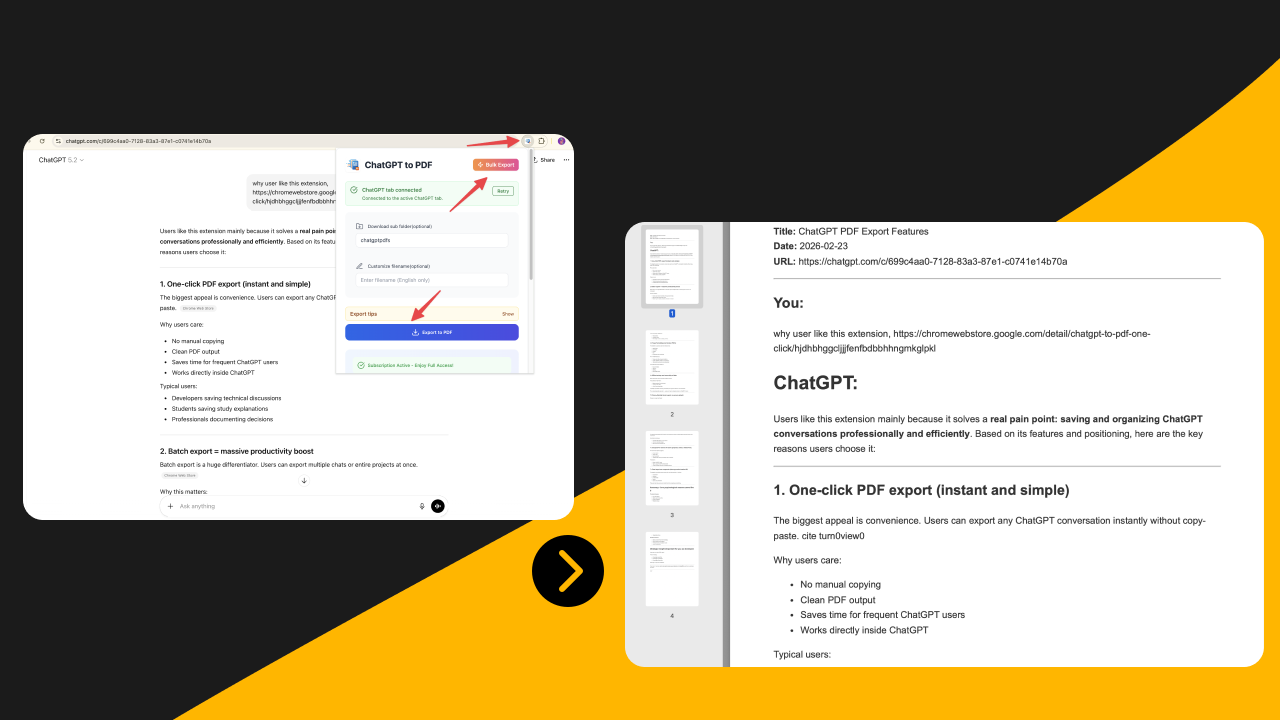
- Export: Click the extension icon and hit “Export to PDF”
- Access: Find your professionally formatted PDF in your Downloads folder
What You Get in Your PDF
Each exported PDF includes:
- Title: Original ChatGPT conversation title
- URL: Source link for context and reference
- Date: Conversation timestamp
- Project Name: (if applicable)
- Content: Fully formatted messages with preserved structure
- Code Blocks: Syntax-highlighted and properly formatted
- Images: Embedded with source links
Privacy & Security
- 100% Local Processing: All PDF generation happens in your browser
- No External Servers: No data sent to third-party services
- No Data Collection: Your conversations remain completely private
- Secure: Uses Chrome’s built-in PDF generation (Chrome DevTools Protocol)
About Debugger Permission
This extension uses Chrome’s debugger permission to generate PDFs locally in your browser. When exporting, you may see a yellow banner saying “Chrome is being controlled by automated test software”—this is normal and expected. The banner appears because we use Chrome’s built-in PDF generation feature to create high-quality PDFs directly on your device. The banner disappears automatically once the export completes. This approach ensures complete privacy as no data is sent to external servers.
Recent Updates
February 2026: Switched to local browser-based PDF generation for improved privacy and reliability. Added metadata headers.
December 2025: Added Group Chats batch export with “Latest 5” or “All” options.
December 2025: Added Deep Researcher support and TextDocs integration.
Next Steps
Ready to get started? Follow our Installation Guide to set up the extension.
Ready to try Chatgpt To Pdf?
Open the product page for feature details, screenshots, pricing, and the Chrome Web Store install link.