
Export Current Chat
Export the active ChatGPT, Claude, Gemini, or Perplexity conversation with supported images, files, citations, code, and generated assets from the AIExportHub popup.
Use the popup when you want to save the conversation that is currently open in your browser. This is the fastest workflow for one-off exports, review copies, and quick Notion saves.
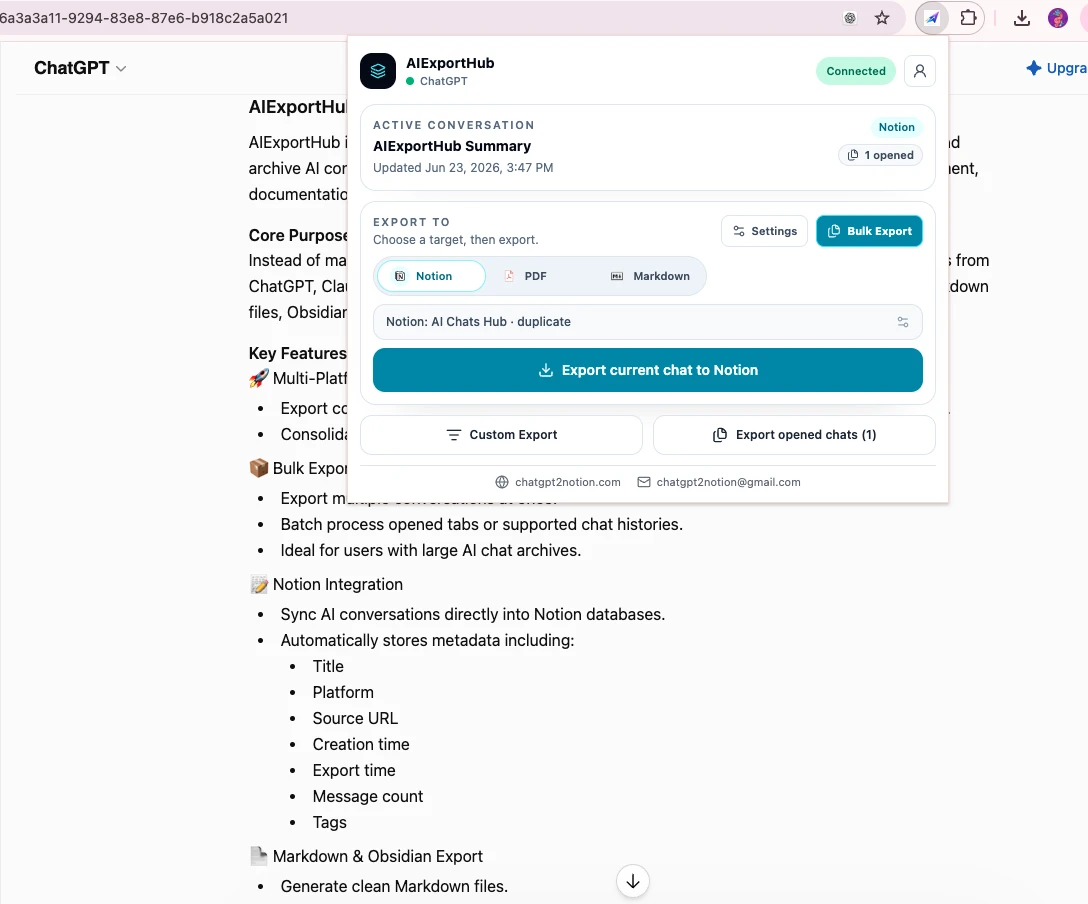
Step 1: Open the source conversation
Open a supported AI chat page:
- ChatGPT conversation
- Claude conversation
- Gemini conversation
- Perplexity thread
If the page was already open before installing the extension, refresh the tab once.
Step 2: Open AIExportHub
Click the AIExportHub extension icon. The popup should show:
- The detected source platform.
- The active conversation title.
- The last updated time when available.
- Export target buttons for Notion, PDF, and Markdown.
Step 3: Choose an export target
Choose the target based on what you need:
- Notion: save the conversation into your selected Notion database.
- PDF: download a readable document with supported images and neighboring file attachments.
- Markdown: download an Obsidian-ready local note with sibling image and attachment folders.
Notion is enabled only after you connect Notion and select a database.
Step 4: Export the current chat
Click the main export button. The label changes based on the selected target, for example:
- Export current chat to Notion
- Export current chat as PDF
- Export current chat to Markdown
Keep the source tab open until the export finishes.
The connected source tab is also used to retrieve protected files that depend on the signed-in AI platform session. Image and file handling is enabled by default for all three targets.
Export opened chats
If you have multiple supported conversation tabs open for the same platform, the popup can export opened conversations as a small batch. Use this when you prepared several tabs manually and do not need the full Bulk Export Workspace.
Custom Export
Click Custom Export when you want to review or customize the current conversation before saving it. The preview page lets you check the transcript layout before sending the final export.
For a media-rich conversation, confirm the preview includes the expected attachments or generated assets before export. Read Images, Files, and Generated Assets for target-specific behavior.
If the export button is disabled
Check these cases:
- The current tab is not a supported AI chat page.
- The source page needs a refresh.
- Notion is selected but no Notion database is connected.
- Another export job is already queued or running.
For deeper fixes, see Troubleshooting.
Ready to try Aiexporthub Hero?
Open the product page for feature details, screenshots, pricing, and the Chrome Web Store install link.