
Installation
Install AIExportHub from the Chrome Web Store and prepare supported AI chat pages for export.
AIExportHub runs as a Chrome extension. Install it once, then open any supported AI chat page to start exporting.
Install from Chrome Web Store
- Open the AIExportHub Chrome Web Store listing.
- Click Add to Chrome.
- Confirm the Chrome permission prompt.
- Pin AIExportHub to your browser toolbar if you plan to export often.
Open a supported source page
After installation, open one of these sites in a normal Chrome tab:
https://chatgpt.com/orhttps://chat.openai.com/https://claude.ai/https://gemini.google.com/https://perplexity.ai/
Open the conversation you want to export, then click the AIExportHub icon.
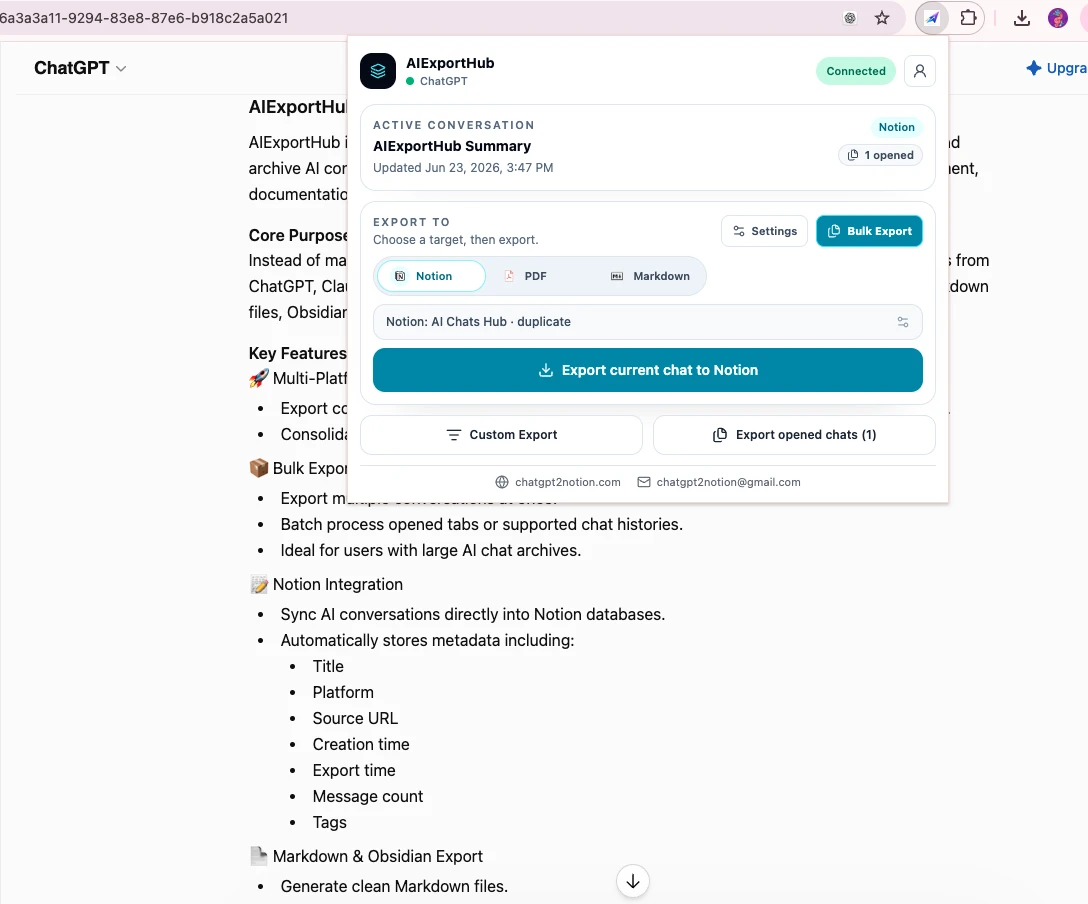
Confirm the extension is connected
The popup shows a status badge:
- Connected means AIExportHub can read the active conversation.
- Refresh Required means the page needs a reload before the content script can connect.
- No Match means the current tab is not a supported platform page.
- Blocked means the extension could not read the source page. Refresh the source tab and try again.
Recommended first test
Before running a large export:
- Open one short conversation.
- Choose Markdown.
- Choose a conversation with representative code, images, or files.
- Click Export current chat to Markdown.
- Open the note and sibling asset folders, then verify formatting, code blocks, links, images, and attachments.
After the first test succeeds, connect Notion or open the Bulk Export Workspace for larger jobs.
What permissions are used for
AIExportHub uses browser permissions for specific export tasks:
tabs: detect supported AI pages and connect to the right tab.storage: save export settings, account state, and job progress.downloads: save Markdown, PDF, images, files, sidecar assets, summaries, and indexes.- Supported site permissions: read the current AI conversation from ChatGPT, Claude, Gemini, and Perplexity pages.
- Connected source-tab access: retrieve supported authenticated files that the signed-in platform does not expose to an unrelated extension page.
- Notion API access: only after you authorize your own Notion workspace.
Next step
Continue with Export Current Chat or Connect Notion.
Ready to try Aiexporthub Hero?
Open the product page for feature details, screenshots, pricing, and the Chrome Web Store install link.